

WooCommerce PluginDownload free version
Abandoned Cart Recovery for WooCommerce
No reviews yet
from$69.00/yr
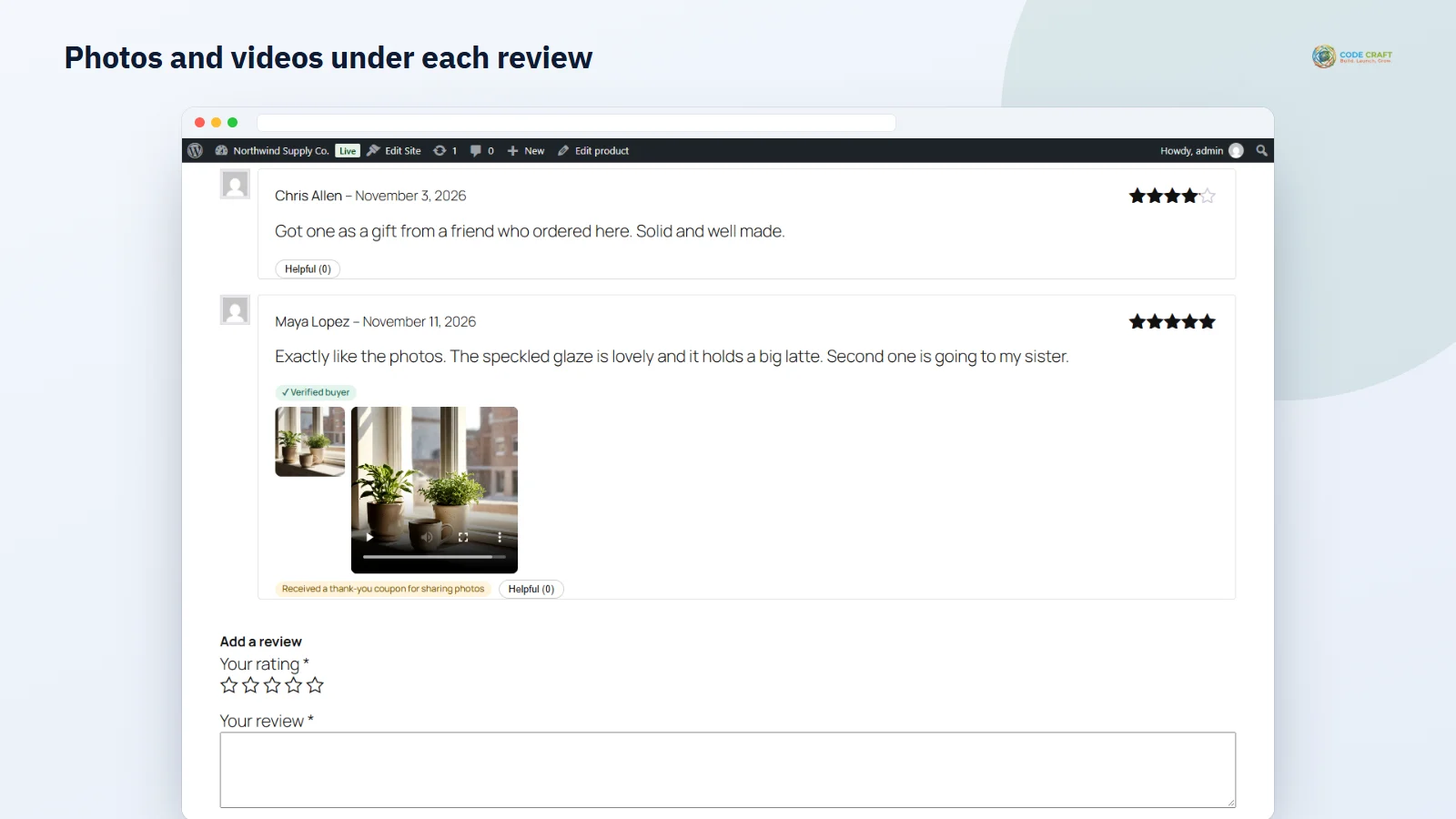
WooCommerce photo reviews from real buyers: photo uploads, a rating summary with bars, a verified buyer label and review request emails
Get a Shutterquill Pro key by email and use every Pro feature for 7 days on one site. No card needed, nothing renews automatically — when the trial ends, Pro switches off unless you choose a plan. One trial per email.
Choose monthly, 1 year or lifetime — your key and download link are emailed instantly.
Upload the zip in wp-admin. The free core works right away.
Paste it in the plugin's License tab to activate.
Pro features, updates and priority support switch on.
In a demo test store: set up photo reviews for verified buyers, complete a test order, send the review request email, follow its link to the pre-filled review form, see a renamed script, a PDF and an oversize photo refused, post a photo and a video, approve the review and see it in the summary, gallery, lightbox and filters.
Download the PDF user guideThe free core is a real, working plugin — not a trial that expires. Pro unlocks the advanced modules with a licence key, and nothing you build on free is lost when you upgrade.
Everything most sites need. No account, no email required — download and install.
.zip · v1.0.0 · 3 downloads
Same plugin, every module unlocked by your licence key — plus updates and priority support.
Already bought it? Enter your key:
Or sign in — every licence you own shows up there.
| Feature | Free | Pro |
|---|---|---|
| Photo uploads in reviews (JPG, PNG, WebP) | Included | Included |
| Files checked by content; size and count limits | Included | Included |
| Photos stored in the media library, GPS data stripped | Included | Included |
| Photos from anyone or only verified buyers | Included | Included |
| Moderation screen: approve, unpublish, remove one photo | Included | Included |
| Rating summary with bars | Included | Included |
| Verified buyer label | Included | Included |
| Review request email X days after completion, opt-out, Send now | Included | Included |
| Video reviews (MP4, WebM) | Not included | Included |
| Customer photo gallery, grid or masonry | Not included | Included |
| Helpful votes, filters and sorting | Not included | Included |
| Coupon thank-you for approved photo reviews | Not included | Included |
| Up to two reminders for buyers who have not reviewed | Not included | Included |
Upgrading is just entering a key — same plugin, same settings, nothing to reinstall or migrate.
Shutterquill does not replace WooCommerce reviews; it adds to them. The Add photos field sits under the review text in the standard WooCommerce review form, so it works with the theme you already use — we tested a block theme (Twenty Twenty-Five) and a classic theme (Twenty Twenty-One). Customers pick up to three files by default (you can allow 1 to 10), see small previews, and post the review as usual. Photos are JPG, PNG or WebP with a size limit you set (5 MB by default); Pro adds MP4 and WebM videos with their own limit. You decide who may add photos: anyone who can post a review, or only verified buyers of the product. A verified buyer is a customer with a paid order for that product, matched by their account or by the billing email, the same rule WooCommerce uses for its own verified owner check.
Uploads are the risky part of any review plugin, so Shutterquill checks each file before WordPress saves the review. The type is read from the file content, never from its name or from what the browser claims: a PHP script renamed to .jpg, a PDF and a photo over the size limit are each refused with a clear message, and the review is not saved, so the customer can go back and try again. We tested exactly those three cases, plus a non-buyer adding a photo when photos are limited to verified buyers. Accepted photos are re-saved through WordPress's image editor, which removes hidden data such as the GPS location from phone photos and caps them at 2048 pixels, then stored in the media library, attached to the product and named after it.
Reviews with photos wait for your approval by default, so nothing appears on a product page before you have seen it. The Photo Reviews screen in wp-admin lists them with their thumbnails, rating, author, verified status, product and date, under Pending, Published and All tabs, with counters for reviews waiting, reviews published with photos and reviews that came from request emails. Approve publishes the review, Unpublish moves it back, Spam and Trash work as they do for WordPress comments, and Remove under a single photo deletes just that photo from the review and the media library. All product reviews stay in Products → Reviews as before.
Above the reviews, Shutterquill shows a rating summary: the average rating, stars, a bar for each star level with its count, how many reviews have photos and the share of reviews from verified buyers. It uses WooCommerce's own rating counts, cached so it does not slow the page, and is also available as the [rspr_summary] shortcode for any page. Reviews from customers who bought the product carry a Verified buyer label; WooCommerce's own "(verified owner)" text is hidden while the label is on, so it does not appear twice.
When an order is marked Completed, Shutterquill queues one review request with WooCommerce's Action Scheduler for the number of days you choose (seven by default, or straight away). The email goes only to the billing email of that order. It lists the products from the order that the customer has not reviewed yet, each with a Write a review button, uses your own subject, heading and message with placeholders such as {first_name} and {order_number}, and is wrapped in the WooCommerce email template so it carries your store's header and colours. The link opens the product's review form with the customer's name and email already filled in and a short thank-you note; reviews posted from it are marked as coming from the request email. Every email ends with a one-click link to stop review requests. The Review requests screen lists each request as Scheduled, Sent, Reviewed, Opted out or Not sent, with the next send date, a short log and a Send now button.
Pro accepts short MP4 and WebM videos next to photos, recognised by their file signature and limited by their own size setting, and plays them in the review. A customer photo gallery shows every photo and video from approved reviews above the reviews, in a masonry or grid layout, with a lightbox that works with the keyboard; the [rspr_gallery] shortcode places it anywhere. Shoppers can mark reviews as helpful (one vote per visitor per review), filter by star level, by reviews with photos or by verified buyers, click a bar in the summary to filter by that star, and sort by newest, most helpful, highest or lowest rating.
With the coupon thank-you on, approving a review that has photos sends the reviewer a one-time WooCommerce coupon: a percentage or fixed amount, valid for the number of days you choose, restricted to their email and usable once, and only once per customer per product. You can limit it to verified buyers. The coupon never depends on the star rating, the email says so, and rewarded reviews can show a "Received a thank-you coupon for sharing photos" label, because many countries require incentivised reviews to be disclosed. Reminders send up to two follow-ups, a set number of days apart, listing only the products still not reviewed; they stop as soon as the customer has reviewed everything or opts out.
Shutterquill is built for honest social proof. It never writes, generates, imports or edits reviews or star ratings, has no review booster or import tool, and sends review requests only to buyers of real, completed orders, never to a list. The demo reviews you see in our screenshots and video exist only in a throwaway test store used to film them.
Shutterquill needs WordPress 6.4 or newer, PHP 7.4 or newer and WooCommerce 8.9 or newer. It was tested with WordPress 7.1 and WooCommerce 11.2 on PHP 8.3 with High-Performance Order Storage, with the Twenty Twenty-Five block theme and the Twenty Twenty-One classic theme.
Most stores running Shutterquill pair it with these. Every plugin below shares the same licence system, coding standards and support team.


