

WooCommerce PluginDownload free version
Abandoned Cart Recovery for WooCommerce
No reviews yet
from$69.00/yr
WooCommerce import export by CSV: import products with column mapping and image URLs, export products, orders, customers and coupons, and (Pro) sync by SKU on a schedule
Get a CargoCSV Pro key by email and use every Pro feature for 7 days on one site. No card needed, nothing renews automatically — when the trial ends, Pro switches off unless you choose a plan. One trial per email.
Choose monthly, 1 year or lifetime — your key and download link are emailed instantly.
Upload the zip in wp-admin. The free core works right away.
Paste it in the plugin's License tab to activate.
Pro features, updates and priority support switch on.
Export the catalogue with variations, edit prices, stock and categories in the CSV, import it back by SKU with a column mapping, read the report, roll an import back, export orders and customers, refuse unsafe uploads, import 500 rows in batches and schedule an emailed export and a supplier import.
Download the PDF user guideThe free core is a real, working plugin — not a trial that expires. Pro unlocks the advanced modules with a licence key, and nothing you build on free is lost when you upgrade.
Everything most sites need. No account, no email required — download and install.
.zip · v1.0.0 · 2 downloads
Same plugin, every module unlocked by your licence key — plus updates and priority support.
Already bought it? Enter your key:
Or sign in — every licence you own shows up there.
| Feature | Free | Pro |
|---|---|---|
| Product CSV import with automatic column mapping | Included | Included |
| Name, SKU, prices, stock, dimensions, categories, tags, attributes | Included | Included |
| Image import from URLs (public http/https only) | Included | Included |
| Batched import with progress bar and row-by-row report | Included | Included |
| New products; update existing products by ID | Included | Included |
| Product, order, customer and coupon CSV export | Included | Included |
| Order export by status and date, one row per item | Included | Included |
| Formula-injection-safe CSV cells | Included | Included |
| Update-by-SKU sync (update + add, or update only) | Not included | Included |
| Variations and custom meta import and export | Not included | Included |
| XML export and import, Excel (.xlsx) export | Not included | Included |
| Scheduled exports by email, scheduled imports from a URL | Not included | Included |
| Saved mapping and export templates | Not included | Included |
| Import logs and one-click rollback; coupon import | Not included | Included |
Upgrading is just entering a key — same plugin, same settings, nothing to reinstall or migrate.
Most stores run on spreadsheets somewhere: the supplier's price list, the stock count from the warehouse, the order list the accountant asks for at the end of the month. CargoCSV moves that data in and out of WooCommerce without copying it by hand. Under CargoCSV → Export you pick Products, Orders, Customers or Coupons, set the filters and untick the columns you do not need, and download a CSV that opens straight in Excel, Numbers, LibreOffice or Google Sheets (it starts with a UTF-8 marker so accents show correctly, which you can turn off). Under CargoCSV → Import you upload a CSV of products and CargoCSV creates or updates them. The product export uses exactly the columns the import understands, so the quickest way to change many products is: export, edit in the spreadsheet, import.
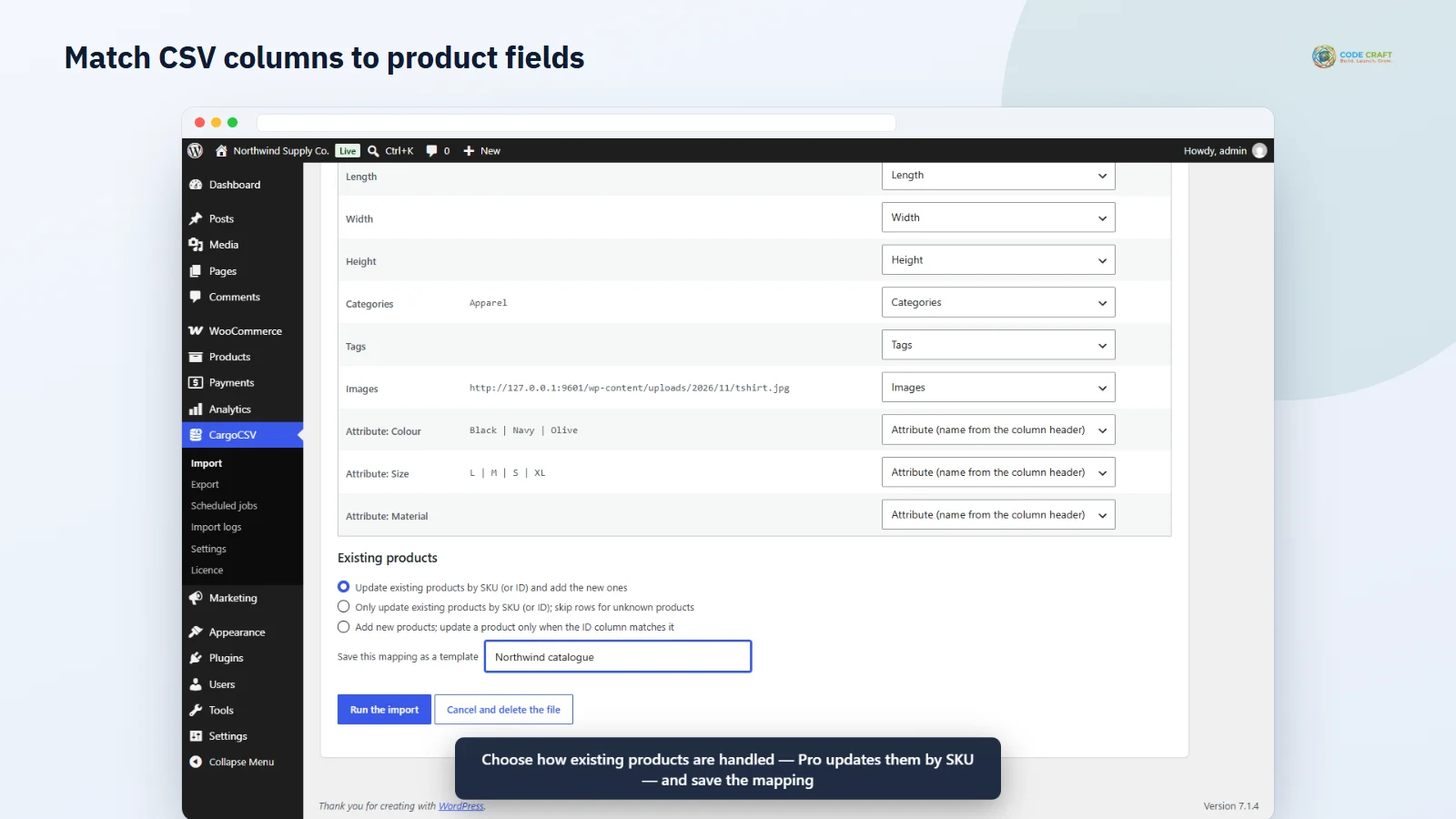
After the upload, CargoCSV lists every column of your file next to its first value and the product field it will go into. Columns are matched by name — its own export headers, WooCommerce's export headers and everyday names such as Price, Qty or Title — and you can change every match or choose Do not import. The comma, semicolon, tab and pipe delimiters are detected automatically, and files Excel saved in the Windows-1252 encoding are converted to UTF-8. Then you choose what happens to products that already exist and run the import.
The import runs 50 rows per batch (5 to 200 in Settings), and a batch also hands back after 20 seconds, so slow hosting and image downloads do not cause time-outs; the page shows a progress bar and, if the connection drops, carries on from the last finished batch when you reload it. In our tests a 500-row product file was imported completely this way. Every row is checked before anything is written: a price or stock value that is not a number, an unknown status or a row with more cells than the header is skipped and listed in the report with its row number and the reason, and the rest of the file is imported. In the free version a row whose SKU already belongs to another product is skipped rather than creating a duplicate; give it an ID column to update that product, or use Pro's update-by-SKU mode.
The order export filters by status and by date range and holds the order number, date, status, customer, billing and shipping details, payment method, currency, subtotal, discount, shipping, tax, total, the items and the customer note. Tick One row per order item to get the item name, SKU, quantity and line total on separate rows, which is what most accounting imports want. Orders are read through WooCommerce's order functions, so the export works with High-Performance Order Storage. The customer export lists every customer with email, username, names, registration date, number of orders, total spent and the billing and shipping address. The coupon export holds the code, type, amount, expiry, usage limits and count, minimum and maximum spend, allowed emails and product SKUs. In our tests the order and customer columns were compared field by field with WooCommerce's own REST API data.
An import tool takes files from outside and writes to your store, so CargoCSV is strict about both. Every screen and action needs the manage WooCommerce capability and a security token.
Pro adds the modes supplier sync needs: update existing products by SKU (or ID) and add the new ones, or update only and skip unknown SKUs. Variations are exported one row each directly under their parent, with the parent SKU and one value per attribute, and imported the same way: an existing variation is found by ID, by SKU or by its attribute values, otherwise it is created and missing values are added to the parent. Any custom meta key can be exported and imported as a "Meta: _gtin" column (WooCommerce's own keys such as _price or _stock are refused; use the normal columns for those). Coupons can be imported too, created or updated by code.
Save a column mapping or an export's settings as a template and reuse it in one click. Then schedule it: a scheduled export (for example processing orders, every morning) is emailed as CSV, XML or Excel to one or more addresses, and a scheduled import fetches a supplier's CSV or XML file from an http or https URL every hour, day or week and imports it with the saved mapping and mode. Schedules run through WooCommerce's Action Scheduler and each has a Run now button and its last result. The import log lists every import with its report, and Roll back undoes one: products and coupons it created go to the bin and products it updated get their previous prices, stock, texts, categories, tags, images, attributes and meta values back.
Stores that sync stock and prices with a supplier or an ERP through files, shops that hand order exports to an accountant or a fulfilment partner, agencies moving a catalogue from another platform into WooCommerce, and anyone who would rather change 300 prices in a spreadsheet than in 300 product screens. The free plugin covers one-off imports and exports; Pro is for stores that repeat the same sync every day.
CargoCSV needs WordPress 6.4 or newer, PHP 7.4 or newer and WooCommerce 8.0 or newer. It was tested with WordPress 7.1 and WooCommerce 11.2 on PHP 8.3 with High-Performance Order Storage on. It works in the admin only, so the shop's theme does not matter; the admin screens were checked with the Twenty Twenty-Five block theme and the Twenty Twenty-One classic theme active.
Most stores running CargoCSV pair it with these. Every plugin below shares the same licence system, coding standards and support team.


