

WooCommerce PluginDownload free version
Abandoned Cart Recovery for WooCommerce
No reviews yet
from$69.00/yr
WooCommerce fraud prevention for fake orders, COD abuse and card testing
Get a FraudFence Pro key by email and use every Pro feature for 7 days on one site. No card needed, nothing renews automatically — when the trial ends, Pro switches off unless you choose a plan. One trial per email.
Choose monthly, 1 year or lifetime — your key and download link are emailed instantly.
Upload the zip in wp-admin. The free core works right away.
Paste it in the plugin's License tab to activate.
Pro features, updates and priority support switch on.
Add a COD-only phone to the blocklist, see Cash on Delivery refused on the block checkout, a throwaway email refused on the classic checkout, COD hidden for a customer with an RTO, a risky order put on hold with its risk score, bulk import, the per-IP order limit, the card-testing limiter and the fraud log.
Download the PDF user guideThe free core is a real, working plugin — not a trial that expires. Pro unlocks the advanced modules with a licence key, and nothing you build on free is lost when you upgrade.
Everything most sites need. No account, no email required — download and install.
.zip · v1.0.0 · 2 downloads
Same plugin, every module unlocked by your licence key — plus updates and priority support.
Already bought it? Enter your key:
Or sign in — every licence you own shows up there.
| Feature | Free | Pro |
|---|---|---|
| Checks the block checkout and the classic checkout | Included | Included |
| Blocklist: emails, domains, phones, IPs, ranges, PIN codes | Included | Included |
| Per entry: block the order or only Cash on Delivery | Included | Included |
| Refuse throwaway email services | Included | Included |
| Order limit per IP address | Included | Included |
| Hide Cash on Delivery above an order total | Included | Included |
| Allowlist and fraud log with one-click blocking | Included | Included |
| Risk score 0–100 on every order, with reasons | Not included | Included |
| Auto hold, cancel or refuse high-risk orders | Not included | Included |
| RTO history: mark returned COD parcels | Not included | Included |
| Card-testing limiter (failed payments, attempts) | Not included | Included |
| IP country and billing-country mismatch rules | Not included | Included |
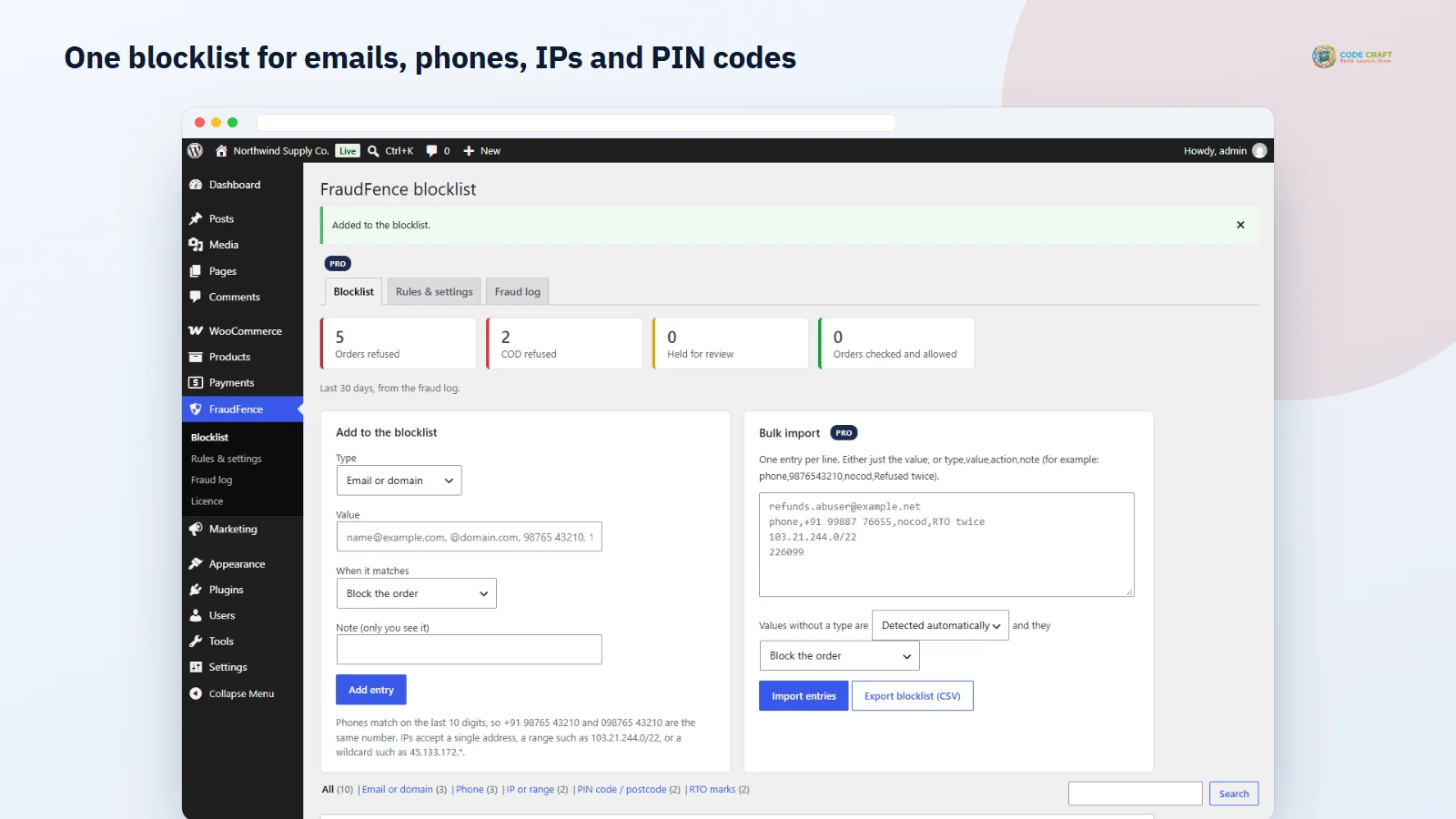
| Bulk import and CSV export of the blocklist | Not included | Included |
Upgrading is just entering a key — same plugin, same settings, nothing to reinstall or migrate.
Fake orders cost a Cash on Delivery store twice: the parcel is packed and shipped, then the courier charges for the return. FraudFence is WooCommerce fraud prevention that stops those orders at the checkout instead of at the doorstep. It runs when the shopper presses Place order — inside the Store API on the Checkout block, and in WooCommerce's own checkout validation on the classic shortcode page — so a refused order is never created, never reduces stock and never sends an email. The shopper sees one short, neutral message that you can change, such as "Sorry, we could not place this order." It never says which rule matched, so a fraudster learns nothing. You see the exact reason in the fraud log.
Add entries on the Blocklist tab: a single email, a whole domain written as @example.com, a phone number in any format, a single IP address, a CIDR range such as 103.21.244.0/22 (IPv6 ranges too), a wildcard such as 45.133.172.*, or a PIN code or postcode. Phone numbers are compared on their last 10 digits, so +91 98765 43210, 098765 43210 and 9876543210 are the same number. Each entry has its own action. "Block the order" refuses the checkout. "Only block Cash on Delivery" lets the customer pay online: COD is hidden in the payment list as soon as their phone, email or PIN code matches, and refused if they try it anyway. Every entry keeps a note for your team and counts how often it matched.
Disposable-email blocking refuses orders from about 65 well-known throwaway email services such as mailinator, yopmail, 10minutemail and guerrillamail, and you can add your own domains. The order limit per IP allows at most a number of orders from one IP address in a number of minutes — 5 in 60 by default — which stops scripted fake-order floods. The COD order limit hides Cash on Delivery above an order total you set, because a large fake COD order hurts most. An allowlist of emails, @domains, IPs and ranges lets trusted buyers, staff or an office network skip every rule. The fraud log keeps refused checkouts, refused COD, held orders and failed payments with time, checkout type, reasons, email, phone, PIN code, IP and order link, and deletes rows older than the number of days you choose.
Pro gives every checkout order a risk score from 0 to 100, built from signals in your own store data. Points are added for earlier orders returned to origin, two or more earlier failed or cancelled orders, a first order from that email, a billing country that differs from the shipping country, an IP country that differs from the billing country, Cash on Delivery, an order total at or above your high-value amount, an Indian mobile number that is not 10 digits starting with 6 to 9, and an email name with five or more digits; a trusted customer with two or more completed orders gets points taken off. You set the points for each signal. From the flag score an order is marked in the log and gets an order note; from the hold score it is put on hold for you to review; from the high-risk score it is refused at checkout or placed and then cancelled. Cancelling only happens to Cash on Delivery, bank transfer and cheque orders — a paid order is held instead, never cancelled. A FraudFence risk box on the order screen and a Fraud risk column in the orders list show the score and every reason.
When a COD parcel comes back, choose "Mark as RTO" in the order actions, or tick several orders in the orders list and use the bulk action. The order gets an RTO tag and its phones and email carry the RTO history: from then on that customer cannot use Cash on Delivery, cannot order at all, or only gets risk points — you choose, and from how many RTO orders. The card-testing limiter logs every failed payment with the customer's IP and pauses checkout for an IP with too many failed payments or too many checkout attempts in a short time, the classic pattern of someone testing stolen cards. Country rules refuse checkouts from IP countries you pick and refuse, hold or score orders whose IP country differs from the billing country. Bulk import takes a pasted list — one value per line, detected automatically, or type,value,action,note — and the whole blocklist exports as CSV.
FraudFence does not call any outside fraud, email-validation or IP-reputation service, so there is no API key to buy and no customer data leaves your site. The IP country for the Pro country rules comes from WooCommerce's own geolocation: the MaxMind GeoLite2 database when you set it up under WooCommerce → Settings → Integration, or a country header that Cloudflare or your host adds. When the IP country is unknown, the country rules are skipped rather than guessed. The Free plugin makes no outside connections at all; Pro contacts coodecraft.com only to activate and check its licence.
FraudFence needs WordPress 6.4 or newer, PHP 7.4 or newer and WooCommerce 8.9 or newer. It was tested with WordPress 7.1 and WooCommerce 11.2.2 on PHP 8.3 with High-Performance Order Storage on, on both the Checkout block and a [woocommerce_checkout] shortcode page with the Twenty Twenty-Five theme, in an Indian-rupee store with Cash on Delivery and bank transfer. Checks are a few indexed database lookups when the order is placed; Pro's risk score adds up to three order lookups by email.
Most stores running FraudFence pair it with these. Every plugin below shares the same licence system, coding standards and support team.


