
Vidya — School Website
A ready-made school website with academics, admissions, indicative fees, a notice board and admission enquiries
Everything included
- About page with principal's message and affiliation placeholders
- Academics by stage, with school timings
- Admissions process, documents and indicative fee table
- Admission enquiry form with class and visit time
- Notice board, with latest notices on the home page
- Facilities and campus safety sections
- School schema, titles and meta descriptions
- Admin panel for your details, currency, chat and enquiries
From order to a live website
- 1
Choose a package
Code only, We set it up, or Customised. All prices are one-time.
- 2
Pay securely
Your download link is emailed once payment is confirmed and also appears in My Account.
- 3
We contact you
For setup packages we email within one business day for your cPanel / hosting login and domain.
- 4
Live on your domain
Your school site runs on your own hosting, with admission enquiries arriving in your inbox.
What parents look for before admission
Parents compare schools on the stages offered, the school day, facilities, safety, the admission process and the fees. Vidya puts each on its own page, with an Admissions button on every screen and the latest notices on the home page.
- Stages from Nursery to Class XII
- School timings table
- Campus facilities and safety
- Process, documents and indicative fees
A notice board that is easy to update
Each notice is a short card with a date, a tag (Admissions, Holiday, Exams, Events) and a few lines of text. Add new ones at the top of the notices page; the home page shows the latest three.
- Dated, tagged notice cards
- Latest three on the home page
- Copy a card to add a notice
- Plain HTML cards, edited in any text editor
Honest by default
The demo makes no claims about board results, toppers or ranks. Affiliation number, school code and recognition details are placeholders that you fill in exactly as issued, and the fee table says clearly that fees are indicative and must be confirmed at admission.
- No result or rank claims
- Affiliation placeholders
- Indicative fee wording
- "No donation or capitation fee" line you can keep
Who it is for
Vidya is written for a co-educational day school run by a registered society or trust, with pre-primary, primary, middle, secondary and senior secondary sections on one campus. It also works for a school that stops at Class VIII or Class X: you delete the stages you do not have. The tone speaks to parents comparing schools before admission season, and to current parents who check the notice board for holidays and meetings.
- K-12 and secondary schools
- Primary and middle schools
- Society or trust-run schools
- Schools preparing for an admission season
Every page, as a parent sees it
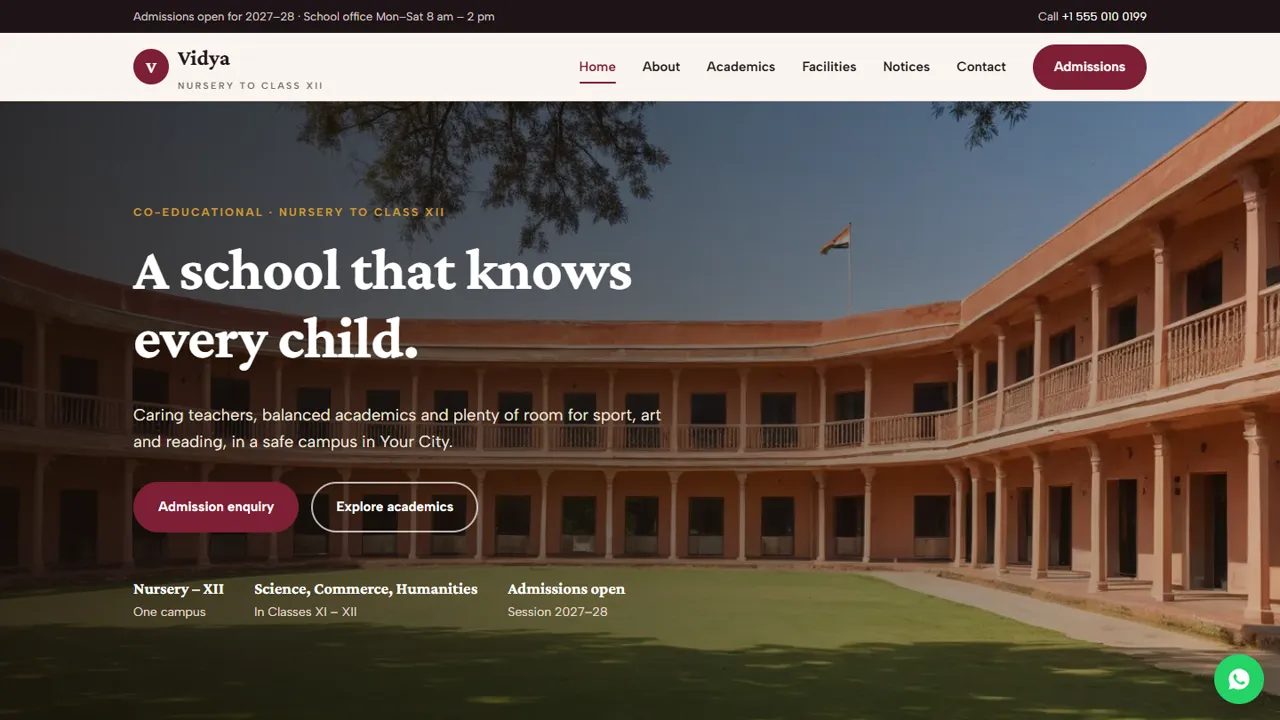
The home page leads with Admission enquiry and Explore academics, three stage cards, an 'our approach' section, the latest three notices, school timings and a campus visit prompt. About carries the principal's message, four values, an affiliation table for your board, number, school code and recognition, a place for a mandatory public disclosure link and a note on the managing society. Academics covers all five stages, clubs and trips, how assessment works and a summer, winter and Saturday timings table. Facilities shows classrooms, labs, library, sports ground, art and music and the parent meeting room, then safety cards on the campus gate, transport, sick room and drinking water. Admissions has the four-step process, documents to bring, seat notes, the fee table and the form.
- Home, About, Academics, Facilities, Admissions, Notices and Contact
- School schema markup for search
- Admission form: class, visit date and time, child's details
- Sample principal's name and notices to replace
Admission enquiries in the school office's admin
Every admission enquiry is emailed to the school office and saved in the admin's Enquiries inbox with the class applied for, the preferred visit date and time, the parent's phone and the child's details from the notes box. During admission season the office can download the list as a CSV and work through it. In the admin the school sets its name, logo, office phone, WhatsApp, address, map and office hours, and they update on every page. The announcement bar suits 'Admissions open' or a sudden closure, and the WhatsApp button opens with an admissions question.
- Enquiries inbox with CSV download
- Announcement bar for admissions and closures
- WhatsApp and click-to-call for the office
- Google Analytics if you advertise admissions
In the zip, setup and what it is not
The zip has the HTML pages, stylesheet, script, photos, the PHP form handler and config.php, the admin panel, an .htaccess file, an installation guide and a README. It runs on any cPanel or shared hosting with PHP 7.4 or later and needs no database setup. It is a public school website, not school software: there is no online fee payment, online registration form download, student or parent login, homework, timetable app, report card, transport tracking or ERP. Notices and fees are edited in the HTML files, not in the admin.
- Upload, set the office email, create the admin login
- Fill in your board and affiliation details exactly as issued
- Fees and notices edited in plain HTML
- No WordPress or monthly fee
More ready-made websites
Built by the same team, with the same setup service and support.
Browse every ready-made website, or compare our custom website packages if you need a site designed from scratch. Want more guests to find you on Google Maps? See our local SEO service, or talk to our web design team.



