
DriveEasy — Self-Drive Car Rental Website
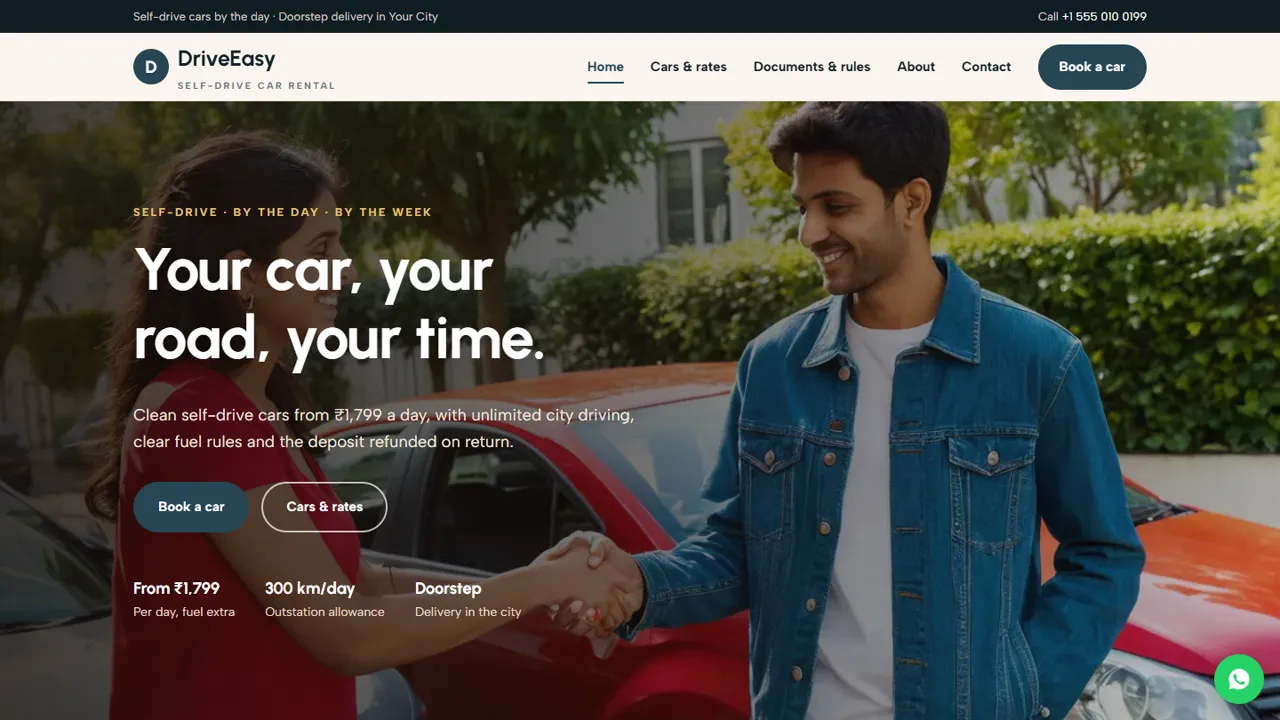
A ready-made self-drive rental website with car cards, daily rates, documents, rules and booking
Everything included
- Car cards with seats, fuel type and daily rates
- Rate chart with weekly price, extra km and deposit
- Documents required and plain-language rental rules
- Booking form with pickup date, time and delivery address
- Four-step rental day explained
- AutoRental schema, titles and meta descriptions
- Admin panel for your details, currency, chat and enquiries
- Colours and fonts changed from one CSS block
From order to a live website
- 1
Choose a package
Code only, We set it up, or Customised. All prices are one-time.
- 2
Pay securely
Your download link is emailed once payment is confirmed and also appears in My Account.
- 3
We contact you
For setup packages we email within one business day for your cPanel / hosting login and domain.
- 4
Live on your domain
Your car rental site runs on your own hosting, with booking requests arriving in your inbox.
Everything a renter checks first
Before renting a self-drive car, people want to know which cars you have, the daily rate, the deposit and the rules. DriveEasy puts car cards, a rate chart, the document list and the rules on clear pages, with a Book a car button on every screen.
- Car cards on the home and cars pages
- Rate chart with weekly and extra-km prices
- Documents and rules page
- About page for your hub and roadside help
Turn visitors into bookings
The booking form asks for the car, pickup date and time and an optional doorstep delivery address, with a message box for the return date and trip plan. The request arrives in your inbox and you confirm availability and documents by phone or WhatsApp.
- Car choice from your fleet
- Pickup date and time
- Optional doorstep delivery address
- Spam trap and input checks
Rules stated plainly
Fuel, deposit, kilometre and damage rules are written as short cards, with a note that the signed rental agreement holds the full terms. Rates and deposits are labelled indicative so you can set your own.
- Same-to-same fuel rule
- Refundable deposit explained
- Tolls, fines and damage responsibilities
- AutoRental schema markup
Who it is for
DriveEasy is built for a small self-drive rental business with a hub in one city and a fleet of a few hatchbacks, sedans, SUVs or 7-seaters. It also suits a travel agency or hotel that rents out its own cars, and an owner moving from WhatsApp-only bookings to a proper site that answers the same questions every renter asks.
- Self-drive rental hubs
- Small fleet owners renting by the day or week
- Hotels and travel desks with rental cars
- Businesses offering doorstep car delivery
The pages, one by one
The home page opens with the starting daily rate, the outstation kilometre allowance and doorstep delivery, then four promises (cleaned every time, simple documents, insured cars, roadside help), the car cards, a weekend-drives block and a closing call to book. It also has a testimonials block with sample quotes, clearly marked in the code for you to replace with real reviews or delete. The cars page repeats the car cards and adds the rate chart for each car type with per day, per week, extra kilometre and deposit columns, a note on what is included and what the renter pays, and four extras: doorstep delivery, child seat, late return and extra cleaning. The rules page lists the documents to bring, including what foreign nationals need, six rule cards on age, fuel, deposit, kilometres, tolls and fines and damage, and the four steps of rental day from booking to the return check. An about page explains how the cars are checked and what happens in a breakdown, and the contact page has a map and a message form.
- Home, Cars & rates, Documents & rules, Book a car, About, Contact and 404
- Rate chart as a simple HTML table
- Hub hours and 24-hour roadside line on the booking page
- Sample testimonials marked for replacement
Where booking requests land
The booking form asks for a name, phone, optional email, the car (or 'suggest a car for my trip'), a pickup date, a pickup time between 8 am and 9 pm, an optional doorstep delivery address and a box for the return date, trip plan and how long the renter has held a licence. The small print says the booking is confirmed only after you check availability and documents, and that rent and deposit are paid at pickup. Every request is emailed to you and saved in the admin's Enquiries inbox at /admin/, with a CSV download, so you can see the week's requests in one list. In the admin you also set the company name, logo, phone, WhatsApp, address, map, hub hours, social links and colours, add an announcement bar for holiday-weekend demand or a new car, and switch on live chat or analytics.
- Booking requests by email and in the admin inbox
- Delivery address captured when the renter wants it
- CSV download of all enquiries
- Hidden spam trap on every form
What is in the zip and how to go live
You receive seven HTML pages, the stylesheet and JavaScript, the PHP form handler and admin panel, car photos, an .htaccess file, a README and an installation guide. Upload to public_html in cPanel, set your email in config.php, create your admin login, paste your licence key and send a test booking. Any shared hosting with PHP 7.4 or later works, with no WordPress or database server. The README reminds you that the car cards appear on two pages and that every rate and deposit is a sample.
- Car cards edited as one block each
- Rules to match your signed agreement
- Built-in SQLite, nothing to install
- Optional setup on your hosting
What it does not do
DriveEasy does not show live availability, block dates, take rent or deposits online, verify licences or store documents. There is no cart, no payment gateway and no fleet database: you confirm each booking yourself and collect payment at pickup. The rules page is a summary and does not replace your rental agreement or insurance terms.
- No online payment or deposit
- No availability calendar
- Documents checked in person at pickup
More ready-made websites
Built by the same team, with the same setup service and support.
Browse every ready-made website, or compare our custom website packages if you need a site designed from scratch. Want more guests to find you on Google Maps? See our local SEO service, or talk to our web design team.



