
TalentBridge — Recruitment & Placement Agency Website
A ready-made recruitment agency website with employer services, a CV upload form and a current openings list
Everything included
- Employer services with indicative fee-on-hire cards
- Book-a-call form for employers
- CV upload form for candidates (PDF, JPG, PNG)
- Current openings table (sample rows to replace)
- "We never charge candidates a fee" notice
- EmploymentAgency schema, titles and meta descriptions
- Admin panel for your details, currency, chat and enquiries
- Colours and fonts changed from one CSS block
From order to a live website
- 1
Choose a package
Code only, We set it up, or Customised. All prices are one-time.
- 2
Pay securely
Your download link is emailed once payment is confirmed and also appears in My Account.
- 3
We contact you
For setup packages we email within one business day for your cPanel / hosting login and domain.
- 4
Live on your domain
Your agency site runs on your own hosting, with CVs and employer requests arriving in your inbox.
Two audiences, two clear paths
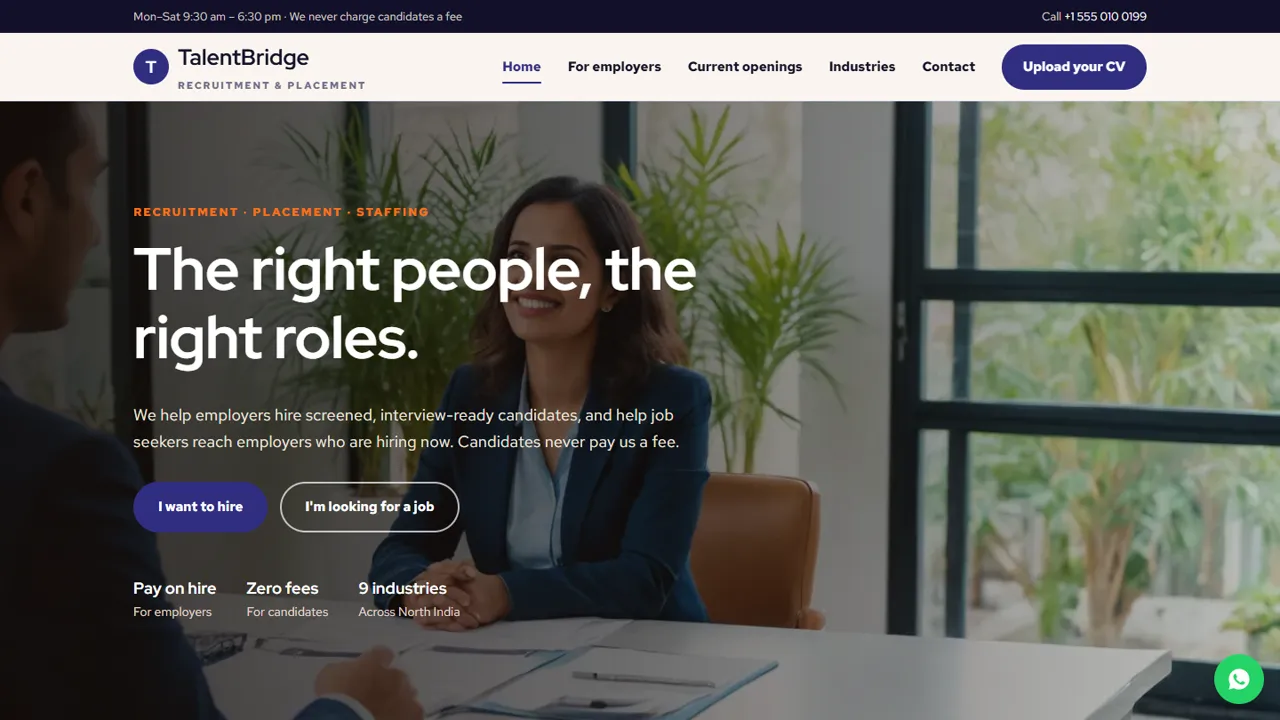
A recruitment site has to win employers and attract candidates at the same time. TalentBridge gives each their own page and button from the home page: employers see services, fees and a call booking form; job seekers see a simple CV upload.
- Home page with I want to hire / I'm looking for a job
- Employer services and process
- Candidate page with CV upload
- Industries and contact pages
CVs straight to your inbox
Candidates attach a PDF or a photo of their CV, add their city and the role they want, and the file arrives as an email attachment. The handler checks the file type by its contents and never saves it on the server.
- PDF, JPG or PNG up to 5 MB
- File type checked by signature
- The CV file is never stored on the website
- Spam trap and input checks
Honest wording built in
Fees are labelled indicative with a note that final terms are agreed in writing, the candidate page says plainly that you never charge candidates and cannot guarantee jobs, and the openings table is marked as sample rows for you to replace.
- "We never charge candidates a fee" notice
- No job or interview guarantees
- Indicative fee wording
- Sample openings marked in the code
Every page, and who it is for
The home page splits visitors straight away with 'I want to hire' and 'I'm looking for a job' buttons, then shows four employer services (permanent hiring, volume hiring, contract staffing and screened candidates), a short 'fewer CVs, better ones' section, one card for each audience and four process steps from role brief to joining day. For employers explains the services, shows three indicative fee-on-hire cards for entry-level, mid-level and senior roles with what each includes, and ends with the book-a-call form and a plain line that you do not guarantee every opening will be filled by a set date. For candidates holds the CV upload form, the no-fee warning with your phone number, what happens after a CV is sent and three CV tips. Current openings is a table of role, industry, location, experience and job type, with a notice that the rows are samples. Industries lists nine sectors with the roles you fill, plus an about-the-agency section. Contact and a 404 page complete the site.
- Separate paths for employers and job seekers
- Fee cards with what each level includes
- Openings table with five columns
- Nine industry cards and an about section
The two forms
The employer form asks for a name, phone, optional email, the hiring need (permanent, volume, contract, executive search or not sure yet), a date and time for a short call, and notes about the company and role. The candidate form asks for a name, phone, optional email, the CV file, current city and the role they want. Both are emailed to you; the CV goes as an attachment after the server checks its size and reads its first bytes to confirm it is a real PDF, JPG or PNG.
- Book-a-call form for employers
- CV upload with city and target role
- Larger CVs can be sent on WhatsApp
Your admin panel for the agency
In /admin/ you set the agency name, logo, office phone, WhatsApp, email, address, map, office hours and social links once, and every page updates. Employer call requests and candidate submissions are kept in the Enquiries inbox (the candidate's details and the CV file name, while the CV itself stays in your email), so your recruiters can see who wrote in and download the list as a CSV for your own candidate sheet. You can switch on the WhatsApp button, add Google Analytics or the Meta Pixel for hiring-drive campaigns, and use the announcement bar to promote a walk-in drive.
- Call requests and CV submissions in one inbox
- CSV download for your own tracker
- Announcement bar for walk-in drives
What you get and what you need
The zip has the seven pages, the stylesheet and script, the PHP form handler that sends CVs, config.php, the admin panel, sample photos, an .htaccess file, a README and the installation guide. It needs any cPanel or shared hosting with PHP 7.4 or later that allows 5 MB uploads. Replace the sample openings with real ones and remove each row as soon as the role is filled.
- No WordPress or database setup
- Openings edited as table rows
- SMTP recommended for CV attachments
More ready-made websites
Built by the same team, with the same setup service and support.
Browse every ready-made website, or compare our custom website packages if you need a site designed from scratch. Want more guests to find you on Google Maps? See our local SEO service, or talk to our web design team.



