
Chai Talk — Podcast & Creator Website
A podcast website with an episode list, host page, media kit and sponsor and guest enquiry forms
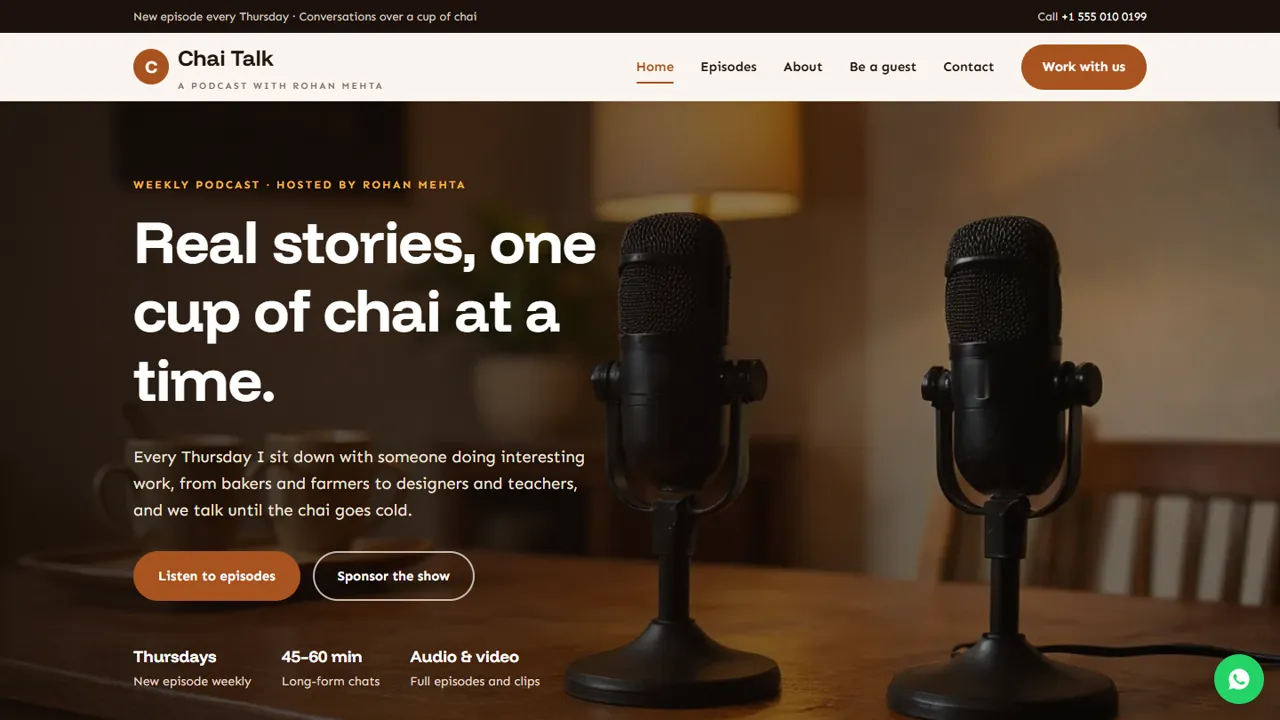
Everything included
- Episode list with listen-link placeholders
- Latest-episode feature on the home page
- Media kit page with sponsorship formats
- Sponsor and collab enquiry form
- Guest pitch form with intro-call date and time
- Host and how-it's-made page
- PodcastSeries schema, titles and meta descriptions
- Admin panel for your details, currency, chat and enquiries
From order to a live website
- 1
Choose a package
Code only, We set it up, or Customised. All prices are one-time.
- 2
Pay securely
Your download link is emailed once payment is confirmed and also appears in My Account.
- 3
We contact you
For setup packages we email within one business day for your cPanel / hosting login and domain.
- 4
Live on your domain
Your podcast site runs on your own hosting, with sponsor and guest enquiries arriving in your inbox.
A home for your show beyond the apps
Podcast apps show your episodes, but not who you are or how to work with you. Chai Talk gives your show its own address, with your latest episode up front, a full episode list and a page about the host.
- Latest episode on the home page
- Episode cards with guest and length
- Listen and watch link placeholders
- About the host and the show
Turn listeners into sponsors and guests
The media kit page explains how brands can work with you, from host-read mentions to collab episodes, and the enquiry form asks for the brand, goals and budget. The guest page collects pitches with a preferred time for an intro call.
- Sponsorship formats as feature cards
- Sponsor and collab enquiry form
- Guest pitch form with date and time
- Clear sponsorship rules section
Honest by design
The media kit ships without listener numbers, so you never publish figures you can't back up. Add your real, current numbers from your dashboards when you want to, or send them privately with your reply.
- No made-up stats in the template
- Notes in the code where real numbers go
- PodcastSeries schema markup
- Colours and fonts in one CSS block
Every page, and what a listener or brand does there
The home page leads with the show's name, release day and two buttons, one to the episodes and one to the sponsor page, then the latest episode with a short write-up and three link buttons marked 'goes here' for your podcast apps and video channel. Below that sit three recent episodes, four cards about what makes the show different, a host introduction and a call to action for sponsors and guests. The episodes page lists every episode newest first, each with its number, title, guest, length, a one-line summary and a listen-link placeholder, followed by follow buttons for your podcast app, video channel and RSS feed. The about page tells the host's story, shows the four steps of how an episode is made and a small photo gallery. The sponsor page has the formats, a 'who listens' section, four steps from enquiry to episode, the enquiry form and your sponsorship rules. The guest page carries the pitch form beside a 'what we look for' list. A contact page and a 404 page complete the site.
- Home: latest episode, recent episodes, host, call to action
- Episodes: full list with listen-link placeholders
- About, Sponsors & media kit, Be a guest, Contact
Two forms that sort your inbox for you
The sponsor form asks for a name, phone, work email, what the brand wants to do (a host-read mention, a sponsored episode or series, a collab episode, social clips, hosting or speaking at an event, or something else) and a note on the brand, audience, timing and rough budget. The guest form asks who is being pitched (themselves, a friend, or a client for PR people, plus live recordings and studio time), a preferred date and time for a short intro call, and the story the guest would tell with links to their work. The page states that the date is for an intro call, not the recording, so nobody assumes a slot is booked.
- Sponsor enquiry by format
- Guest pitch with intro-call date and time
- Spam trap on every form
Your admin panel for the show
In /admin/ you set the show or host name, logo, email, WhatsApp, social links and colours, and they replace the demo details on every page. Sponsor enquiries, guest pitches and listener messages are emailed to you and kept together in the Enquiries inbox, which you can export to CSV when you plan the next season. You can also add Google Analytics, Tag Manager or the Meta Pixel to see which episodes people open, run an announcement bar for a new season or a live recording, and switch on live chat or the WhatsApp button if you want brands to reach you quickly.
- Pitches and enquiries in one inbox
- CSV export for planning
- Analytics and pixel from the admin
- Announcement bar for new seasons
What is in the zip and how to set it up
You get the home, episodes, about, sponsor, guest, contact and 404 pages, the stylesheet and script, the PHP form handler and config.php, the admin panel, sample photos, an .htaccess file and a README that lists where every placeholder is. Upload it to any cPanel or shared hosting with PHP 7.4 or later, set your email in config.php, create your admin login, paste your licence key, then replace the sample episodes and every 'link goes here' button with your real links.
- Any PHP host, no WordPress
- Sample episodes marked in the code
- Add your RSS feed address to the schema
What it does not do
Your audio and video stay with your podcast host and video platform. The site does not upload or play episodes, build an RSS feed, pull episodes in automatically, count downloads, sell merchandise, or take sponsor payments. New episodes are added by copying an episode card in the HTML.
- No audio hosting or player
- No automatic episode import
- No payments or shop
More ready-made websites
Built by the same team, with the same setup service and support.
Browse every ready-made website, or compare our custom website packages if you need a site designed from scratch. Want more guests to find you on Google Maps? See our local SEO service, or talk to our web design team.



