
Auto Currency Rates — Node.js Store Add-on
Keep your Node.js store's currency rates up to date automatically, with an optional markup
Everything included
- Daily automatic rate updates
- Two free sources, no API key needed
- Optional markup percentage
- Manual rates kept as the fallback
- Update now button and last-run status
- Settings in the store's Add-ons screen
From order to a live website
- 1
Buy the add-on
One-time price; the licence key and download link arrive by email and in My Account.
- 2
Copy into addons/
Drop the folder into your store's addons/ folder and restart the app.
- 3
Enable and configure
Admin → Add-ons: enable it, paste the licence key and fill in its settings.
Who it is for
The Northfield store lets visitors switch currency in the header, and converts every price with the rate you set in Admin → Currencies. Typing those rates by hand is fine for one or two currencies that hardly move, but it gets old quickly when you sell in several. This add-on is for store owners who want those rates refreshed for them every day, so a visitor in Europe or the UK sees a price close to today's conversion rather than last month's.
- For stores showing more than one currency
- No more typing rates by hand
- Prices follow the market day by day
Prices that follow the market
Choose one of two free sources that need no account or API key: ExchangeRate-API's open access endpoint, with about 160 currencies, or Frankfurter, which publishes the European Central Bank's reference rates for about 30 currencies. The add-on asks the source for the latest rates against your base currency and writes the new rate into every other currency in Admin → Currencies, rounded to six decimals. The store's price cache is cleared straight after, so the next page a visitor opens already uses the new rates. Each order keeps the rate it was placed at, so updating rates never changes past orders.
- Two free sources, no API key
- Every non-base currency updated
- Orders keep the rate they were placed at
Safe when the service is down
A rate source can be slow, return an error or be missing a currency. The add-on waits up to 15 seconds for an answer. If the request fails, every rate stays exactly as it was and the last-run line says so. If the source answers but does not know one of your currencies, that currency keeps the rate you typed in, and the message lists which ones were kept. Nothing is ever set to zero or a negative rate.
- 15-second timeout
- Manual rates kept on any failure
- Unknown currencies keep their manual rate
What you see in the admin
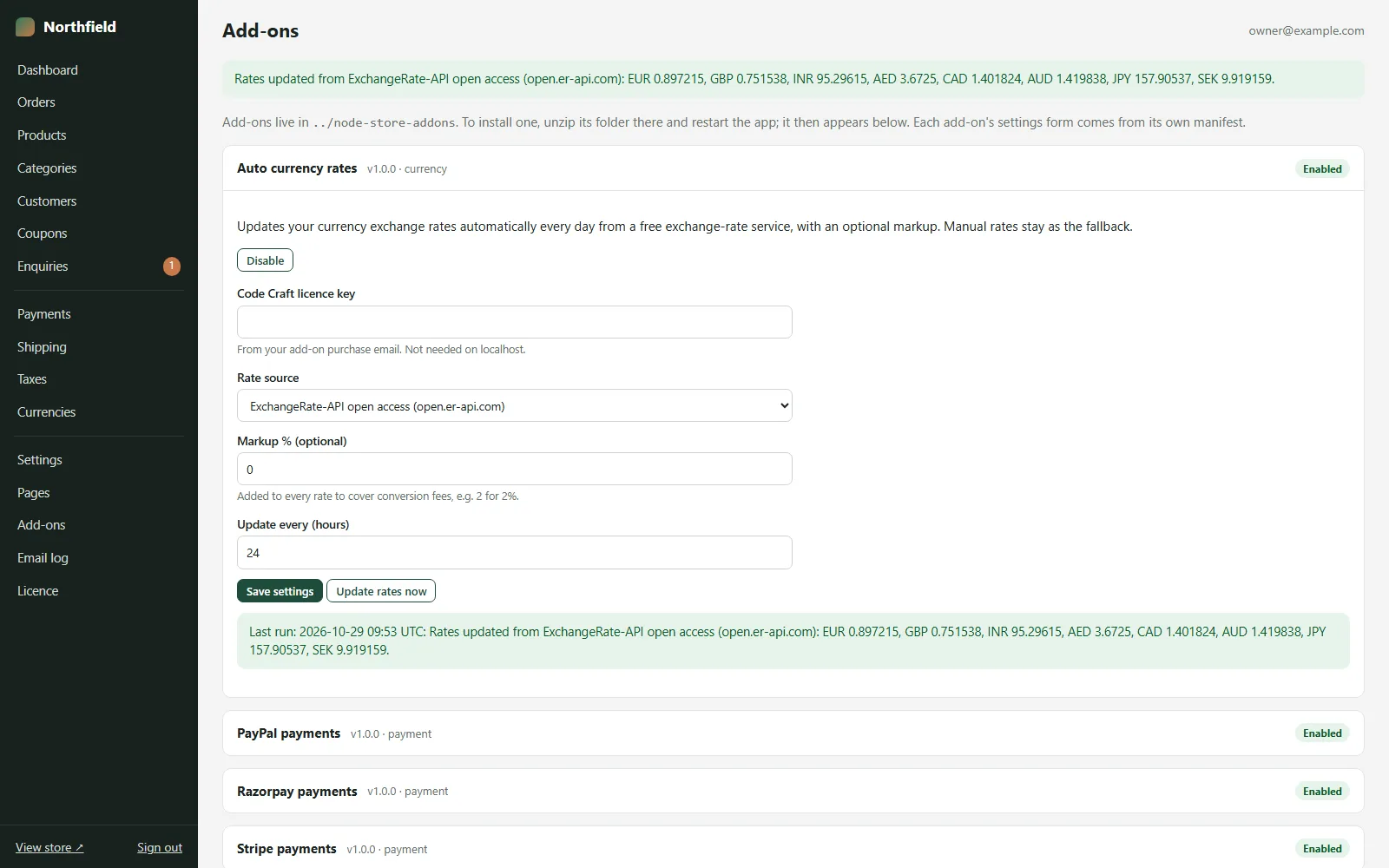
Auto currency rates appears in Admin → Add-ons with three settings and your add-on licence key: the rate source, an optional markup in percent (for example 2 to cover card conversion fees, limited to between minus 50 and plus 50), and how often to update in hours, 24 by default. The Update rates now button fetches rates immediately. Under the add-on a last-run line shows the time in UTC, the source, the markup and each new rate, or the reason it could not update. The store checks once an hour, and 15 seconds after it starts, whether the interval has passed.
- Rate source, markup and interval settings
- Update rates now button
- Last-run line with every new rate
Installing and first run
The zip holds one folder, auto-currency-rates, with its index.js and a README. Copy it into your store's addons/ folder, restart the app (Restart app on Hostinger or cPanel, pm2 restart store on a VPS) and open Admin → Add-ons. Press Enable, paste your add-on licence key, pick a rate source and save. Then press Update rates now and open Admin → Currencies: every currency the source knows now shows today's rate, and the last-run line under the add-on lists what changed. Check the base currency in Admin → Currencies first, because all rates are fetched against it. From then on the store refreshes the rates by itself, as long as the app keeps running.
- Copy, restart, enable
- Update rates now for a first check
- Rates fetched against your base currency
Limits to know
The free sources publish rates about once a day; they are fine for shop prices but are not live market quotes. The add-on updates all currencies except your base currency; there is no switch to keep one currency on a manual rate while it runs. It only changes display and checkout rates in the store: what a payment gateway charges or converts is decided by your gateway account. We tested it against mocked responses that follow both providers' published APIs.
- Daily rates, not live quotes
- Updates every non-base currency
- Tested against mocked API responses
More ready-made websites
Built by the same team, with the same setup service and support.
Browse every ready-made website, or compare our custom website packages if you need a site designed from scratch. Want more guests to find you on Google Maps? See our local SEO service, or talk to our web design team.



