
Razorpay Payments Add-on for Code Craft Store (Next.js)
Accept UPI, cards, netbanking and wallets in the Next.js store through Razorpay Standard Checkout
Everything included
- Razorpay Orders API + Standard Checkout
- Payment signature verified with your key secret
- Webhooks verified with your webhook secret
- Order and payment re-read from Razorpay
- Key secret never sent to the browser
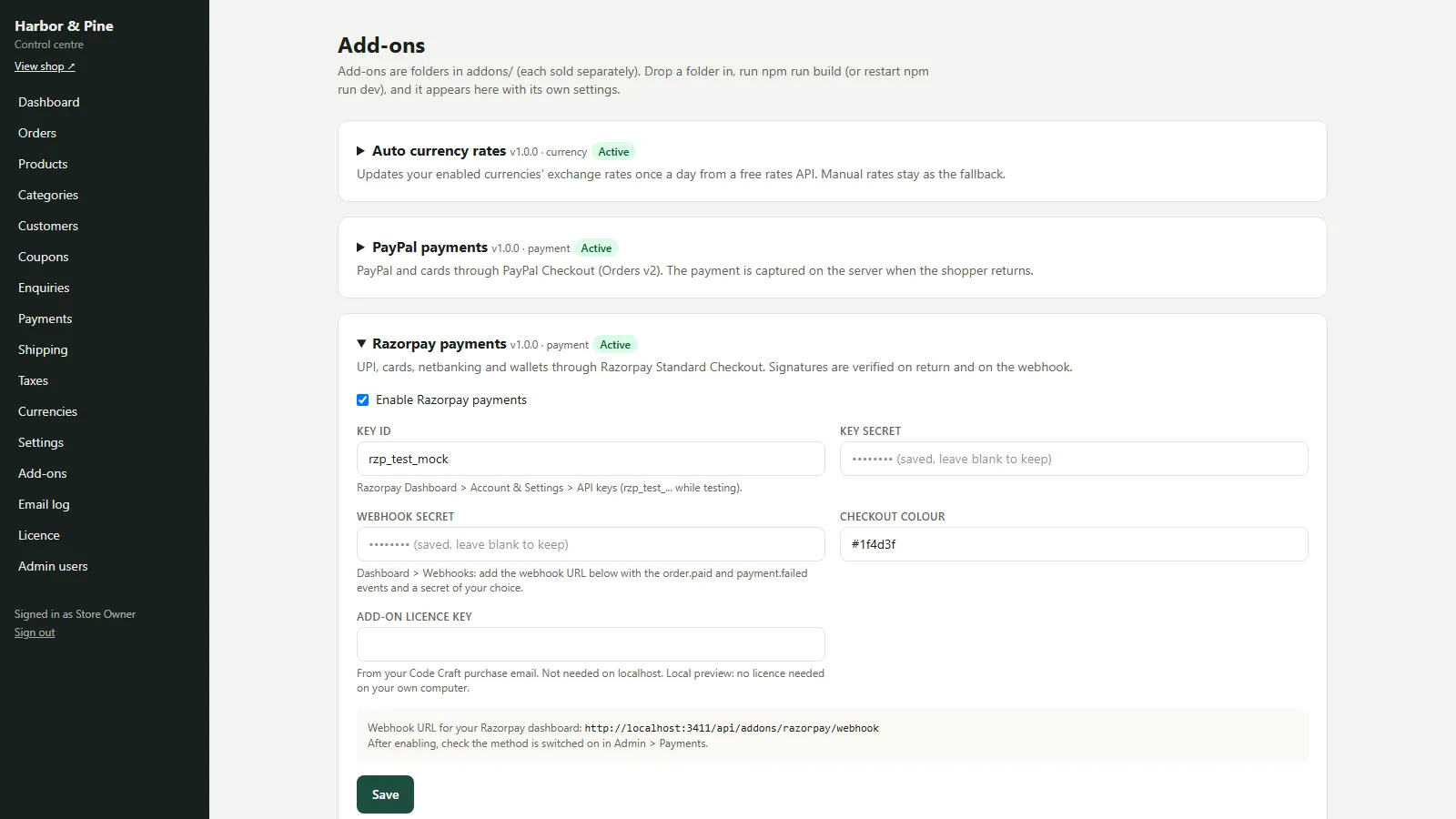
- Settings and licence key in Admin → Add-ons
From order to a live website
- 1
Buy the add-on
One-time price. Your download link and licence key arrive by email and in My Account.
- 2
Drop it in
Copy the folder into addons/, rebuild and restart the store.
- 3
Configure
Pick Razorpay at checkout, pay in the Razorpay window, and the store verifies the signature and marks the order paid.
Who it is for
This add-on is for shops running Code Craft Store: Next.js Ecommerce that sell mainly in India and want shoppers to pay online with UPI apps, cards, netbanking or wallets. The store's built-in UPI option shows a QR code and leaves you to check your bank; with Razorpay the payment is confirmed automatically and the order moves to Paid. You need your own Razorpay account, with KYC and settlements set up on Razorpay's side.
- Automatic confirmation of UPI and card payments
- Works next to COD, bank transfer and pickup
- Your own Razorpay account and settlements
How a Razorpay payment runs
When the shopper picks Razorpay, the store creates a Razorpay order through POST /v1/orders for the exact amount in paise, or in the order's currency, with the store order number as the receipt and in the notes. The shopper sees a short pay page and Razorpay Checkout opens with their name, email and phone filled in, in the colour you choose in the settings. A Pay now button reopens the window if they close it, and a Cancel link takes them back to their order.
- Razorpay order per store order
- Shopper details pre-filled
- Checkout colour setting
- Pay now and Cancel on the pay page
Verified twice before it counts
After payment Razorpay posts the payment id, order id and signature back. The add-on recomputes HMAC-SHA256 of order id and payment id with your key secret; a forged signature fails without even calling Razorpay. If it matches, the add-on reads the order and the payment back from the Razorpay API and ignores a Razorpay order that belongs to a different shop order. The store then compares amount and currency with the order before marking it paid. Webhooks for order.paid, payment.captured and payment.failed are accepted only with a valid X-Razorpay-Signature made with your webhook secret over the raw body. The key secret never reaches the browser.
- Checkout signature checked first
- Order and payment re-read from Razorpay
- Signed webhooks only
- Failed payments noted on the order
What you see in the admin
Razorpay payments has the key id, key secret, an optional webhook secret and the checkout colour in Admin → Add-ons, plus the licence key field. Once enabled, it appears in Admin → Payments, where you can rename it and set its order. A paid order keeps the Razorpay payment id as its reference and moves to Paid with a timeline entry and the usual email to the shopper.
- Four settings and a licence key
- Rename and reorder in Admin → Payments
- Payment id saved on the order
Installing and going live
The zip holds the razorpay/ folder with its source, its tests, a README and a PDF guide. Copy it into the store as addons/razorpay/ (keep the folder name), then run npm run build and restart the store, or restart npm run dev while you try it. scripts/sync-addons.mjs registers it automatically. Open Admin → Add-ons → Razorpay payments, tick Enable, fill in the settings and paste the add-on licence key, which is not needed on localhost. Test with your rzp_test_ keys and an INR order, then swap in your live keys. Until the add-on licence is active on your live domain, the store treats the add-on as switched off.
- Copy, rebuild, enable
- Licence key per add-on
- npm test runs its mocked tests
Limits to know
Refunds are made in the Razorpay Dashboard; then set the order to Refunded in the store. Razorpay accepts INR for most accounts; other currencies need international payments enabled on yours. Subscriptions, payment links and Razorpay Route are not included. The add-on was tested only against mocked Razorpay responses, never with a real account or real money.
- Refunds in the Razorpay Dashboard
- INR by default
- Tested against mocks, not real payments
Requires Code Craft Store
This is an add-on for Code Craft Store: Next.js Ecommerce, sold separately. Copy its folder into the store's addons/ folder, rebuild, and configure it in Admin → Add-ons. Each add-on has its own licence key.
- Works with Code Craft Store 1.0 or later
- Installed in minutes, no code changes
- Its own settings screen in the admin
More ready-made websites
Built by the same team, with the same setup service and support.
Browse every ready-made website, or compare our custom website packages if you need a site designed from scratch. Want more guests to find you on Google Maps? See our local SEO service, or talk to our web design team.



