
PayPal Payments Add-on for Code Craft Store (Next.js)
Accept PayPal and cards in the Next.js store with PayPal Checkout (Orders v2) and server-side capture
Everything included
- PayPal Orders v2: create, approve, capture
- Sandbox and live modes
- Server-side capture on return
- Webhook verification through PayPal's API
- Amount and currency checked before marking paid
- Settings and licence key in Admin → Add-ons
From order to a live website
- 1
Buy the add-on
One-time price. Your download link and licence key arrive by email and in My Account.
- 2
Drop it in
Copy the folder into addons/, rebuild and restart the store.
- 3
Configure
Pick PayPal at checkout, approve on PayPal, and the store captures the payment and marks the order paid.
Who it is for
This add-on is for shops running Code Craft Store: Next.js Ecommerce that sell to buyers abroad and want to offer PayPal, which many of them already use. Buyers can pay from their PayPal account or with a card through PayPal. It sits next to the store's built-in cash on delivery, bank transfer, UPI and pickup methods. You need a PayPal business account and an app on developer.paypal.com; a sandbox app lets you test everything first.
- For shops with international buyers
- PayPal account or card through PayPal
- Sandbox first, then live
How a PayPal payment runs
When the shopper picks PayPal, the add-on gets an OAuth token with your client id and secret and creates a PayPal order with intent CAPTURE for the exact total, written with the currency's own decimals. The request carries a PayPal-Request-Id built from the order number, amount and currency, so a repeated click does not create a second order. The approval page is set to Pay Now, skips PayPal's shipping-address step because your checkout already has the address, and can show your shop name if you fill in that setting. After approving, the shopper returns to your store; if they cancel, they land back on their order page.
- Orders v2 with intent CAPTURE
- Request id against duplicate orders
- Optional shop name shown on PayPal
- Cancel returns to the order page
Captured and checked on the server
On return the add-on captures the payment on the server and reports the captured amount and currency; the store compares them with the order total before marking it paid. Refreshing the return page is safe, because an order PayPal has already captured is read instead of captured again, and a PayPal order that belongs to a different shop order is ignored. A capture that fails or is declined is written to the order timeline. If you add a webhook for PAYMENT.CAPTURE.COMPLETED and PAYMENT.CAPTURE.DENIED and paste its id, every event is first checked with PayPal's verify-webhook-signature API before it is used.
- Server-side capture on return
- Safe page refresh
- Declined captures noted on the order
- Webhooks verified by PayPal
What you see in the admin
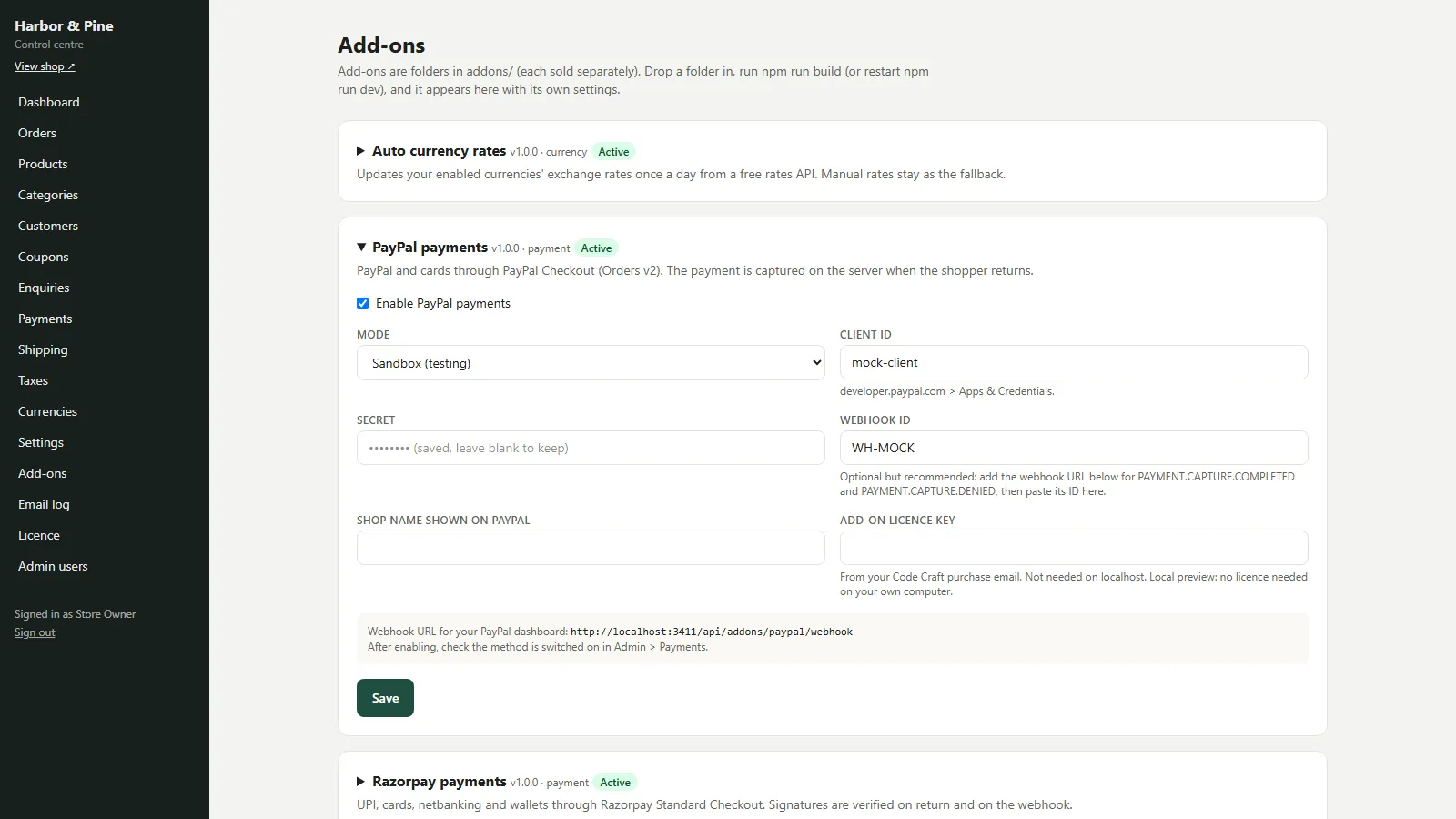
PayPal payments has a Mode switch (Sandbox or Live), the client id, the secret, an optional webhook id and an optional shop name for PayPal's page, plus the licence key field, in Admin → Add-ons. Once enabled, PayPal appears in Admin → Payments, where you can rename it and set its order. A paid order keeps the PayPal capture id as its payment reference and moves to Paid with a timeline entry and the usual email.
- Sandbox and Live mode
- Rename and reorder in Admin → Payments
- Capture id saved on the order
Installing and going live
The zip holds the paypal/ folder with its source, its tests, a README and a PDF guide. Copy it into the store as addons/paypal/ (keep the folder name), then run npm run build and restart the store, or restart npm run dev while you try it. scripts/sync-addons.mjs registers it automatically. Open Admin → Add-ons → PayPal payments, tick Enable, fill in the settings and paste the add-on licence key, which is not needed on localhost. Test in Sandbox mode with a sandbox buyer account, then switch Mode to Live with your live app's credentials. Until the add-on licence is active on your live domain, the store treats the add-on as switched off.
- Copy, rebuild, enable
- Licence key per add-on
- npm test runs its mocked tests
Limits to know
Refunds are made in your PayPal account; then set the order to Refunded in the store. PayPal only accepts certain currencies, so enable only store currencies your PayPal account can receive. Subscriptions, Pay Later messaging and card fields on your own page are not included. The add-on was tested only against mocked PayPal responses, never with a real PayPal account or real money.
- Refunds in PayPal
- Currency must be one PayPal accepts
- Tested against mocks, not real payments
Requires Code Craft Store
This is an add-on for Code Craft Store: Next.js Ecommerce, sold separately. Copy its folder into the store's addons/ folder, rebuild, and configure it in Admin → Add-ons. Each add-on has its own licence key.
- Works with Code Craft Store 1.0 or later
- Installed in minutes, no code changes
- Its own settings screen in the admin
More ready-made websites
Built by the same team, with the same setup service and support.
Browse every ready-made website, or compare our custom website packages if you need a site designed from scratch. Want more guests to find you on Google Maps? See our local SEO service, or talk to our web design team.



