
Auto Currency Rates Add-on for Code Craft Store (Next.js)
Keep the Next.js store's exchange rates up to date automatically, with your manual rates as the fallback
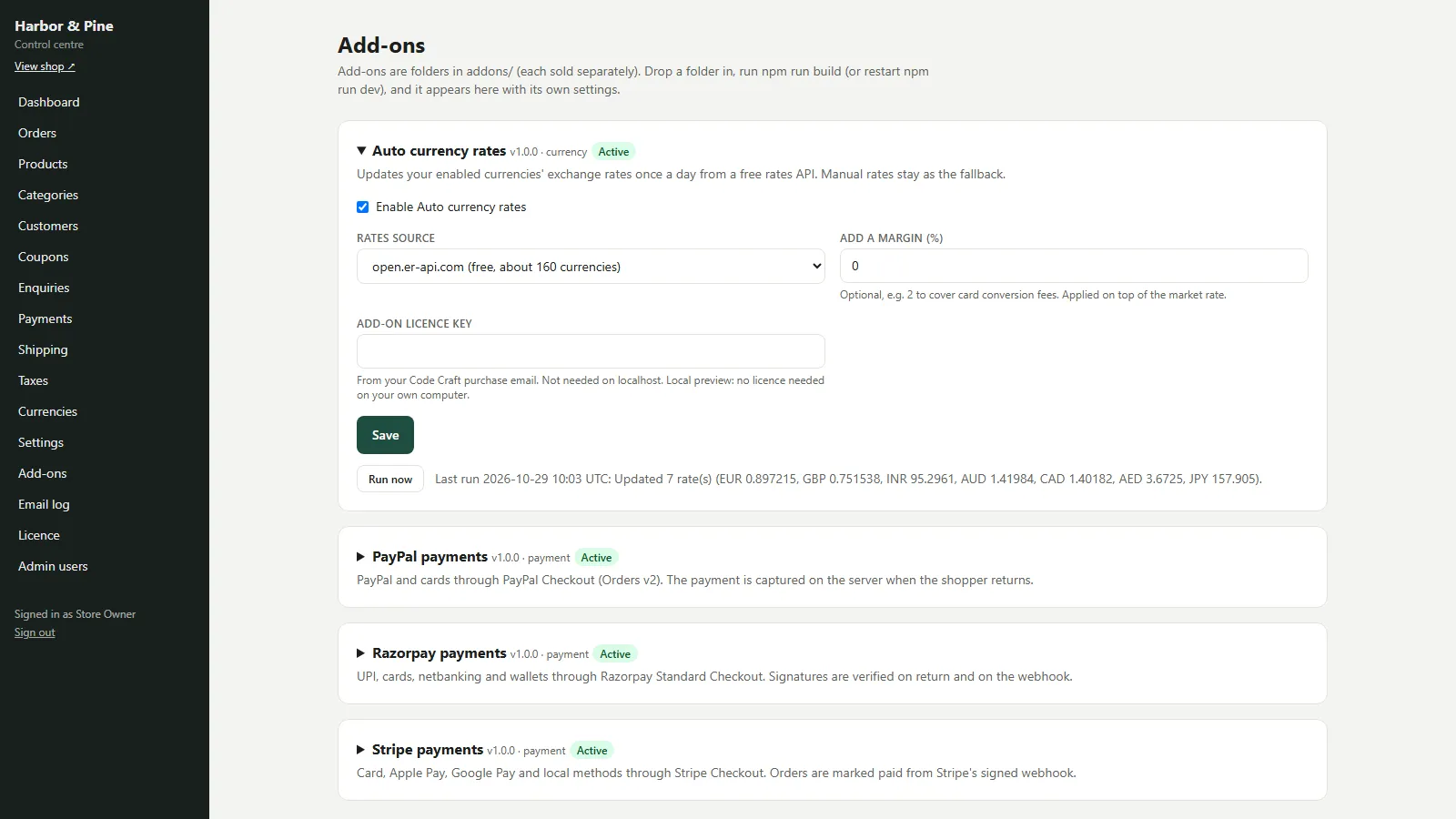
Everything included
- Daily update of currencies marked Auto rate
- Two free sources: open.er-api.com or Frankfurter (ECB)
- Optional margin in percent
- Manual rates kept as the fallback
- Run now button with a result log
- Works from the admin or your host's cron
From order to a live website
- 1
Buy the add-on
One-time price. Your download link and licence key arrive by email and in My Account.
- 2
Drop it in
Copy the folder into addons/, rebuild and restart the store.
- 3
Configure
Enable it, choose a rates source and the currencies to update. Rates refresh once a day, or when you press Run now.
Who it is for
Code Craft Store lets shoppers switch currency in the header and converts every price at the rate you set in Admin → Currencies. Typing those rates by hand is fine for one currency that barely moves; it becomes a chore when you sell in several. This add-on is for shop owners who want the rates refreshed once a day, so a shopper paying in euros or pounds sees a price close to today's rate rather than last month's.
- For shops showing more than one currency
- No more typing rates by hand
- Prices follow the market day by day
How the daily update works
Once a day the add-on asks a free rates service for the latest rates against your base currency and the store saves them on every currency marked Auto rate in Admin → Currencies, rounded to six significant digits. You choose the source: open.er-api.com, with about 160 currencies, or Frankfurter, which publishes the European Central Bank's reference rates for about 30. Neither needs an account or a key. An optional margin in percent is added on top of the market rate, for example 2 to cover card conversion fees; it is limited to between minus 50 and plus 50.
- Currencies marked Auto rate only
- Two free sources, no key
- Optional margin
When it runs
The store runs due tasks when an admin opens the dashboard, so a shop whose admin is used daily needs nothing else. To run it on a timer as well, ask your host's cron to open https://your-shop.com/api/cron?key=YOUR_CRON_SECRET once an hour; the update still happens only once every 24 hours. The Run now button on the add-on's screen updates immediately and shows how many rates changed and which kept their manual value.
- Runs from the dashboard or a cron call
- Once every 24 hours
- Run now button with a result line
Safe when the service is down
If the service cannot be reached, returns an error or answers with no rates, nothing is changed and your manual rates stay in use. A currency the service does not know, or a zero or invalid rate, is skipped and keeps its manual rate. Any currency you untick Auto rate on is never touched, so you can keep a fixed rate for one currency while the others follow the market. Orders always store the rate they were placed with, so past orders never change.
- Manual rates as the fallback
- Untick Auto rate to keep a fixed rate
- Past orders keep their rate
Installing and going live
The zip holds the auto-currency-rates/ folder with its source, its tests, a README and a PDF guide. Copy it into the store as addons/auto-currency-rates/ (keep the folder name), then run npm run build and restart the store, or restart npm run dev while you try it. scripts/sync-addons.mjs registers it automatically. Open Admin → Add-ons → Auto currency rates, tick Enable, fill in the settings and paste the add-on licence key, which is not needed on localhost. Press Run now once and check Admin → Currencies to see the new rates. Until the add-on licence is active on your live domain, the store treats the add-on as switched off.
- Copy, rebuild, enable
- Licence key per add-on
- npm test runs its mocked tests
Limits to know
The free sources publish rates about once a day; they suit shop prices but are not live market quotes. The add-on changes the rates the store shows and charges at; any further conversion by your payment gateway is set in your gateway account. It was tested against mocked API responses that follow both providers' published APIs.
- Daily rates, not live quotes
- Gateway conversions are separate
- Tested against mocked responses
Requires Code Craft Store
This is an add-on for Code Craft Store: Next.js Ecommerce, sold separately. Copy its folder into the store's addons/ folder, rebuild, and configure it in Admin → Add-ons. Each add-on has its own licence key.
- Works with Code Craft Store 1.0 or later
- Installed in minutes, no code changes
- Its own settings screen in the admin
More ready-made websites
Built by the same team, with the same setup service and support.
Browse every ready-made website, or compare our custom website packages if you need a site designed from scratch. Want more guests to find you on Google Maps? See our local SEO service, or talk to our web design team.



