
Auto Currency Rates Add-on for Code Craft Store (Laravel)
Keep the Laravel store's exchange rates up to date automatically, with your current rates kept if a fetch fails
Everything included
- Daily rate update without a cron job
- Two free sources, no API key
- Optional margin percentage
- Currencies you want to keep manual
- Fetch rates now button and artisan command
- Manual rates kept if the source is down
From order to a live website
- 1
Buy the add-on
One-time price. Your download link and licence key arrive by email and in My Account.
- 2
Drop it in
Upload the folder to addons/ and enable it in the admin.
- 3
Configure
Enable it and your currency rates refresh once a day; check the date of the last update next to each rate under Admin → Currencies.
What it does
Updates the exchange rate of every non-base currency in Code Craft Store: Laravel Ecommerce once a day from a free rates API (open.er-api.com or api.frankfurter.app, no API key needed). It runs on the first visit after 24 hours, so it works on shared hosting without a cron job, and can also be run with php artisan store:currency-rates or the Fetch rates now button. You can add a margin percentage and list currencies to keep setting by hand. If the rates source cannot be reached, your current rates stay in place. It was tested against mocked API responses.
- Daily rate update without a cron job
- Two free sources, no API key
- Optional margin percentage
- Currencies you want to keep manual
Requires Code Craft Store for Laravel
This is an add-on for Code Craft Store: Laravel Ecommerce, sold separately. Upload its folder to the store's addons/ folder and configure it in Admin → Add-ons; no Composer or code changes needed. Each add-on has its own licence key.
- Works with Code Craft Store for Laravel 1.0 or later
- Installed in minutes on cPanel, Hostinger or a VPS
- Its own settings card in the admin
Who needs it
It is for shops running Code Craft Store: Laravel Ecommerce that show prices in more than one currency and do not want to type new exchange rates by hand. The store converts prices for display using the rate saved for each currency, and every order records the currency and rate that were used. This add-on keeps those rates current. It needs no account and no API key, only outgoing internet access from your hosting to the rates source you pick.
- For stores with two or more currencies
- No API key or sign-up
- Hosting must allow outgoing HTTPS requests
Settings in your admin
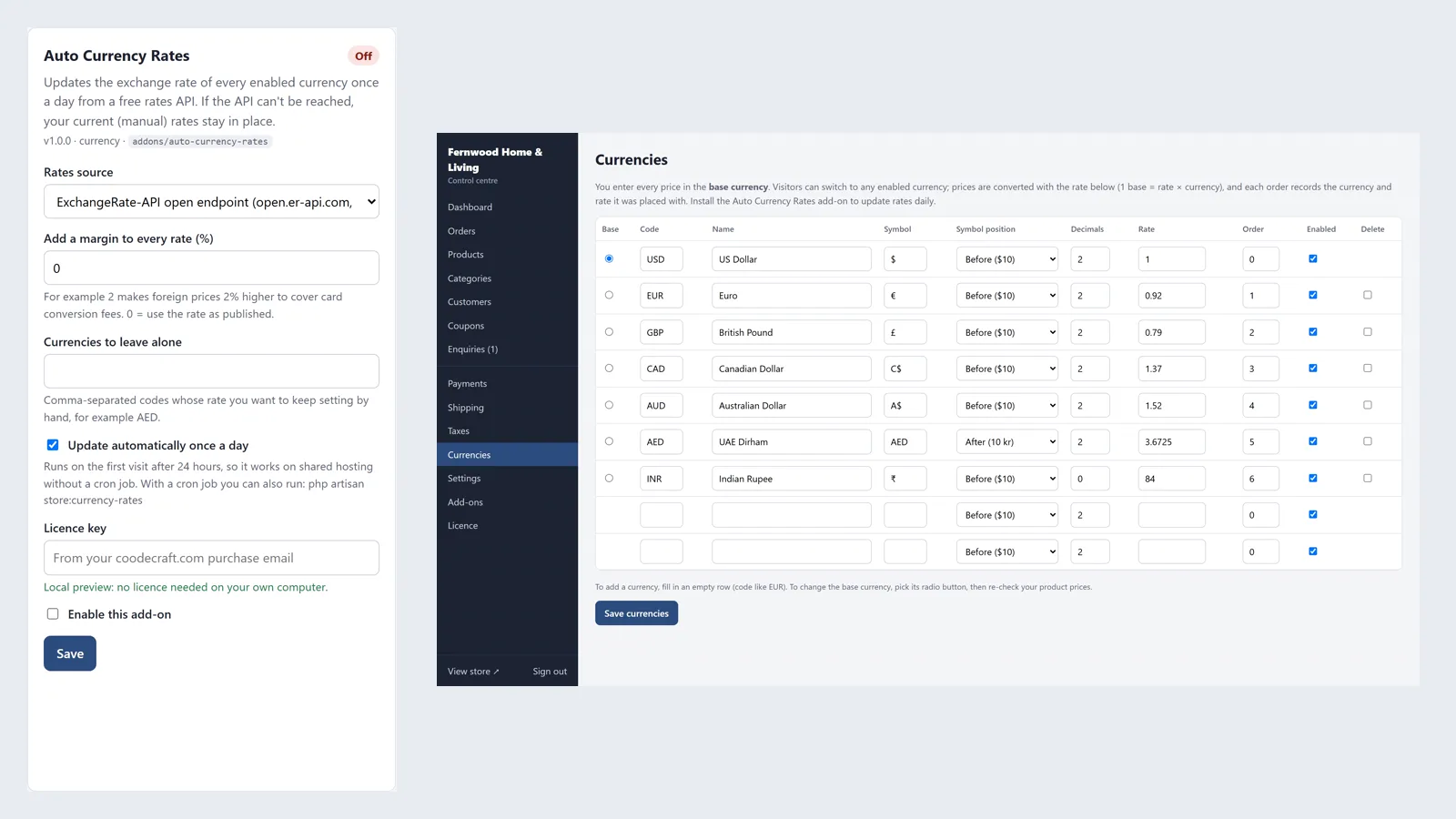
In Admin → Add-ons → Auto Currency Rates you choose the source: open.er-api.com (about 160 currencies, the default) or Frankfurter at api.frankfurter.app (European Central Bank reference rates, about 30 currencies). You can add a margin from -50 to 50 per cent to every fetched rate, for example 2 to cover card conversion fees, and list currency codes to leave alone, such as AED, if you set those rates yourself. The Update automatically once a day box switches the daily update on or off, and the add-on adds a Fetch rates now link to the admin.
- Two free sources to choose from
- Margin percentage
- Comma-separated list of currencies to skip
- Automatic daily update on or off
How the update runs
With the automatic update on, the first page request after 24 hours triggers a fetch once the response has been sent, so visitors do not wait; a lock stops two fetches running at once. On a VPS or with cron you can run php artisan store:currency-rates instead. The rates are fetched for your base currency and written to every other currency in Admin → Currencies, switched on or off, except the ones you skip; the time of each update shows next to the rate. The result, including any currency the source does not publish, appears as a message after Fetch rates now.
- No cron needed on shared hosting
- php artisan store:currency-rates
- Last update time shown per currency
Honest limits
A fetched rate replaces the rate saved for that currency, so list a currency under skip if you want to keep setting it by hand. If the source cannot be reached, the current rates are kept and the next try is a day later. The rates are reference rates for showing prices; they are not what a payment gateway or bank charges. It was tested only against mocked API responses in the store's feature tests.
- Fetched rates overwrite unskipped currencies
- Failed fetch: current rates kept
- Mocked tests only
Working with your currency list
The add-on does not create currencies. You still add each one in Admin → Currencies with its symbol, decimals and symbol position, and decide which ones visitors can choose. After an update the new rate and the time it was fetched appear in that list. Orders placed earlier keep the rate they were placed at, so a rate change never alters past orders, their totals or their invoices. Prices in your catalogue stay in your base currency; only the conversion for display changes.
- You decide which currencies exist
- Past orders keep their rate
- Catalogue prices stay in the base currency
More ready-made websites
Built by the same team, with the same setup service and support.
Browse every ready-made website, or compare our custom website packages if you need a site designed from scratch. Want more guests to find you on Google Maps? See our local SEO service, or talk to our web design team.



