Hirelark Jobs — Jobs Portal App
A jobs portal you host yourself: job search with filters, private PDF CVs with a view log, an applicant pipeline for employers and recruiters, admin moderation, paid featured jobs by UPI, job alerts, REST API and an Expo mobile app
Everything included
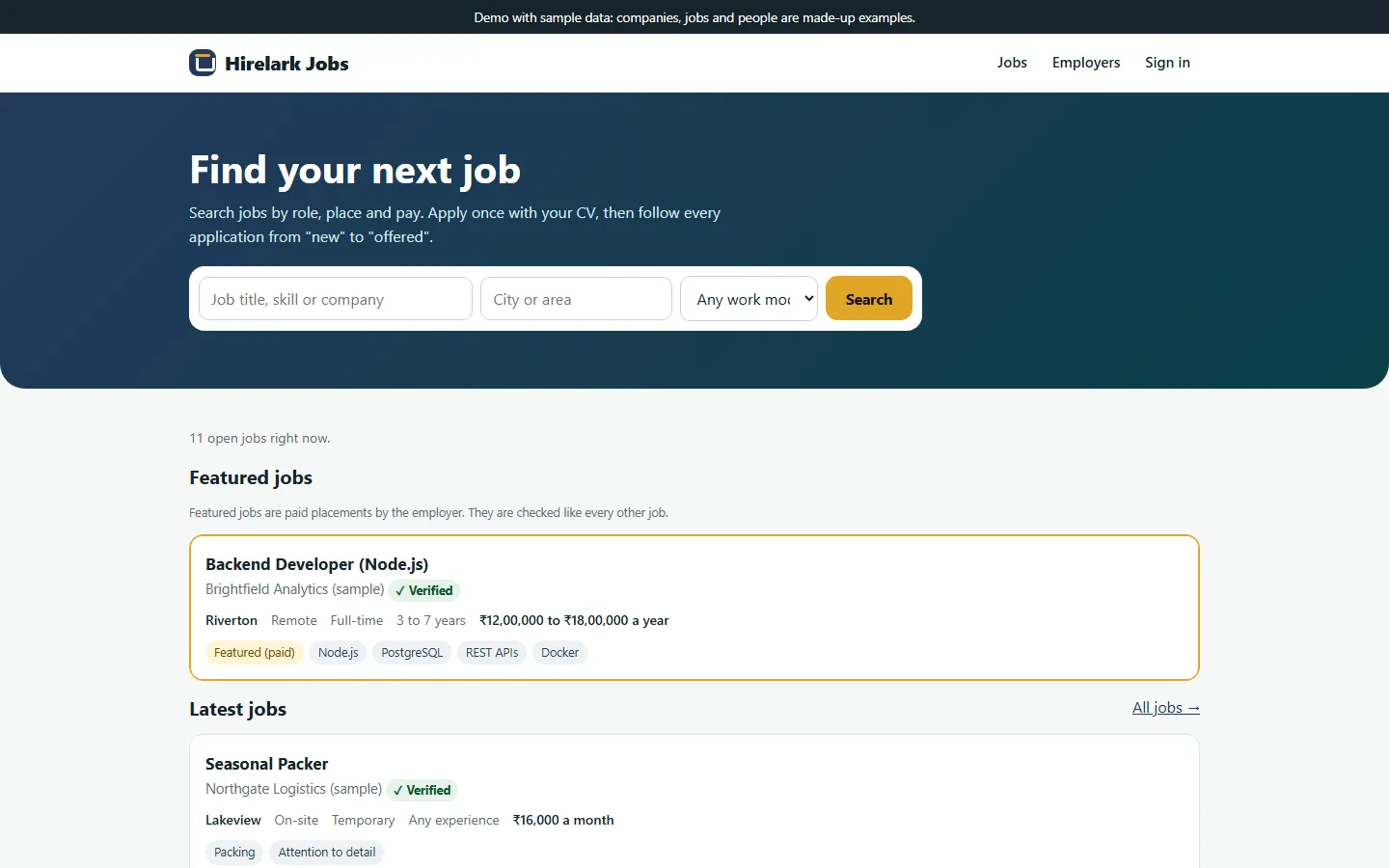
- Job search: keyword, location, work mode, salary
- Candidate profile and PDF-only CV upload
- CVs stored privately, every view logged
- Apply once per job, track the stage, withdraw
- Applicant pipeline with interviews and notes
- Recruiter logins under the company owner
- Admin moderation and verified companies
- Paid featured jobs by UPI, confirmed by admin
- Daily or weekly job alerts by email
- REST API and Expo app with candidate and employer modes
From order to a live website
- 1
Choose a package
Code only, We set it up, or Customised. All prices are one-time.
- 2
Pay securely
Your download link is emailed once payment is confirmed and also appears in My Account.
- 3
We contact you
For setup packages we email within one business day for your cPanel / hosting login and domain.
- 4
Live on your domain
Your job portal runs on your own Node.js hosting, with applicants in the employer panel and moderation and featured payments in your admin.
A job board you own
Hirelark Jobs gives you the code of a working jobs portal: a niche job board for your city or industry, a careers marketplace for a placement agency, or a board for a college or association. The download has four parts that share one database: the candidate web app, an employer panel at /employer for company owners and their recruiters, the admin panel at /admin, and a REST API used by the included mobile app. The name Hirelark Jobs is a placeholder: change the name, logo and colours in Admin → Settings. The demo companies, jobs, people and CVs are sample data, marked "(sample)", and counts on the site are always real counts from your database.
- Candidate web app built for phones
- Employer panel for owners and recruiters
- Admin panel with a setup wizard for an empty install
- REST API /api/v1 and an Expo mobile app
What candidates do
Candidates fill in a profile (headline, summary, location, skills, years of experience, work history and education) and upload a CV. Only PDF files are accepted: the server checks the file's first bytes, not just its name, and the size limit you set. Search covers keyword (title, skills, description and company), location, remote, hybrid or on-site, minimum salary a year (monthly salaries are converted), job type, area and the candidate's experience. Featured jobs show first and are labelled as paid. A candidate applies once per job with an optional note; a database unique constraint makes even two simultaneous clicks one application. They follow the stage, see interview details, withdraw, save jobs and set up job alerts. Their profile shows who opened their CV, and they can delete the CV or the whole account.
- Search with salary, work mode and experience filters
- PDF-only CV checked by its content
- One application per job, stage tracking, withdraw
- Saved jobs, alerts and a CV view list
Employers, recruiters and the pipeline
Company owners set up the company profile and logo; the verified badge is only set by the admin. Job posts have a title, area, location, work mode, an optional salary range (shown only if given), skills, an experience range, a type, a description and a closing date. Jobs leave search after the closing date and can be renewed, closed and reopened. New jobs from unverified companies wait for moderation, and editing a live job of an unverified company sends it back for review. Applicants move through new, shortlisted, interview and offered, or not selected; only sensible moves are allowed. Each move can carry an interview date and place or link and an email to the candidate, and employers keep private notes. Owners add and block recruiter logins; recruiters work jobs and applicants, while only the owner edits the company, the team and featured payments. An employer can only ever load its own company's jobs and applicants.
- Job posts with closing dates and renewals
- Pipeline with interviews, notes and emails
- Recruiter logins managed by the owner
- Another company's job or applicant is a 404
Admin, moderation and featured jobs
The admin verifies or suspends companies with an internal note of what was checked, approves jobs or rejects them with a reason that is emailed, sees all jobs with a CSV export and handles reports from users (scam, misleading, discriminatory, duplicate or other) by resolving, dismissing or closing the job. Featured placements are paid straight to your UPI ID: the employer picks a plan (prices come from the server), pays by link or QR code and enters the UTR. The admin matches the UTR with the bank statement and confirms it, which features the job and writes a ledger line, or marks it as not found. Only admins can confirm and a second confirm does nothing. The ledger takes manual refunds and adjustments and exports to CSV. Settings cover business details, logo and colours, SEO, maintenance mode, job and CV limits, featured plans, the UPI ID, live chat, WhatsApp, analytics, banners and SMTP.
- Company verification and suspension
- Moderation queue and user reports
- Featured jobs by UPI with admin confirmation
- Ledger, CSV exports and an email log
CV privacy and job alerts
CVs are personal data, so they are stored in storage/cvs (outside the public folder) under random file names that never appear in a page or an API answer. A CV can be opened only by the candidate, by employers of a company the candidate has an active application with, and by admins. Every employer or admin view is logged and shown to the candidate, and the admin has a CV access log. The README explains your duties as the operator under laws such as India's DPDP Act 2023 and the EU/UK GDPR: a privacy notice, how long you keep CVs, and access and deletion requests. Job alerts are saved searches sent daily or weekly with an unsubscribe link. They go out when your cron job runs npm run alerts, when a cron URL is called with your key, or from the admin button; until SMTP is set, every email is written to the email log so you can see what would have been sent.
- CVs outside the public folder, random names
- Access only for the candidate, their employers and admins
- Every view logged and shown to the candidate
- Alerts by cron, cron URL or admin button
REST API, mobile app and what is in the zip
The REST API at /api/v1 uses bearer tokens that last 90 days. It covers job search and job pages, a candidate's applications, saved jobs and alerts, and an employer's jobs, applicants and pipeline moves; API.md documents every endpoint. The mobile/ folder holds an Expo (React Native) app with a candidate mode (search with filters, apply with the CV already on the profile, applications with progress and withdraw, saved jobs, alerts) and an employer mode for owners and recruiters (jobs with counts by stage, applicants, renew, stage moves with interview details, email switch and notes). The zip has server.js, the routes, views, the Prisma schema and seed script, mobile/, README.md, API.md and the PDF guide. npm run setup creates four sample companies (one not verified), 14 sample jobs and two sample candidates with sample CVs. npm test runs 25 tests on a throwaway SQLite database, covering CV privacy and the view log, duplicate applications, pipeline moves, cross-company isolation, expiry, moderation and featured payments.
- API.md documents every endpoint
- Expo app: candidate and employer modes
- Sample data labelled as sample, no invented counts
- 25 unit, API and web tests
Honest limits
Jobs are not sent to or imported from any other job site, and there is no connection to applicant-tracking software. There are no background checks on employers or candidates: "Verified" only means the admin checked a company's details, so say in your own terms what you check. No payment gateway is bundled and there is no wallet: featured placements are paid to your UPI ID and confirmed by hand, and the ledger only records them. Job alerts need a cron job or the admin button; nothing runs on a schedule inside the web process. The mobile app has no file picker, so CV uploads, job posting, the company profile, the team and featured payments are on the website. It has been type-checked and exported for web; native Android and iOS builds have not been run, so test your EAS builds on real phones. Only SQLite was tested.
- No syndication, ATS link or background checks
- UPI confirmed by hand, no gateway or wallet
- Native builds not run; CV upload on the web only
More ready-made websites
Built by the same team, with the same setup service and support.
Browse every ready-made website, or compare our custom website packages if you need a site designed from scratch. Want more guests to find you on Google Maps? See our local SEO service, or talk to our web design team.