Larderloop — Grocery Delivery App
A grocery delivery platform you host yourself: store chosen by pincode, express or slot delivery, picking with customer-approved substitutes, rider panel, admin, REST API and an Expo mobile app
Everything included
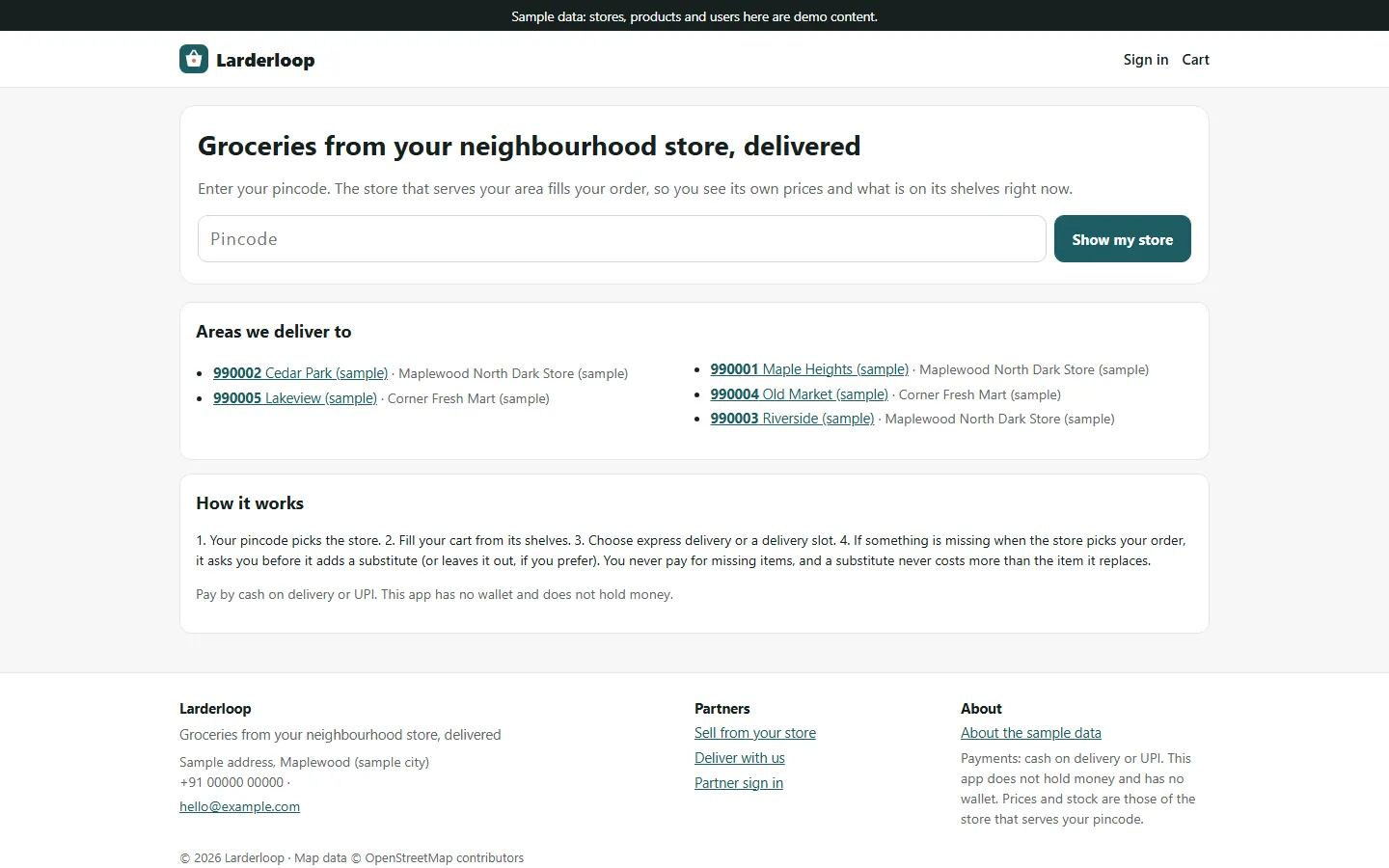
- Pincode picks the store; its own prices and stock
- Categories, brands, pack sizes with price and MRP
- Express delivery or scheduled slots with capacity
- Substitutes the customer approves, never charged more
- Stock taken off on order, returned on cancel
- Store panel: orders board, picking, stock, slots
- Delivery-partner panel: claim, pick up, deliver
- Admin: stores, pincodes, catalogue, fees, payouts ledger
- Cash on delivery and UPI; no wallet
- REST API and Expo app with customer and rider modes
From order to a live website
- 1
Choose a package
Code only, We set it up, or Customised. All prices are one-time.
- 2
Pay securely
Your download link is emailed once payment is confirmed and also appears in My Account.
- 3
We contact you
For setup packages we email within one business day for your cPanel / hosting login and domain.
- 4
Live on your domain
Your grocery delivery platform runs on your own Node.js hosting, with orders on the store board, deliveries on the partner panel and everything in your admin.
A grocery delivery service you own
Larderloop gives you the code of a working grocery delivery service instead of a monthly subscription. It is built for the way local grocery delivery works: one or more dark stores or partner shops, each serving its own list of pincodes, each with its own stock, opening hours and delivery windows. The download has four parts that share one database: the customer web app, a partner panel at /partner for store staff and delivery partners, the admin panel at /admin, and a REST API used by the included mobile app. The name Larderloop is a placeholder: change the name, logo and colours in Admin → Settings and the app name in mobile/.env.
- Customer web app built for phones
- Store and delivery-partner panel at /partner
- Admin panel at /admin with a setup wizard for an empty install
- REST API /api/v1 and an Expo mobile app
What customers do
A customer starts by entering a pincode, or picking a saved address, and the store that serves it is chosen. They browse that store's shelves by category, brand or search. Each product shows its pack sizes with price, MRP and an 'only N left' or 'out of stock' note, and the cart holds items from one store with that store's minimum order. Switching to a pincode served by another store empties the cart, so nobody orders from shelves that will not deliver to them. At checkout the customer picks the address, express delivery (offered only while the store is open) or a scheduled slot for today or the next days, with full slots greyed out, and what should happen if something is missing: approve each substitute, or leave missing items out. They apply a coupon and pay by cash on delivery or UPI. The order page refreshes by itself and shows each step, any substitute waiting for an answer, the delivery partner and their position on the map. After delivery the customer can rate the order once.
- Pincode decides the store, prices and stock
- Express or a scheduled slot
- Substitution preference at checkout
- Live status, substitute answers, one rating per order
The store panel: picking, substitutes and stock
Store staff see a live orders board in three columns (new, to pick, packed or out) with accept and decline. Picking happens line by line: mark a line picked, or out of stock, and optionally offer an in-stock substitute (the panel suggests items from the same category). A substitute is held from stock and charged at no more than the item it replaces. If the customer chose to approve substitutes, the order cannot be packed until they answer; a declined substitute goes back on the shelf. When the order is packed the bill is worked out again from what was packed, so the total can only go down. Staff keep the shelf count for each pack size in Stock (marking a line out of stock sets that count to zero), manage delivery slots with a capacity per window and see today's bookings, set hours, express on or off and the minimum order, and see their earnings ledger and ratings.
- Live orders board with accept and decline
- Picking line by line with substitutes
- Stock per pack size, kept by the store
- Delivery slots with capacity, hours, express switch
Delivery partners
Delivery partners sign up at /partner/register and wait for your approval. Once approved they go online in their zone and see deliveries from the stores in that zone. Only one partner can claim a delivery. They pick it up once it is packed, see how much cash to collect, open directions on OpenStreetMap, share their location while the page is open and mark the order delivered. Their earnings are kept in a ledger, and the same steps work in the mobile app's delivery-partner mode.
- Online in a zone, one partner wins each delivery
- Pick up after packing, cash to collect
- Location shared while the screen is open
- Earnings ledger
The admin panel
The dashboard shows today's orders, active orders, live stores, partners online and sign-ups waiting for approval. On each order you can confirm a UPI payment after checking your bank app, assign a partner or cancel; orders and the payouts ledger export to CSV. Stores are where you set each store's login, zone, hours, minimum order, commission and the pincodes it serves, one store per pincode. The catalogue is shared by all stores: categories, brands, products, pack sizes, prices, MRP and photos, while each store keeps its own stock. Fees & commission sets the delivery fee by distance (base fee, kilometres included, per extra kilometre, cap and free above an amount), the express fee, a handling fee, tax, the default commission, partner pay, slot rules and the time zone. You also manage delivery partners, users, zones, coupons (flat or percentage with a cap, funded by the platform or by one store), ratings moderation, payment methods, settings (business, live chat, analytics, SMTP, maintenance), add-ons, the email log and the licence.
- Stores and the pincodes each one serves
- One catalogue, stock per store
- Delivery, express and handling fees, tax and commission
- Coupons, payouts ledger, ratings, CSV export
REST API, mobile app and what is in the zip
The REST API at /api/v1 uses bearer tokens that last 90 days and are stored hashed. It covers the pincode lookup, each store's products and slots, a cart quote, addresses, orders, substitute decisions, the UPI reference, ratings, the store's picking and stock actions, and the delivery partner's steps; API.md documents every endpoint. The mobile/ folder holds an Expo (React Native) app with a customer mode and a delivery-partner mode, chosen by the account you sign in with; store staff and admins use the web panels. The app never calculates a price. The zip has server.js, the routes, views, CSS, the Prisma schema and seed script, mobile/, README.md, API.md and the PDF guide. npm run setup creates .env, the tables and an invented sample city with three sample stores, six placeholder pincodes, twenty sample products and demo users; no orders, ratings or sales are invented. npm test runs 27 tests on a throwaway SQLite database, covering forged prices, no overselling when two customers race for the last units, slot capacity, stock returned on cancel, substitutes and role checks.
- API.md documents every endpoint
- Expo app: customer and delivery-partner modes
- Sample city and demo logins, no invented orders
- 27 unit and flow tests, plus a curl smoke test
Honest limits
Native Android and iOS builds of the mobile app have not been run: its TypeScript check passes and its web export builds, so build it with EAS and test on real phones before publishing. Push notifications and background GPS are not included. No payment gateway is in the download and UPI payments are confirmed by hand; gateway add-ons in this product family are tested only against mocked responses, and a gateway that charges up front must refund the difference when picking lowers the total. There is no wallet or stored balance, and payouts are a ledger only. The sample products have no photos (a letter tile is shown), so upload photos you own. Stock is only as good as the counts the stores keep; there is no barcode scanning or supplier management. Maps use OpenStreetMap's public tiles, which are for testing only, and distances are straight-line. Only SQLite was tested; MySQL and PostgreSQL are supported through Prisma.
- Mobile app: native builds not run, no push
- No gateway bundled, UPI confirmed by hand, no wallet
- No product photos in the sample; use your own map tiles
More ready-made websites
Built by the same team, with the same setup service and support.
Browse every ready-made website, or compare our custom website packages if you need a site designed from scratch. Want more guests to find you on Google Maps? See our local SEO service, or talk to our web design team.