
Zest — Juice & Smoothie Bar Website
A ready-made juice bar website with a menu in two sizes, subscription plans and an order / enquiry form
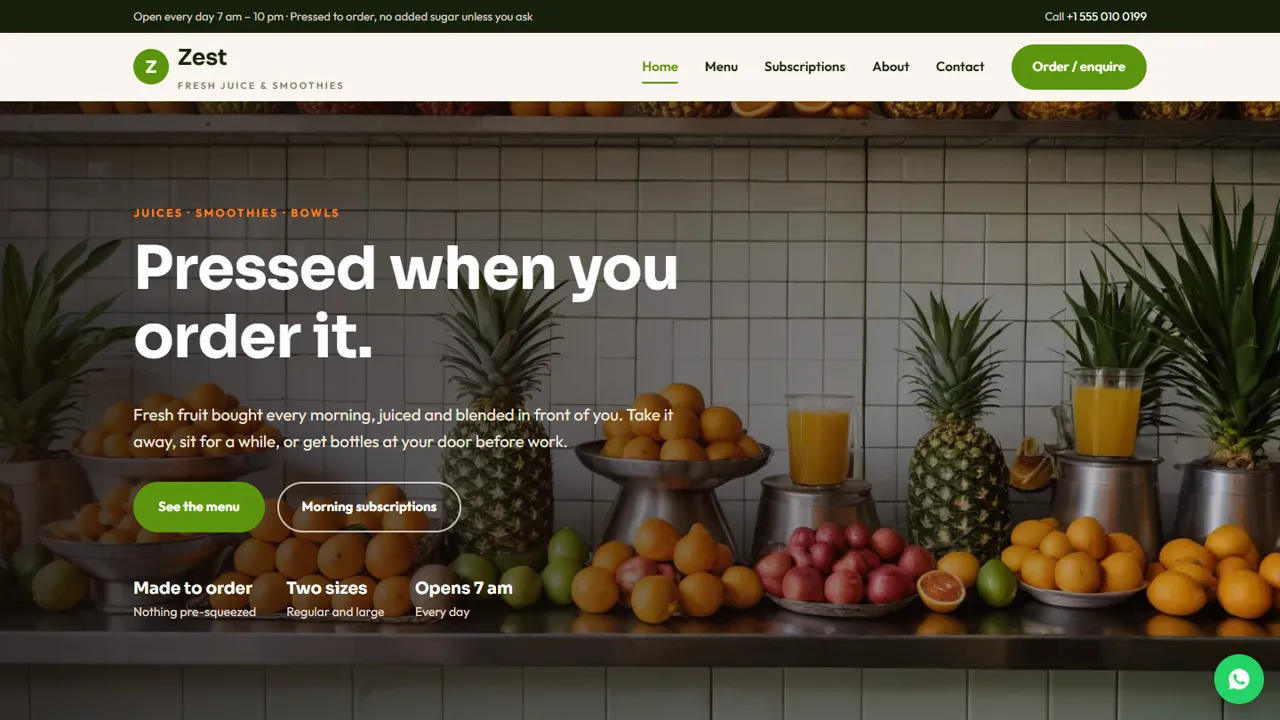
Everything included
- Tabbed menu with regular / large prices
- Three subscription plans with prices
- Order / enquiry form for pickup, plans and events
- Home, menu, subscriptions, order, about and contact pages
- Health notice with no cure or treatment claims
- WhatsApp and click-to-call on every page
- CafeOrCoffeeShop schema, titles and meta descriptions
- Admin panel for your details, currency, chat and enquiries
From order to a live website
- 1
Choose a package
Code only, We set it up, or Customised. All prices are one-time.
- 2
Pay securely
Your download link is emailed once payment is confirmed and also appears in My Account.
- 3
We contact you
For setup packages we email within one business day for your cPanel / hosting login and domain.
- 4
Live on your domain
Your juice bar site runs on your own hosting, with orders and enquiries arriving in your inbox.
A menu people can read on a phone
Juice customers decide quickly. Zest shows your menu in tabs (fresh juices, smoothies, cold-pressed bottles, bowls and add-ons) with regular and large prices in one column, the sizes written once under the title, and a note on sugar and allergens.
- Tabbed menu with four sections
- Regular / large prices side by side
- Menu cards on the home page
- Editable sugar and allergy note
Sell subscriptions, not just glasses
Regular morning bottles are steadier income than walk-ins. The subscriptions page shows three plans as cards, explains how starting and pausing works in four steps, and links every plan to the enquiry form. You confirm the area and share payment details yourself.
- Three plans as editable cards
- Four-step how-it-works section
- Bottle deposit and pause rules
- Health notice with no cure claims
One form for every kind of order
The order page handles pickups, subscription requests and office or event orders. Customers choose what they need, a date and a time, and add details in the notes box. Each request arrives in your inbox and you reply on WhatsApp or by phone.
- Grouped order types
- Date and time picker
- Notes for drinks, sizes or address
- Spam trap and input checks
What it does not do
Zest does not take payments, run recurring billing or manage delivery routes. Subscription payments are arranged directly with your customers (for example by UPI). It also does not make health claims, and the guide explains why you should keep it that way.
- Orders: by email and WhatsApp
- Payments: arranged by you
- Menu: edited in plain HTML
Who it is for
Zest is written for a small juice counter that also wants regular morning customers: a market juice stall that has grown into a shop, a smoothie and bowl café near offices or gyms, or a cold-pressed bottle brand that delivers in its own neighbourhood. If you sell glasses over the counter, bottles by subscription and trays for office meetings, each of those has its own place on the site.
- Juice counters and smoothie cafés
- Cold-pressed bottle brands with local delivery
- Juice bars that cater office meetings and parties
Page by page
The home page opens with a photo, a See the menu button and a Morning subscriptions button, then four short points (fruit bought daily, no added sugar or ice unless asked, morning delivery, office orders), three menu cards with starting prices, and blocks for subscriptions and office orders. The menu page writes the sizes once at the top, then shows fresh juices, smoothies, cold-pressed bottles, and bowls and add-ons in tabs, with a bottle deposit line and a note on GST, seasonal fruit and allergens such as milk, nuts and peanuts. The subscriptions page has three plan cards, a four-step how-it-works section and the health notice. The about page tells your story and walks through your process from the morning market to the glass. The order page sets out pickup, subscription and office options in one dropdown, with a date, a time from 7 am to 9 pm and an optional notes box, next to a short list of what to expect. The contact page has your address, hours, delivery window and a message form.
- Plan cards with an Ask about this plan button
- Bottle deposit and seasonal fruit notes
- Order types grouped: pickup, plans, events
- Counter hours and delivery window shown
The admin panel, for a juice bar
Your shop name, logo, phone, WhatsApp, address, map, counter hours and social links are set once in the admin and replace the demo details on every page. Each order and subscription request is emailed to you and kept in the Enquiries inbox, so you can look back at who asked for a Monthly plan last week, and download the list as a CSV for your delivery planning. The floating WhatsApp button carries a message you choose. You can show an announcement bar for a seasonal mango menu, add live chat or Google Analytics, and switch on maintenance mode while you change prices.
- Order and subscription requests in one inbox
- CSV download of every request
- Announcement bar for seasonal drinks
In the zip, and what you need
You get the seven HTML pages, the stylesheet, scripts, the PHP form handler and admin, the photos, an .htaccess file and an illustrated installation guide. It runs on any cPanel or shared hosting with PHP 7.4 or later; data is stored in SQLite, so there is no database to create. Upload, open the admin, paste your licence key and send a test order. The menu and plan prices are sample prices you change in the HTML.
- Plain HTML, CSS, JavaScript and PHP
- No WordPress, no monthly fee
- Sample prices to replace with yours
More ready-made websites
Built by the same team, with the same setup service and support.
Browse every ready-made website, or compare our custom website packages if you need a site designed from scratch. Want more guests to find you on Google Maps? See our local SEO service, or talk to our web design team.



