
TandoorBox — Cloud Kitchen & Food Delivery Website
A ready-made cloud kitchen website with combos, WhatsApp ordering, delivery areas and bulk office orders
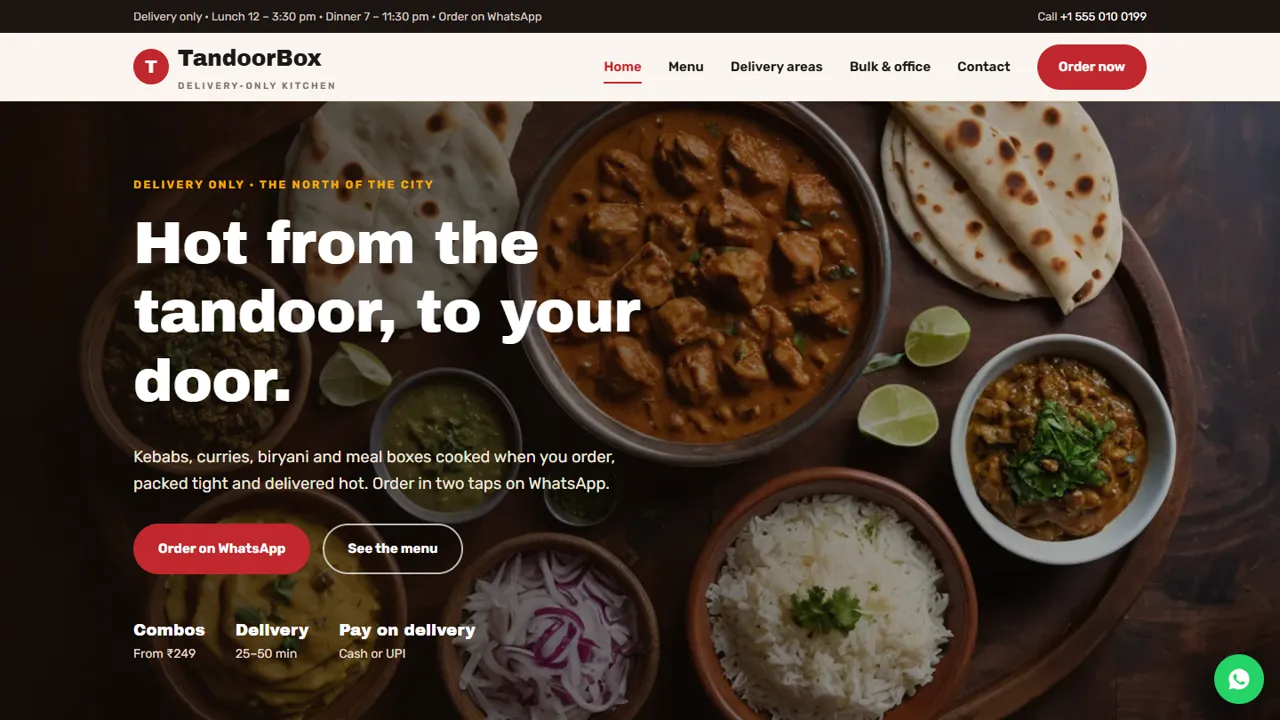
Everything included
- Combo meal cards with one-tap WhatsApp ordering
- Tabbed menu with prices and veg markers
- How to order page: WhatsApp, phone, pay on delivery
- Delivery areas table with times, minimum order and fees
- Bulk and office order form with date, time and headcount
- FoodEstablishment schema, titles and meta descriptions
- Admin panel for your details, currency, chat and enquiries
- Colours and fonts changed from one CSS block
From order to a live website
- 1
Choose a package
Code only, We set it up, or Customised. All prices are one-time.
- 2
Pay securely
Your download link is emailed once payment is confirmed and also appears in My Account.
- 3
We contact you
For setup packages we email within one business day for your cPanel / hosting login and domain.
- 4
Live on your domain
Your kitchen site runs on your own hosting, with orders on WhatsApp and bulk requests in your inbox.
Your own ordering channel
Food apps take a large cut of every order. TandoorBox gives your kitchen its own website where customers browse the menu and order directly on WhatsApp or by phone. Every Order button opens WhatsApp with a ready message, so the customer only adds the address.
- Order on WhatsApp buttons on every page
- Combo cards that pre-fill the order message
- Click-to-call for customers who prefer to phone
- A copy-and-send order template
A menu people can scan on a phone
The menu page is split into tabs (All, Combos, From the tandoor, Curries, Biryani & rice, Breads & sides, and Desserts & drinks), so a hungry customer jumps straight to what they want instead of scrolling one long list. Each dish has a name and price you edit in the HTML. The How to order page walks through four steps: pick your food, send it on WhatsApp, get the total from you, and pay on delivery. It also has a fill-in order message to copy, and a Before you order box saying orders are confirmed only once you reply with the total, pre-orders can be placed a day ahead and pickup is available. The dishes, prices, areas and kitchen hours in the demo are samples: replace them with your own.
- Seven menu tabs, every dish priced
- Four-step how-to-order guide
- Pre-order and pickup notes
- Lunch, dinner and last-order times
Answers before they ask
Do you deliver to my area, how long will it take and what is the minimum order? The Delivery areas page answers all three in one table, and lunch and dinner hours sit in the header and footer of every page.
- Delivery areas table with time, minimum order and fee
- Lunch and dinner timings on every page
- Pickup option explained
- Delivery-only notice so nobody turns up for dine-in
Bulk and office orders
Office lunches and party trays are steady, high-value orders. The bulk order form asks for the order type (one-day office lunch boxes, weekly office meals, meeting snacks, house party trays, birthday or kitty parties, puja or family functions, or a request to suggest a menu), the delivery date, a lunch or dinner time and number of people, with a notes box for the address, veg and non-veg split and budget. The request arrives in your inbox for a quote.
- Office, party and function order types
- Headcount dropdown from 10 to 200+
- Delivery date and time
- Spam trap and input checks
What it does not do
TandoorBox has no cart, online payment or order tracking, and it does not connect to Zomato, Swiggy or a kitchen display system. Customers pay cash or UPI on delivery. If you need online payments or a cart, ask us about our shop templates or a custom build.
- Everyday orders: WhatsApp and phone
- Bulk orders: request by email
- Payments: cash or UPI on delivery
The kitchen's admin panel
Open your-domain.com/admin/ to manage the details that change with the kitchen. Bulk and office order requests are saved in the Enquiries inbox with the order type, date, time and headcount, as well as emailed, and contact messages land there too; the list downloads as a CSV for quoting and follow-up. Set your brand name, logo, phone, WhatsApp number, address, map and lunch and dinner hours once, and they change on every page. The WhatsApp button's default message, live chat, the Meta Pixel and Google Analytics, and an announcement bar for a festival menu or a closed day are all set here. Menu items and prices are edited in the HTML. Everyday WhatsApp orders go to your phone, not the admin.
- Bulk orders kept in the Enquiries inbox
- Kitchen hours and WhatsApp number in one place
- Announcement bar for specials or closures
- CSV download of requests
What is in the zip and how it goes live
You receive six HTML pages and a 404 page, the stylesheet and scripts, the PHP form handler, the admin panel, food photos and an .htaccess file, with an illustrated installation guide. Upload to any cPanel or shared hosting with PHP 7.4 or later, put the address for bulk order emails in config.php, create your admin login and paste your licence key on the Dashboard to switch the forms on. One key works on up to three domains. The admin uses SQLite, created automatically when PHP's pdo_sqlite is on, or MySQL if you prefer; email goes by PHP mail() or your own SMTP server.
- Plain HTML, CSS, JavaScript and PHP
- No WordPress, Node.js or app fees
- SQLite built in, MySQL optional
More ready-made websites
Built by the same team, with the same setup service and support.
Browse every ready-made website, or compare our custom website packages if you need a site designed from scratch. Want more guests to find you on Google Maps? See our local SEO service, or talk to our web design team.



