
Ledgerwick — Small Business Accounting App
Double-entry accounting you host yourself: GST or VAT invoices, bills, expenses, bank ledgers, reports, a REST API and an Expo mobile app
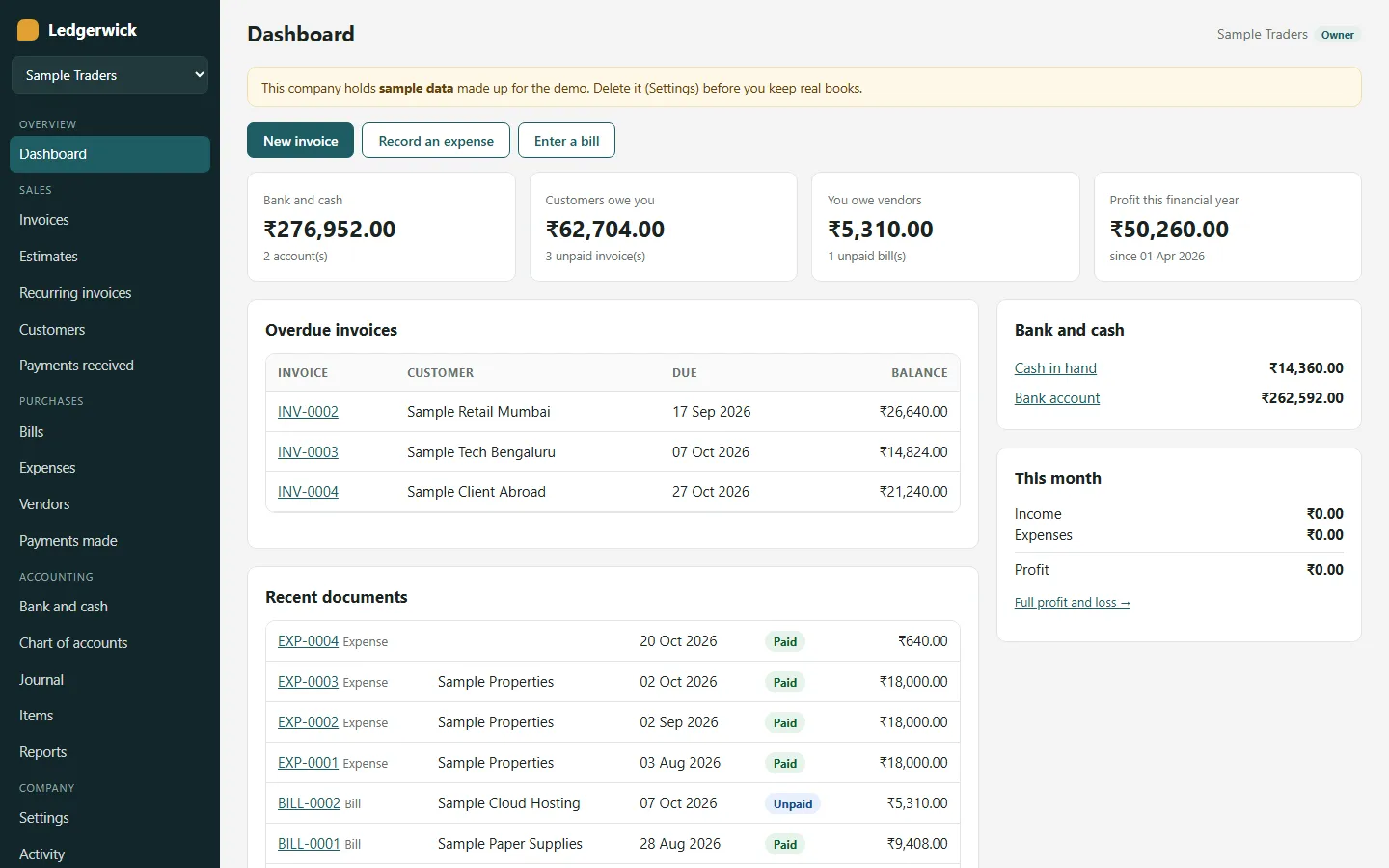
Everything included
- Double-entry ledger: every document posts a balanced entry
- Several companies per login; owner and accountant roles
- Invoices and estimates with GST (CGST + SGST or IGST) or VAT
- Invoice PDF with GSTIN, HSN/SAC, bank details and UPI QR
- Bills, expenses, payments received and made, part payments
- Bank and cash ledgers with running balances and transfers
- Recurring invoices: weekly, monthly, quarterly or yearly
- P&L, balance sheet, trial balance, tax summary, ageing, CSV
- REST API /api/v1 and an Expo mobile app source
- SQLite by default; MySQL or PostgreSQL via Prisma
From order to a live website
- 1
Choose a package
Code only, We set it up, or Customised. All prices are one-time.
- 2
Pay securely
Your download link is emailed once payment is confirmed and also appears in My Account.
- 3
We contact you
For setup packages we email within one business day for your cPanel / hosting login and domain.
- 4
Live on your domain
Your accounting app runs on your own Node.js hosting, with each company's books private to its owner and accountants.
Who it is for
Ledgerwick is for people who want to run their own bookkeeping service rather than rent one: a founder launching accounting software for shops and freelancers in their region, an accounting practice that wants one installation where each client company has its own books, or a developer who needs a plain Node.js double-entry core to build on. Anyone can sign up (or you can close sign-ups in the admin), create a company and invite an accountant by email. The app is not a replacement for an accountant: it keeps clean records that an accountant can review.
- Your brand, colours and logo from Admin → Settings
- Sign-ups open or closed
- Each company's books are private to its members
Companies, owners and accountants
One login can belong to several companies, switched from the sidebar. Each company has its own chart of accounts, tax rates, numbering, contacts and books. The owner can do everything, including company settings, tax rates, inviting members by email with a 7-day link, changing roles and deleting the company; a company always keeps at least one owner. An accountant can do all the bookkeeping and see every report, but cannot change settings, tax rates or members. Someone who is not a member gets "not found" for that company, on the web and in the API. The installation's admin sees company names and members only, never the books.
- Owner and accountant roles checked on every write
- Invitations by email, roles changed or removed by the owner
- Activity log of every change per company
Invoices, estimates and how tax is worked out
Customers and vendors carry a GST state and GSTIN or a VAT number; items carry HSN/SAC, sale and purchase prices, a default tax rate and accounts. Invoices can be saved as drafts, issued, edited, voided, and drafts deleted. Estimates move through sent, accepted and declined and turn into invoices. You set the invoice and estimate prefix, the next number and the default payment days. With GST, an 18 % rate becomes CGST 9 % + SGST 9 % when the place of supply is your own state and IGST 18 % for another state or a customer abroad; the place of supply comes from the customer and can be changed per invoice. With VAT there is one VAT line per rate, and a company can also be set to charge no tax. Totals and tax are always calculated on the server.
- Draft, issue, edit, void; estimates convert to invoices
- A4 PDF with GSTIN, HSN/SAC, tax breakdown and bank details
- Email the invoice with the PDF attached
- UPI QR and link for the amount due on INR invoices
Purchases, payments and banking
Bills post to expense or asset accounts with input tax and sit in accounts payable until you record the payment made. Expenses are recorded as already paid from a bank or cash account. Payments received and made can be cash, UPI, bank transfer, cheque, card or other, with part payments and a reference such as the UTR or cheque number; a document becomes paid when its balance reaches zero. Every bank and cash account has its own ledger with a running balance, and you can record transfers between them. The chart of accounts can be extended, renamed and switched off, and manual journal entries cover opening balances and corrections. A journal that does not balance is refused.
- Bills, expenses and payments made
- Bank and cash ledgers with running balance, CSV export
- Chart of accounts and manual journals for opening balances
Recurring invoices and reports
Recurring invoices repeat weekly, monthly, quarterly or yearly, are created as issued invoices or drafts, and stop at an end date. Month ends are kept (31 January, then 28 February, then 31 March), missed dates are caught up after downtime and two runs at the same moment cannot create the same invoice twice. The app creates due invoices every hour while it runs, and on hosting that sleeps you add a daily cron job. Reports cover profit and loss for any period, the balance sheet as of a date (this year's profit shown in equity until your accountant closes the year), the trial balance, a tax summary with output and input tax per component, net payable and taxable value by rate, and receivables and payables ageing. Every report exports to CSV, with spreadsheet formulas neutralised.
- Profit and loss, balance sheet, trial balance
- Tax summary per CGST, SGST, IGST or VAT
- Receivables and payables ageing
- Account ledgers, invoice lists and the journal in CSV
The admin panel
The admin at /admin is for whoever runs the installation, not for a company's bookkeeping. Its dashboard counts users, companies, new sign-ups and invoices created this month. You can switch a user off, see each company's name and members, add more admin users and read an email log of everything the app sent (so you can check invitations and invoice emails before SMTP is set up). Settings cover the brand name, colours and logo, whether sign-ups are open, the recurring-invoice timer, SEO defaults, maintenance mode, live chat, analytics, the cookie notice and SMTP. Add-ons and the licence have their own screens.
- Users, companies, admin users and email log
- Brand, sign-ups, SEO, maintenance mode, SMTP
- Add-ons and licence screens
REST API and the mobile app
A versioned REST API at /api/v1 covers sign-up and sign-in with bearer tokens (valid 90 days, revocable from the account page), companies and members, customers, vendors, items, tax rates, accounts and ledgers, all four document types, payments, journals, transfers, recurring invoices and every report, documented endpoint by endpoint in API.md. The Expo (React Native) app in mobile/ uses only that API: sign in or create an account with a first company, pick a company, see the dashboard, list and filter invoices, open one, issue a draft, record a payment received, create an invoice, record an expense and read the profit and loss, balance sheet totals and tax summary. Its colours and name come from your admin settings. Company settings, members, PDFs, email and CSV exports stay in the web app.
- Bearer tokens stored hashed, rate-limited sign-in
- Money in minor units, totals worked out by the server
- Expo app for Android and iOS, branded from your settings
What is in the zip and how it was tested
You get the complete source: server.js, the Express routes for the web app, company workspace, admin and API, the double-entry core (ledger.js), tax rules (tax.js), reports, recurring invoices and the PDF builder, EJS templates, the Prisma schema with a sample-data seed, the mobile/ app, README.md, API.md and the illustrated PDF installation guide. npm run setup creates the .env file with a random secret, the tables and the sample companies; --no-seed gives empty tables and an admin setup wizard. The test folder has 19 unit tests for GST and VAT, rounding, document totals, the ledger's balance checks and journal lines, recurring dates and CSV safety, plus 11 API tests that run the app on a throwaway SQLite database and check a known sample's profit and loss, balance sheet, trial balance and tax summary to the paisa, along with company isolation, roles, CSRF and rate limits. The mobile app passes its TypeScript check.
- Full source with README, API.md and PDF guide
- Sample data clearly flagged as sample
- Unit and API tests, plus a curl smoke test
Honest limits
Ledgerwick is not approved by an accountant and not certified by any tax authority. The GST and VAT rules are a starting point: have an accountant check the tax regime, rates, place of supply, invoice wording and rounding before you rely on them. It does not file returns, and it does not handle GST e-invoicing (IRN), e-way bills, TDS or TCS, reverse charge, composition scheme, exemptions or exports under LUT. There are no credit notes or debit notes yet (void and re-issue instead), no multi-currency invoices (each company has one currency), no inventory quantities or stock valuation, no bank feeds or statement import and no automatic year-end close. Payments are only records of money that moved outside the app: there is no wallet, no stored value and no payment gateway, and the UPI QR cannot confirm that a transfer arrived. Native Android and iOS builds of the mobile app have not been run, and the tests ran on SQLite; MySQL and PostgreSQL are supported through Prisma but were not tested by us.
- Not tax-certified; have an accountant check the settings
- No e-invoicing, e-way bills, TDS/TCS, reverse charge, credit/debit notes
- No multi-currency invoices, inventory quantities or bank feeds
- Payments are records only; no gateway or wallet
More ready-made websites
Built by the same team, with the same setup service and support.
Browse every ready-made website, or compare our custom website packages if you need a site designed from scratch. Want more guests to find you on Google Maps? See our local SEO service, or talk to our web design team.



