

WooCommerce PluginDownload free version
Abandoned Cart Recovery for WooCommerce
No reviews yet
from$69.00/yr
WooCommerce variation swatches: colour, image and size buttons instead of dropdowns
Get a Swatchwise Pro key by email and use every Pro feature for 7 days on one site. No card needed, nothing renews automatically — when the trial ends, Pro switches off unless you choose a plan. One trial per email.
Choose monthly, 1 year or lifetime — your key and download link are emailed instantly.
Upload the zip in wp-admin. The free core works right away.
Paste it in the plugin's License tab to activate.
Pro features, updates and priority support switch on.
Set swatch types and a term colour, choose the look, pick a colour and size on the product page, add to cart, switch one product to image swatches and see swatches on the shop page.
Download the PDF user guideThe free core is a real, working plugin — not a trial that expires. Pro unlocks the advanced modules with a licence key, and nothing you build on free is lost when you upgrade.
Everything most sites need. No account, no email required — download and install.
.zip · v1.0.0 · 4 downloads
Same plugin, every module unlocked by your licence key — plus updates and priority support.
Already bought it? Enter your key:
Or sign in — every licence you own shows up there.
| Feature | Free | Pro |
|---|---|---|
| Colour, image and label swatches | Included | Included |
| Swatch type per attribute | Included | Included |
| Colour and image per term, colours guessed from names | Included | Included |
| Per-product swatch settings | Included | Included |
| Tooltips and chosen-option label | Included | Included |
| Live out-of-stock cross-out (or disable / hide) | Included | Included |
| Round or square, any size | Included | Included |
| Swatches on shop and category pages | Not included | Included |
| Limit swatches + "more" link on shop pages | Not included | Included |
| Image swatches from variation photos | Not included | Included |
| Two-tone (dual-colour) swatches | Not included | Included |
| Option price in the tooltip | Not included | Included |
| Copy swatch colours to FilterNest | Not included | Included |
Upgrading is just entering a key — same plugin, same settings, nothing to reinstall or migrate.
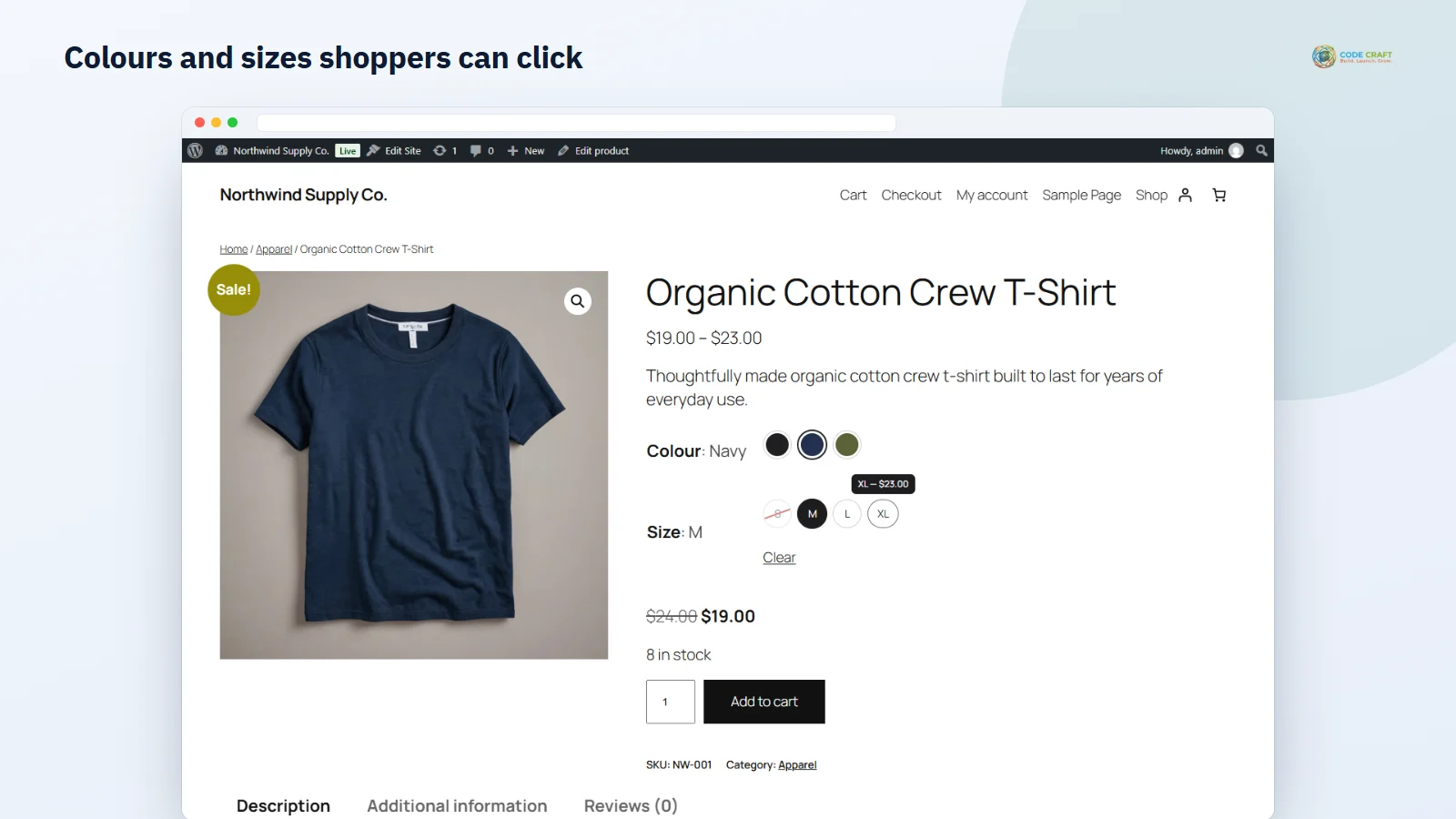
A dropdown hides your colours until the shopper opens it, and on a phone it covers the product photo. Swatchwise shows WooCommerce variation swatches instead: round or square colour dots for Colour, buttons for Size, and small photos where a pattern or fabric matters. It is built for fashion, footwear and home-decor stores, where colour and size decide the sale. Shoppers click a swatch to choose it and click it again to clear it; the chosen swatch gets a dark ring, size buttons turn dark, and "Colour: Navy" appears next to the attribute name so there is no doubt what goes in the cart.
Swatchwise does not replace WooCommerce's variation form. It hooks into the standard variation dropdown, keeps the original select in the form (hidden once the swatches are ready) and sets its value when a swatch is clicked. WooCommerce then finds the variation, updates the price, the stock message and the main photo, and adds the right variation to the cart, just as if the shopper had used the dropdown. Because of that, themes, quantity fields and other plugins that read the variation form keep working, and if JavaScript fails the normal dropdown is still there.
Swatchwise → Attributes lists every global attribute with a preview of its terms. Choose Label buttons, Colour swatches, Image swatches or Dropdown for each and save. The Colours & images button opens the term list, where each term has a swatch colour, a swatch image and (Pro) a second colour, plus a Swatch column so every colour can be checked at a glance. You do not have to colour every term: about 35 common names such as Black, Navy, Olive, Tan, Burgundy and Sage get a matching colour automatically until you set your own. Every variable product also gets a Swatches tab in the Product data box, where one product can use a different swatch type, its own colour or image per option, or plain dropdowns.
Sold-out options get a red diagonal line. Swatchwise checks stock against what the shopper has already picked: on a T-shirt where Navy in size S is sold out, choosing Navy crosses out S while M, L and XL stay available, and a colour sold out in every size is crossed out from the start. In the settings you decide whether crossed-out options stay clickable (so the shopper sees WooCommerce's "Out of stock" message), are disabled, or are hidden. The live check uses the variation data WooCommerce sends with the page, which it does for products with up to 30 variations; larger products cross out options that are sold out in every combination.
Swatchwise → Settings has the shape (round, or square with rounded corners), the swatch size from 16 to 80 pixels, the tooltip with the option name on hover and keyboard focus, the "Colour: Navy" label, the out-of-stock style, and whether attributes without a swatch type become label buttons or keep their dropdown. A live preview in the sidebar shows colour and size swatches with your settings, including the out-of-stock style. The delete-data option is off by default, so swapping the Free plugin for Pro keeps every colour and setting.
Pro shows swatches under each variable product on the shop, category and tag pages. Clicking a colour swaps the product photo to that variation and points the product link to the product with that colour pre-selected; a second click opens it. Limit the swatches per product (for example 3) and the rest become a "+1 more" link. Image swatches can be made automatically from each variation's photo, so a T-shirt shows small photos of each colour. Terms can have a second colour for two-tone and striped items, and when options cost different amounts the tooltip adds the price, such as "XL — $23.00". If you also use FilterNest, our AJAX product filter, Pro copies the swatch colours and images to FilterNest's filter swatches so both match.
Swatchwise needs WordPress 6.4 or newer, PHP 7.4 or newer and WooCommerce 8.0 or newer, and was tested with WordPress 7.1 and WooCommerce 11.2 on PHP 8.3. It declares High-Performance Order Storage compatibility; it does not touch orders, the cart or the checkout. Per-product variation data is cached and refreshed when a product, variation or its stock changes. The free plugin makes no outside connections; Pro contacts coodecraft.com only to activate and check the licence.
Most stores running Swatchwise pair it with these. Every plugin below shares the same licence system, coding standards and support team.


