

WooCommerce PluginDownload free version
Abandoned Cart Recovery for WooCommerce
No reviews yet
from$69.00/yr
WooCommerce checkout field editor for the block and classic checkout
Get a Tillform Pro key by email and use every Pro feature for 7 days on one site. No card needed, nothing renews automatically — when the trial ends, Pro switches off unless you choose a plan. One trial per email.
Choose monthly, 1 year or lifetime — your key and download link are emailed instantly.
Upload the zip in wp-admin. The free core works right away.
Paste it in the plugin's License tab to activate.
Pro features, updates and priority support switch on.
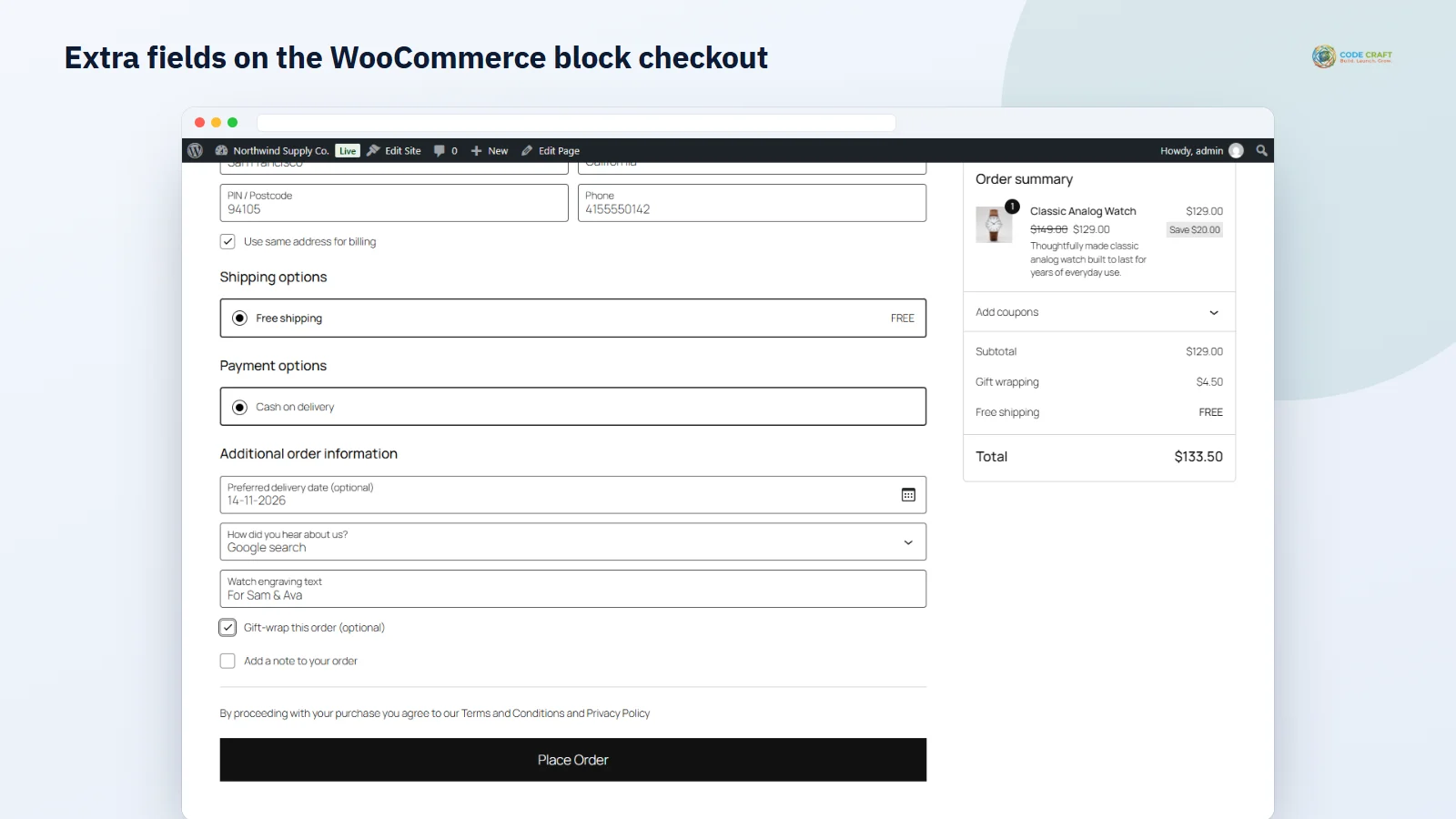
Add a gift-wrap fee field, set a conditional engraving field, relabel address fields, then place orders on the block and classic checkouts and find every answer in the order, emails, My Account and a CSV export.
Download the PDF user guideThe free core is a real, working plugin — not a trial that expires. Pro unlocks the advanced modules with a licence key, and nothing you build on free is lost when you upgrade.
Everything most sites need. No account, no email required — download and install.
.zip · v1.0.0 · 2 downloads
Same plugin, every module unlocked by your licence key — plus updates and priority support.
Already bought it? Enter your key:
Or sign in — every licence you own shows up there.
| Feature | Free | Pro |
|---|---|---|
| Custom fields on the block checkout | Included | Included |
| Custom fields on the classic checkout | Included | Included |
| Text, paragraph, dropdown, radio, checkbox, date | Included | Included |
| Required / optional, drag-and-drop order, on/off | Included | Included |
| Rename, require, hide, reorder address fields | Included | Included |
| Answers in order admin, emails, My Account | Included | Included |
| Conditional fields (product, category, role, country) | Not included | Included |
| Fields that add a fee (e.g. gift wrap) | Not included | Included |
| Validation: GSTIN, phone, email, number, pattern | Not included | Included |
| File upload field (classic checkout) | Not included | Included |
| Section headings and two columns (classic) | Not included | Included |
| CSV export of orders with field answers | Not included | Included |
| Updates and email support | Community | Included |
Upgrading is just entering a key — same plugin, same settings, nothing to reinstall or migrate.
Most stores need one or two answers WooCommerce does not ask for: a GST or VAT number for an invoice, a delivery date, a purchase order number, a gift message, where the customer heard about you. Tillform adds those questions under Checkout Fields → Add field. Choose a label and a type, pick the section (billing details, shipping address or additional information) and, for the block checkout, the area (Contact information, Address forms or Additional order information). Mark it required or optional, and the field is live on both checkouts. This WooCommerce checkout field editor uses WooCommerce's own Additional Checkout Fields API for the Checkout block, so WooCommerce renders, validates and saves the field itself, and it adds the same field to the classic shortcode checkout through WooCommerce's checkout field filter.
Free includes text, paragraph (textarea), dropdown, radio buttons, checkbox and date fields. Dropdowns and radio buttons take one choice per line. Date fields can have an earliest date — for example two days from today for a delivery date — which is enforced on both checkouts. On the classic checkout you can also add a placeholder, help text under the field and a default value. Fields are listed on one screen with their type, section, whether they are required and which checkouts show them; drag rows to reorder, switch a field off without deleting it, duplicate it or delete it. Answers already saved on orders are never removed when a field is deleted.
The Address fields tab lists WooCommerce's first name, last name, company, country, street address, apartment, city, state, postcode and phone. Give any of them a new label, make it required or optional, hide it, or move it with a position number. The changes apply to the billing and shipping forms on both checkouts: Tillform feeds them into WooCommerce's country address settings, which the Checkout block and the classic checkout both read. Company, apartment and phone use WooCommerce's own hidden / optional / required setting — the same one the Checkout block sidebar changes — so the two never disagree. Country cannot be hidden because taxes and shipping depend on it, and a country with no postcodes or states keeps those fields hidden.
On classic checkout orders, Tillform prints each answer under the billing address, the shipping address or in the general column of the order screen, adds it to the order emails, and shows it on the thank-you page and in My Account → Orders → View, with a switch per field for each place. On block checkout orders WooCommerce itself shows the answers in the same places through its Additional Checkout Fields API, so nothing is printed twice. Values are stored and read with WooCommerce's order functions, never with post meta calls, so stores using High-Performance Order Storage and the older posts storage both work.
Show a field only when it matters: when the cart contains certain products (variations included), when it contains a product from certain categories, for certain customer roles or guests, or for certain billing countries — with all or any of the filled-in conditions. A hidden field is never required. On the block checkout the role is checked when the page loads and the product, category and country rules become WooCommerce visibility rules that update live as the cart or address changes, and are enforced again when the order is placed. On the classic checkout cart and role rules are checked when the page loads, the billing country rule live, and everything again on submit.
Turn a checkbox into a paid option — gift wrapping for 4.50, express handling, a printed invoice — or give each dropdown or radio choice its own price with "Gift box | 4.50". The fee appears in the order totals as soon as the customer ticks or picks it, named as you choose and taxable if you want. On the classic checkout it is recalculated on every order review update; on the block checkout it is read from the update the Checkout block already sends to the Store API when a field changes, so no extra script is loaded, and when the order is placed the fee lines are rebuilt from the submitted answers, so the order always charges what the customer chose.
Validation rules check text fields on both checkouts: Indian GSTIN with its format and check digit, phone numbers (7–15 digits, + allowed), email addresses, numbers, or your own regular expression with your own error message. The file upload field (classic checkout) accepts the types you allow, up to a size you set, stores files with random names in a protected folder and gives store staff a download link in the order. Section headings and half-width fields arrange the classic checkout in two columns. The Export tab downloads a CSV of orders in a date range and statuses, with one column per field and the field fees, protected against spreadsheet formulas.
Tillform needs WordPress 6.4 or newer, PHP 7.4 or newer and WooCommerce 8.9 or newer, and was tested with WordPress 7.1 and WooCommerce 11.2.2 on PHP 8.3, on both the Checkout block and a [woocommerce_checkout] shortcode page with the Twenty Twenty-Five theme. The native date picker on the block checkout needs WooCommerce 11.2; older versions get a text field that accepts YYYY-MM-DD. The Free plugin makes no outside connections; Pro contacts coodecraft.com only to activate and check the licence.
Most stores running Tillform pair it with these. Every plugin below shares the same licence system, coding standards and support team.


