

WooCommerce PluginDownload free version
Abandoned Cart Recovery for WooCommerce
No reviews yet
from$69.00/yr
WooCommerce request a quote and catalog mode: hide prices, collect quote requests, send quotes customers accept and pay
Get a Quoteloom Pro key by email and use every Pro feature for 7 days on one site. No card needed, nothing renews automatically — when the trial ends, Pro switches off unless you choose a plan. One trial per email.
Choose monthly, 1 year or lifetime — your key and download link are emailed instantly.
Upload the zip in wp-admin. The free core works right away.
Paste it in the plugin's License tab to activate.
Pro features, updates and priority support switch on.
Turn on catalog mode for two categories and one made-to-order product, fill a quote basket as a guest, price and send the quote with a PDF, accept it and pay the order at the quoted prices, then try the enquiry form, add-to-cart-only mode and the guest, role and country rules.
Download the PDF user guideThe free core is a real, working plugin — not a trial that expires. Pro unlocks the advanced modules with a licence key, and nothing you build on free is lost when you upgrade.
Everything most sites need. No account, no email required — download and install.
.zip · v1.0.0 · 3 downloads
Same plugin, every module unlocked by your licence key — plus updates and priority support.
Already bought it? Enter your key:
Or sign in — every licence you own shows up there.
| Feature | Free | Pro |
|---|---|---|
| Hide prices and Add to cart, or only Add to cart | Included | Included |
| All products or chosen categories (sub-categories included) | Included | Included |
| Per-product override: always or never catalog mode | Included | Included |
| Hide for guests only | Included | Included |
| Your own price text and button text | Included | Included |
| Enquiry form on the product page (with product options) | Included | Included |
| Request email to the store and a copy to the customer | Included | Included |
| Quotes screen with status; hidden in the Store API too | Included | Included |
| Quote basket for several products | Not included | Included |
| Price quotes: unit prices, shipping, note, expiry date | Not included | Included |
| Quote email with PDF attached | Not included | Included |
| Customer accepts and pays an order at the quoted prices | Not included | Included |
| Rules by role and country; roles that always see prices | Not included | Included |
| Quote history in My Account | Not included | Included |
Upgrading is just entering a key — same plugin, same settings, nothing to reinstall or migrate.
Many products do not have one price: furniture made to measure, printed packaging, bulk orders of mugs for a café chain, machine parts priced per batch. Quoteloom lets the same WooCommerce store sell the products that have a price and take quote requests for the ones that do not. You choose what to hide — prices and the Add to cart button, or only the button — and where: on every product, on the categories you tick (their sub-categories are included), or on single products. Each product has a Catalog mode setting in its General tab with three choices: follow the rules, always quote-only (for made-to-order items, whoever the visitor is), or never. Then you choose who: everyone, or guests only, so logged-in customers keep seeing prices and buying as usual.
Hiding a price with CSS or a template change leaves it readable in the page source, in product blocks and in the WooCommerce Store API. Quoteloom removes it at the source: WooCommerce's own price getters return no price for a catalogue product and the product is marked as not purchasable. That is why the shop grid, the product page, product blocks in a block theme, the classic cart and the Store API behind the Cart and Checkout blocks all agree. We tested it: a guest's Store API product response has no price and is_purchasable false, and a direct add-to-cart call to the Store API is refused, while products outside the rules keep their price and can still be bought. In "only Add to cart" mode the price stays visible and the add-to-cart call is still refused.
On a catalogue product the Add to cart form is replaced by a Request a quote button that opens the enquiry form: quantity, the product options for variable products (for example Colour and Size, so you know exactly which variation they want), name, email, phone, company and a message. The phone field can be optional, required or hidden. The request is saved under Quotes in wp-admin and emailed to the address you choose, with the customer as Reply-To so you can answer from your inbox; the customer gets a copy. Emails use the WooCommerce email template, so they carry your store's header and colours. A hidden spam-trap field and a limit of five requests per visitor in ten minutes keep bots out without a CAPTCHA.
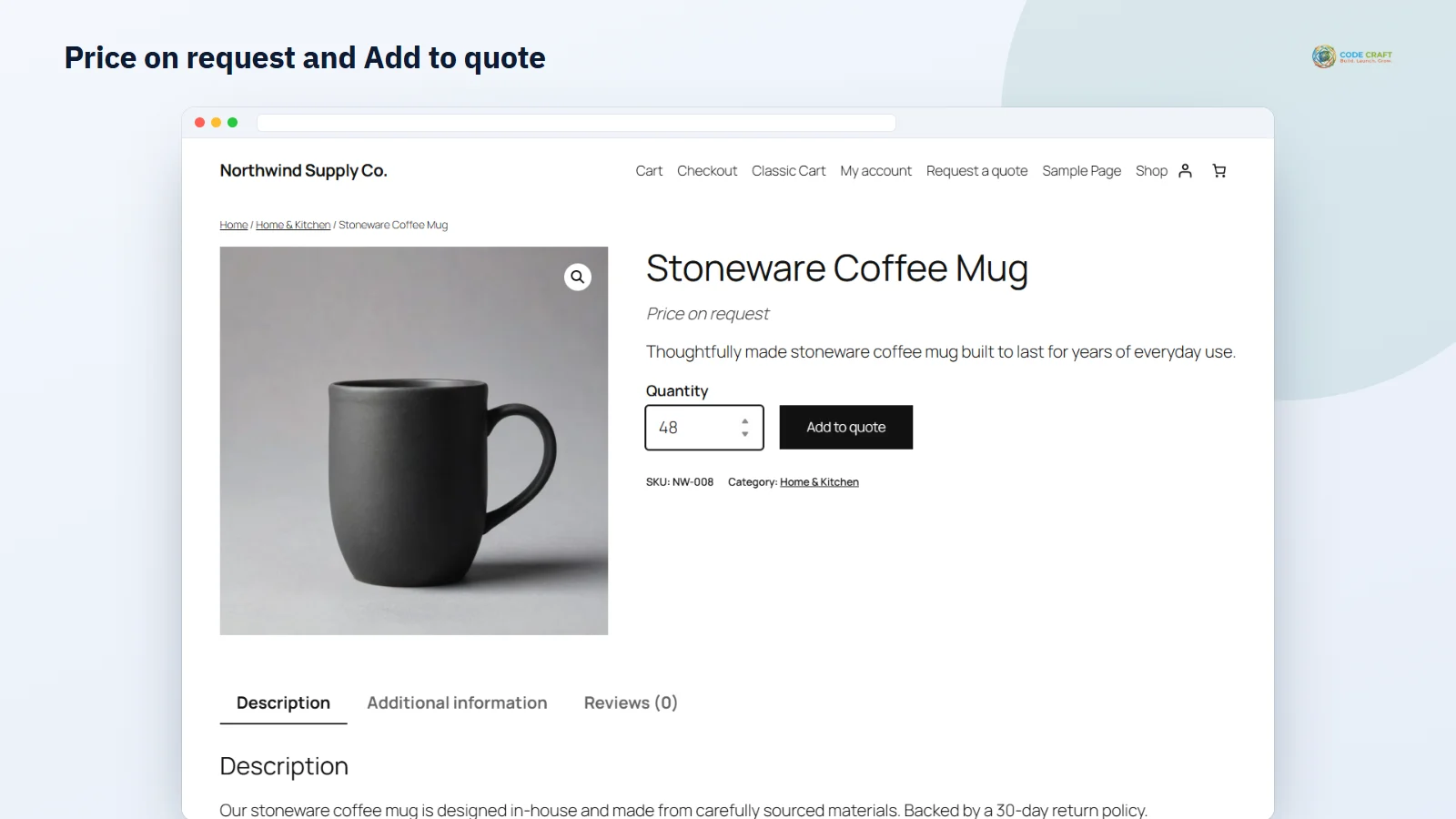
With Pro the product page shows Add to quote instead of the single form. Shoppers collect several products and options in a quote basket — a page Pro creates for you with the [qdcm_quote_basket] shortcode — change quantities, remove lines and send one request. On the quote screen in wp-admin you see each line with its list price for reference and enter your unit price, add a shipping or delivery charge, write a note and set a valid-until date (14 days by default). Save a draft or send it: the customer gets an email with the prices, the total, the expiry date, a View and accept your quote button and a PDF copy of the quote attached. Preview PDF shows you the same file.
The link in the quote email opens the quote on your site with a Download PDF link and two buttons. Accept and pay creates a pending WooCommerce order with your quoted unit prices, the quoted shipping and the customer's details, and takes the customer to the order payment page, where they pay with any of your payment methods. The quote is marked Accepted and linked to the order, and you get an email. Decline marks it Declined and tells you. After the valid-until date the quote expires and can no longer be accepted. Customers with an account also find every quote under My Account → Quotes.
Pro adds two more answers to "who": customers with the roles you tick (with "Guests" as an option), and visitors from the countries you pick. The country is the customer's billing country, or WooCommerce's customer location for guests. You can also name roles that always see prices and can always buy — a Trade Buyer or Wholesale role, for example — so one store can show prices to trade accounts and ask everyone else to request a quote.
Manufacturers and workshops that price per order, B2B suppliers that quote by volume, print and packaging shops, furniture and fit-out companies, equipment dealers and any WooCommerce store that has been answering "how much for 200?" by email. The Free plugin covers catalog mode and enquiries; Pro is for stores that want to send priced quotes and get paid without retyping orders.
Quoteloom needs WordPress 6.4 or newer, PHP 7.4 or newer and WooCommerce 8.9 or newer. It was tested with WordPress 7.1 and WooCommerce 11.2 on PHP 8.3 with High-Performance Order Storage on, with the Twenty Twenty-Five block theme and the Twenty Twenty-One classic theme, in a US-dollar store.
Most stores running Quoteloom pair it with these. Every plugin below shares the same licence system, coding standards and support team.


