
GST / VAT Invoice PDF Add-on for HTML + PHP Shops
Create numbered GST or VAT tax invoices as PDF files for every paid order, in pure PHP
Everything included
- PDF invoices in pure PHP (no Composer)
- Own running invoice numbers with a prefix
- GST: CGST + SGST or IGST split
- VAT mode with one tax line
- Download for you and for the customer
- Optional PDF attachment on the payment email
From order to a live website
- 1
Buy the add-on
One-time price. Your download link and licence key arrive by email and in My Account.
- 2
Drop it in
Upload the folder into addons/ on your hosting.
- 3
Switch it on
Turn it on in Admin → Add-ons, add the licence key and your settings.
What it does
Creates tax invoices as PDF files for orders in the Code Craft HTML + PHP shop templates, with a small PDF writer included (no Composer or extensions needed). Invoices get their own running number, show your business and tax number, the buyer and their tax number when given, every line, discount, delivery and tax. In GST mode, a sale within your own state shows CGST and SGST, other states IGST; VAT mode shows one tax line. You download the PDF from the admin order screen, customers from their order page, and it can be attached to the payment email. Check the invoice rules that apply to you with your accountant.
- PDF invoices in pure PHP (no Composer)
- Own running invoice numbers with a prefix
- GST: CGST + SGST or IGST split
- VAT mode with one tax line
Works with
This add-on is for the 12 Code Craft HTML + PHP shop templates (Kora, Annapurna, Bunkar, Giftsy, Harit, Mithas, Nazar, Petal, PhoneZone, Pukka, Pustak, WoodCraft). It is sold separately and has its own licence key. Upload its folder into the website's addons/ folder and switch it on in Admin → Add-ons; no code changes.
- Site core 1.1 or later
- Drop-in folder, no code changes
- Its own settings screen and licence key
Who it is for
It is for owners of one of the 12 Code Craft HTML + PHP shop templates (Kora, Annapurna, Bunkar, Giftsy, Harit, Mithas, Nazar, Petal, PhoneZone, Pukka, Pustak and WoodCraft) who need a proper numbered tax invoice for each sale: GST invoices for Indian businesses, or a VAT or sales-tax invoice elsewhere. The PDF is made in pure PHP by a small writer included in the add-on, so there is no Composer, no PHP extension and no outside service. Your accountant should still check the layout against the rules that apply to you.
- One of the 12 shop templates, site core 1.1+
- Pure PHP, no Composer or extensions
- GST or VAT layouts
Settings and what goes on the invoice
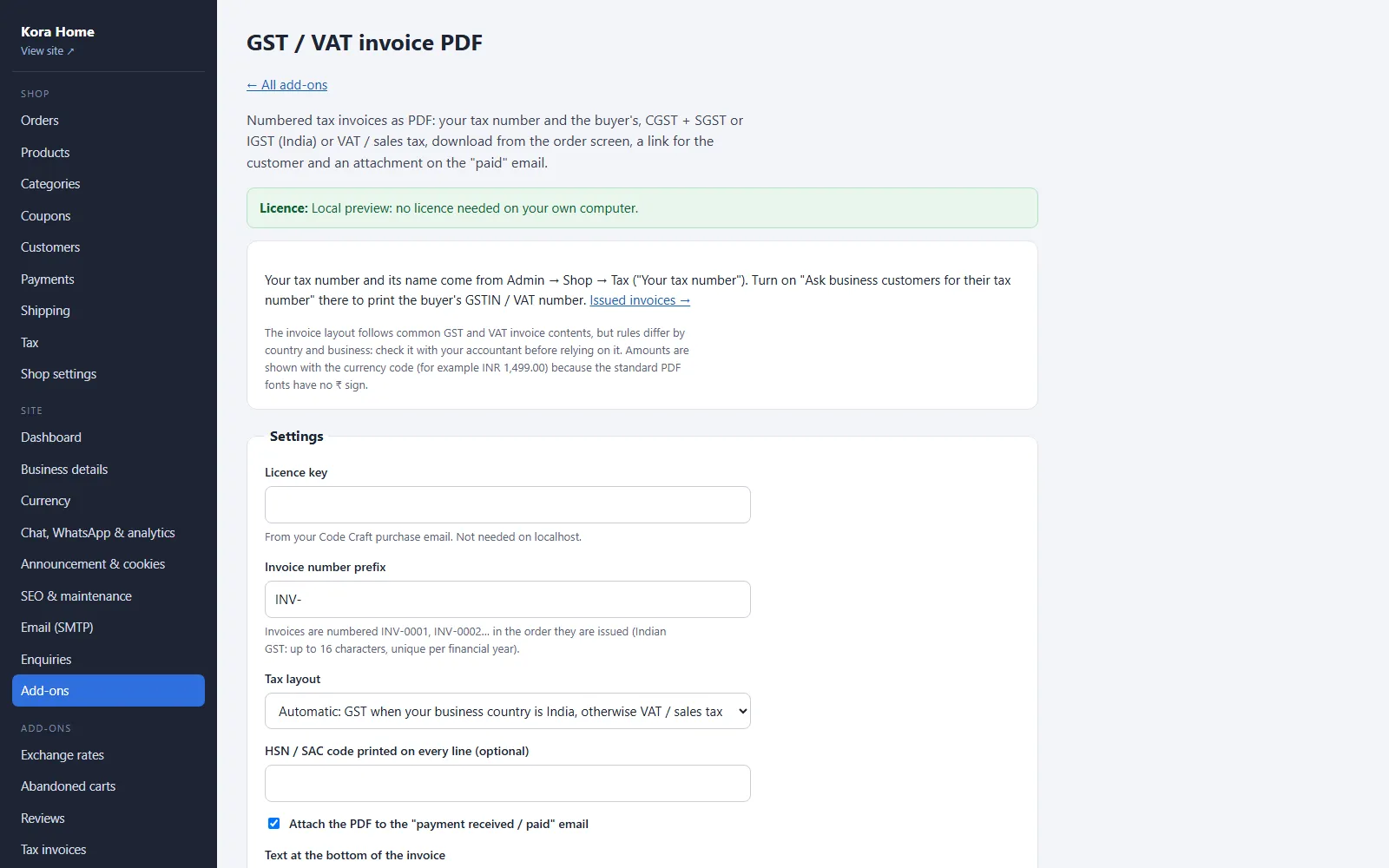
In the add-on's Settings you set the number prefix (default INV-, up to 16 letters, numbers, - or /), the tax layout (automatic: GST when your business country is India, otherwise VAT or sales tax; or force GST or VAT), an optional HSN or SAC code printed on every line, whether to attach the PDF to the paid email (on by default) and a footer text. Your tax number and its name come from Admin → Shop → Tax, where you can also ask business customers for their tax number at checkout. The invoice shows your business details, the buyer's address and tax number, each line, discount, delivery, fees, taxable value, tax and total.
- Prefix and running numbers
- Automatic, GST or VAT layout
- Optional HSN/SAC code
- Your footer text
How GST and VAT are shown, and who can download
In GST mode a buyer in your own state (from Admin → Business details) gets CGST and SGST at half the rate each; a buyer in another state gets IGST, and the place of supply is printed. In VAT mode there is one tax line with the name and rate from your tax settings; prices that include tax show the tax contained in the total. Numbers run INV-0001, INV-0002 and so on, given when the order is paid or the first time you download it, and never change. You download from the order screen in Admin → Shop → Orders or from Admin → Add-ons → Tax invoices; customers get a Tax invoice (PDF) link on their order page once it is paid.
- CGST + SGST or IGST
- One VAT or sales-tax line
- Customer link only after payment
Honest limits
There is one A4 layout in English using Helvetica; long orders run over more pages. The standard PDF fonts cannot show characters outside Windows-1252, such as Devanagari, and amounts are written with the currency code (for example INR 1,499.00) because those fonts have no ₹ sign. There are no credit notes, e-invoicing (IRN or QR) or digital signatures. It was tested on Kora and Pustak with real PHP 8.3: downloads refused before payment and with a wrong token, the paid-email attachment, same-state and other-state GST, VAT mode, totals and numbering, with every PDF read by pypdf and pdftotext and rendered with PyMuPDF.
- English, A4, Helvetica
- No credit notes or e-invoicing
- Check with your accountant
More ready-made websites
Built by the same team, with the same setup service and support.
Browse every ready-made website, or compare our custom website packages if you need a site designed from scratch. Want more guests to find you on Google Maps? See our local SEO service, or talk to our web design team.



