
Nova — Freelancer Portfolio Website
A ready-made portfolio website for freelancers, with case studies, services with starting prices and a hire-me booking form
Everything included
- Work page with case-study cards
- Services with starting prices
- About page with skills and process
- Hire-me form with project type, date and time
- WhatsApp and click-to-call on every page
- ProfessionalService and Person schema, titles and meta descriptions
- Admin panel for your details, currency, chat and enquiries
- Colours and fonts changed from one CSS block
From order to a live website
- 1
Choose a package
Code only, We set it up, or Customised. All prices are one-time.
- 2
Pay securely
Your download link is emailed once payment is confirmed and also appears in My Account.
- 3
We contact you
For setup packages we email within one business day for your cPanel / hosting login and domain.
- 4
Live on your domain
Your portfolio runs on your own hosting, with project enquiries arriving in your inbox.
Let your work do the talking
Clients want to see what you have done, what you offer, roughly what it costs and how working with you goes. Nova gives each of those its own page, with a short case study layout for your best project and a Hire me button on every screen.
- Home page with selected work
- Work page with case-study cards
- Services with starting prices
- About page with skills and process
Turn visitors into project calls
The hire-me form asks what the visitor needs and a date and time for a first call, plus notes on their business, timeline and budget. The enquiry arrives in your inbox and you confirm by email or WhatsApp.
- Hire-me form with project type
- Preferred call date and time
- Notes for scope and budget
- Spam trap and input checks
Easy to keep up to date
Each project is a simple card and prices are plain text, so adding new work or changing a price takes a minute in any text editor. The home page client quotes are marked samples to replace with real ones. Colours and fonts are set in one place, and ProfessionalService schema with your name is ready for Google.
- Project cards easy to copy
- Sample quotes marked for replacement
- ProfessionalService and Person schema
- Colours and fonts in one CSS block
Page by page: what a client sees
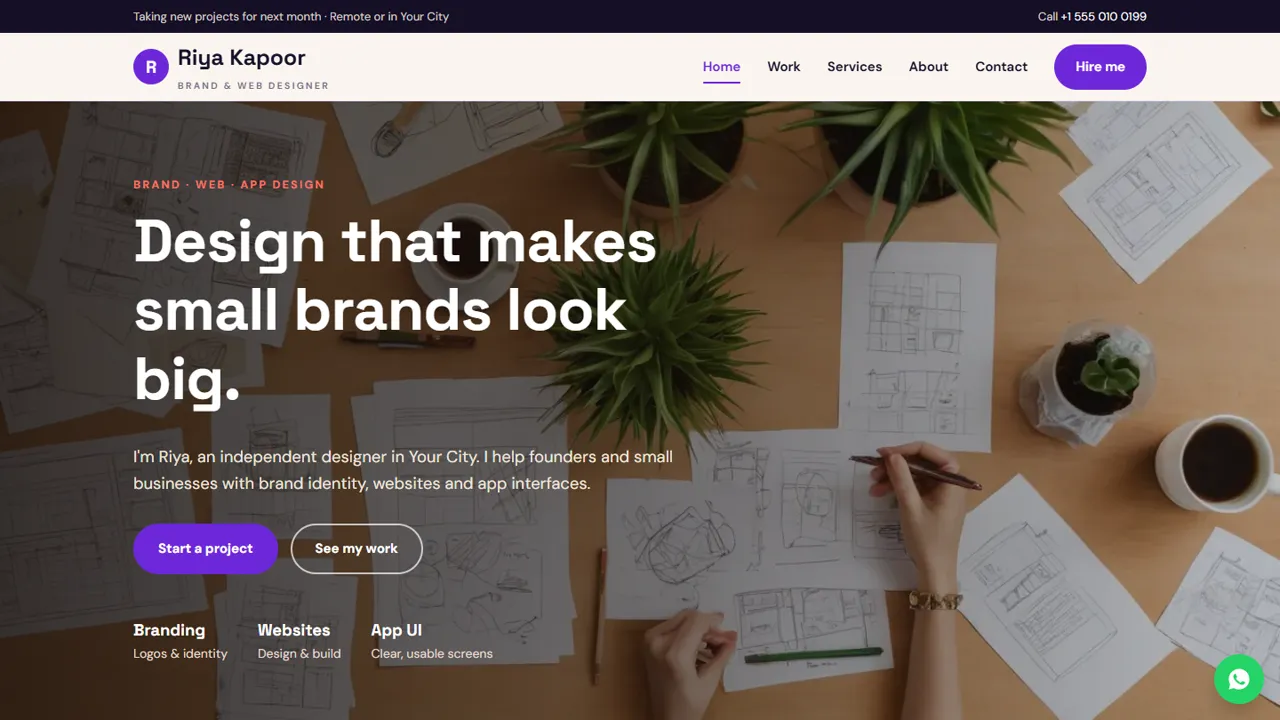
The home page introduces you in one line, with Start a project and See my work buttons, three recent projects, a short note on working one-to-one with you, four service tiles and a few client quotes (sample text you replace or delete). The work page shows six project cards with the client, the job and tags such as Branding or App UI, followed by one full case study laid out as the brief, what you did and the result. The services page has three main services with a usual timeline, a starting price and what is included, then a line of smaller jobs and your payment terms. The about page tells your story, lists what you do and shows your four-step process from a free call to hand-off. The contact page has your address, phone, WhatsApp, email, working hours and a message form.
- Home, work, services, about, hire me and contact pages
- Six project cards and one case study
- Timelines and starting prices per service
- Friendly 404 page
Made for your kind of freelance work
The demo belongs to a brand and web designer, but every section is plain HTML you can rename. A developer can list builds and tech stacks on the project cards, a photographer can turn the work page into a set of shoots, a writer can show articles and clients, and a consultant can swap the services for packages or hourly rates. The project-type drop-down on the hire-me page is grouped into main design work and smaller jobs; change its options to the work you actually take on.
- Rename services and project types
- Copy a card to add a project
- Rewrite the case study for your best job
- Person and ProfessionalService schema to edit
Your admin panel as a freelancer
In /admin/ you set your name or studio name, logo, phone, WhatsApp number, email, address, working hours and social links such as Behance, Dribbble, LinkedIn or Instagram, and they replace the demo details on every page. Every hire-me request and contact message is emailed to you and kept in the Enquiries inbox with a CSV download, so leads do not get lost in a busy mailbox. You can add Google Analytics 4 or the Meta Pixel to see which posts send visitors, switch on the floating WhatsApp button or live chat, show an announcement bar when you open slots for next month, and turn on maintenance mode while you refresh your portfolio.
- Leads in the Enquiries inbox
- Announcement bar for open slots
- Maintenance mode for a refresh
- SMTP email settings
What is in the zip and what it does not do
The zip holds six HTML pages plus a 404 page, CSS, JavaScript, the PHP form handler and admin core, the demo images, an .htaccess file, a README and an illustrated installation guide. Upload it to any cPanel host with PHP 7.4 or later, create your admin login, paste your licence key and send a test request. SQLite is built in. The site does not book calls into a calendar, send quotes or invoices, take advances or host client files; you confirm the call and agree terms yourself.
- No calendar sync or video calls
- No quotes, invoices or payments
- No client file sharing
More ready-made websites
Built by the same team, with the same setup service and support.
Browse every ready-made website, or compare our custom website packages if you need a site designed from scratch. Want more guests to find you on Google Maps? See our local SEO service, or talk to our web design team.



