
Marigold — Shopify Fashion Theme
Shopify fashion theme for clothing, beauty and lifestyle brands — Online Store 2.0, cart drawer, shoppable lookbook
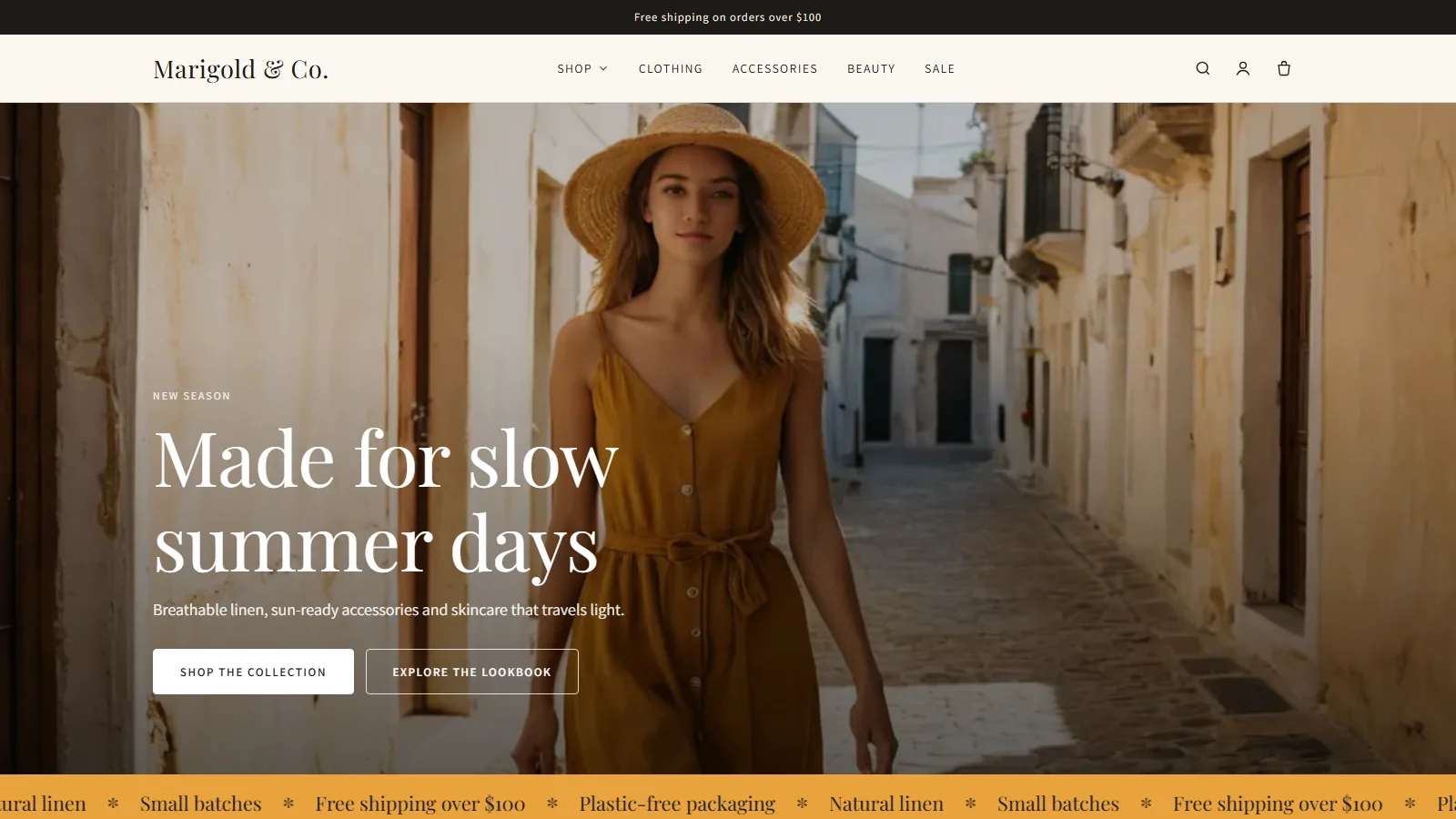
Everything included
- Online Store 2.0: sections everywhere, app blocks
- Shoppable lookbook with product hotspots
- Slide-out cart with free-shipping progress bar
- Mega menu, predictive search, collection filters
- Colour swatches, size guide, sticky add to cart
- 3 style presets, passes Shopify theme check
From order to a live website
- 1
Try the demo
Click through the live demo store to see every section working.
- 2
Buy a licence
Choose 1 year or Lifetime; the download link arrives instantly.
- 3
Upload to Shopify
Online Store → Themes → Add theme → Upload zip file.
- 4
Customise and publish
Add your logo, colours, collections and photos in the editor.
Marigold Shopify theme demo
A tour of the live Marigold demo store: homepage sections, mega menu, product page with colour and size options, adding to the cart drawer, the collection grid and the cart page.
Download the PDF user guideA Shopify fashion theme that sells the look
Fashion and beauty shoppers buy with their eyes, so Marigold puts your photography first: a full-bleed hero with a slow zoom, editorial headings, tall product images that swap to a second photo on hover, and a shoppable lookbook where each numbered hotspot opens the product it points to. Warm neutrals and a serif display font set the tone, and three presets (Marigold, Sage and Noir) re-style the whole store in one click.
- Hero banner with two buttons and image overlay control
- Scrolling marquee and rotating announcement bar
- Collection tiles, image with text, icons with text, newsletter
- Shoppable lookbook with up to six product hotspots
Product pages built for clothing and cosmetics
Options named Color show as round swatches, sizes as buttons, and sold-out combinations are crossed out. Link a size-guide page once and it opens on every product. Collapsible tabs hold materials, care and shipping details, stock status warns when only a few are left, and a sticky add-to-cart bar follows the shopper down long pages. The product page accepts app blocks, so reviews, subscriptions and upsell apps drop straight in.
- Stacked or carousel gallery with variant images
- Colour swatches from Shopify swatches or colour names
- Size guide, collapsible tabs, low-stock message
- Dynamic checkout buttons and product structured data
A cart drawer that lifts order value
Add to cart slides in a cart drawer instead of leaving the page. Quantities change in place, and a free-shipping bar shows exactly how much more unlocks free delivery, which is one of the simplest ways to raise average order value. Quick add on product cards puts single-variant items in the cart straight from a collection. Prefer a classic cart page? Switch the cart type in theme settings.
- Slide-out cart with free-shipping progress bar
- Quick add from collection and homepage grids
- Cart page with order note and accelerated checkout buttons
- Works with Shopify's Ajax cart, no app needed
Navigation, search and filters
Nest your main menu two levels deep and Marigold turns it into a full-width mega menu with an optional promo image. Predictive search shows products and collections as shoppers type. Collection pages support Shopify's Search & Discovery filters for availability, price, product type, vendor and colour, with sorting, removable filter chips and pagination.
Fast, accessible and easy to own
There is no framework or jQuery: Marigold loads one stylesheet and one small script, uses responsive lazy-loaded images, and keeps fonts to Shopify's font library. It includes skip links, focus styles, labelled controls and reduced-motion support. Every customer template, the gift card, the password page and the blog are styled too, and all storefront text is in the locale file so it can be translated.
Every template and section, explained
Marigold ships 33 sections and a JSON template for every page type Shopify needs: home, product, collection, collections list, cart, search, page, a contact page, blog, article, 404 and password, plus seven customer account templates (login, register, account, order, addresses, activate account and reset password) and a styled gift card. Twelve sections can be added to any page from the editor; the rest power the main page types. The header and footer are section groups, so you edit them once and they appear everywhere.
- Hero banner: image, overlay strength, four heights, two text positions, eyebrow, heading, text and two buttons
- Scrolling text marquee with your own phrases, colours and speed
- Featured collection: 2–16 products, 2–5 columns, swipe on mobile, View all link
- Collection list: up to 8 collection tiles, each with an optional custom image
- Shoppable lookbook: one photo with up to 6 numbered product hotspots you position by percentage
- Image with text, icons with text (up to 4), rich text, newsletter and contact form
- Announcement bar with up to 4 rotating messages; footer with up to 5 menu, text or newsletter blocks
- Related products loaded from Shopify's product recommendations
Theme settings and style presets
Theme settings control the whole store from one place. Colours: background, alternate background, text, buttons, button text and the sale badge. Typography: heading and body fonts from Shopify's font library and a heading size from 80% to 140%. Layout: page width from 1,000 to 1,600 pixels and corner radius from square to 24 pixels. Product cards: portrait, square or tall image shape, second image on hover, quick add and vendor name. Cart: drawer or page, and the free-shipping threshold. You can also add five social links and a favicon. The Marigold, Sage and Noir presets set all of these at once and are a starting point you can change.
- 6 colour settings, 2 font pickers and a heading scale
- Page width, corner radius and card image shape
- Cart type and free-shipping threshold
- Instagram, Facebook, Pinterest, TikTok and YouTube links
Install, requirements and what's in the download
You need a Shopify store on any plan. The download contains Marigold-1.0.0.zip (the theme you upload), an illustrated installation guide as a PDF, a README and the licence. In Shopify admin open Online Store, Themes, Add theme, Upload zip file, choose the theme zip, then click Customize to set up your homepage, menus and colours before you publish. Collection filters use Shopify's free Search & Discovery app, and swatches use Shopify's colour swatches when your products have them.
Honest limits
Marigold 1.0.0 is a new release. It passes Shopify's theme check and every template was rendered and tested in our demo store, but it does not yet have a track record on many live stores. It does not include a wishlist, a product compare table or a quick-view pop-up: quick add puts single-variant products straight in the cart, and products with options link to their product page. Reviews come from your reviews app through app blocks, not from the theme. The theme ships with English storefront text only; every string is in the locale file, so you can translate it in Shopify's language editor. Colour names that are not web colours, such as Sand, show as an outlined swatch unless you set Shopify swatch colours. The demo store's name, products and photos are samples and are not included.
Works well with Marigold
Most stores running Marigold pair it with these. Every plugin below shares the same licence system, coding standards and support team.
Also popular with our customers: Forgeline, Halden, Verdant. Browse every shopify themes or see our best-selling plugins. Need this built into a custom project? Our WordPress development team can help.