
MemberCraft — Gym Membership Software
Gym membership software for Windows — members, renewals, fees, receipts and check-in, offline
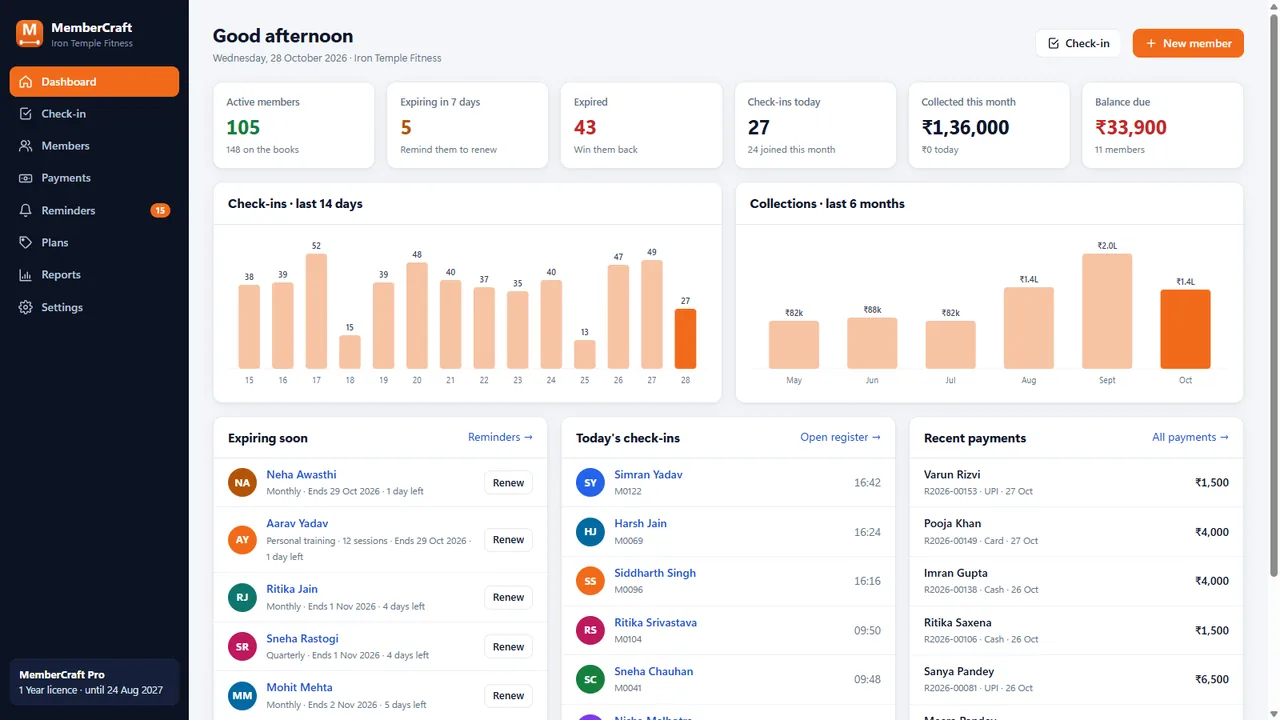
Everything included
- Members, plans & renewals with automatic dates
- Fees, part payments & A5 PDF receipts (GST/VAT)
- Front-desk check-in by code, phone or name
- WhatsApp & email renewal reminders
- Dashboard, collection & attendance reports, CSV
- Offline, daily backups — free for 50 members
From order to a live website
- 1
Download free
Install MemberCraft on your front-desk PC — free for up to 50 members.
- 2
Set up in minutes
Business details, currency and tax; starter plans are added for you.
- 3
Buy a licence
Choose monthly, 1 year or lifetime — your key is emailed instantly.
- 4
Paste your key
Licence → Activate. Unlimited members switch on straight away.
MemberCraft in 45 seconds
A walk through the real app with a demo gym: the dashboard, member list and profile, renewing a plan, front-desk check-in, admission, WhatsApp reminders, payments, plans, reports, settings and the licence screen.
Download the PDF user guideGym membership software built for the front desk
Most gyms and studios still run on a register, an Excel sheet and memory: who has paid, whose plan ends this week, who is training on an expired membership. MemberCraft puts all of that on the reception PC. Each member has one profile with their plan, start and end dates, balance and every visit, and the dashboard tells you each morning who is expiring, who has lapsed and who owes money.
- Member codes (M0001…), search by name, phone or code
- Statuses: active, expiring, expired, no plan, archived
- Balance due shown in red everywhere it matters
- Keyboard shortcuts: F2 check-in, Ctrl+N new member
Renewals and fees without the arithmetic
Choose a plan and MemberCraft works out the dates — a renewal starts the day after the current plan ends, so members never lose days by paying early, and a lapsed member restarts today. Give a discount, take a full or part payment in cash, UPI, card or bank transfer, and print or save an A5 receipt with your logo details and the GST or VAT part shown.
- Plans in months or days: monthly, quarterly, annual, class packs, day passes
- Discounts and part payments with running balances
- Receipt numbers per year (R2026-00001), PDF or print
- Retired plans keep their name on old receipts
Check-in and reminders that bring members back
At the desk, type a code or mobile number and press Enter. Green means welcome in; amber means the plan ends soon or money is due; red means expired, with a Renew button right there. The Reminders screen lists everyone ending soon, recently lapsed or owing, with a friendly message you can edit — one click opens it in WhatsApp or your email app for you to send.
- One check-in per member per day, with undo
- Reminder window you choose (7 days by default)
- Message placeholders for name, plan, end date and dues
- Nothing is sent automatically — you stay in control
Reports, backups and your data on your PC
See collections by day and payment method, check-ins per day, your busiest hours and how many members joined, for any date range, and export members, payments or attendance to Excel. MemberCraft stores everything in one file on your PC, keeps 14 days of automatic backups, and can save a copy to a USB drive or cloud folder whenever you like. Nothing about your members is sent to Code Craft.
- Collections, attendance, peak hours, new members
- CSV export that opens in Excel
- CSV import to move from a spreadsheet
- Automatic daily backups and one-click restore
Free edition and Pro licence
Download MemberCraft and use every feature free for up to 50 members, for as long as you like. When you grow past that, buy a licence and paste the key: Pro unlocks unlimited members and removes the small free-edition line from receipts. Monthly and 1-year licences cover one PC with updates and email support; Lifetime covers three PCs and never expires.
Who it suits, and what it does not do
MemberCraft is made for a single front desk: one gym, studio or academy running on one Windows PC. Setup takes a few minutes — enter your business name, currency and tax details and five starter plans are created for you to edit. Version 1.0 is honest about its limits. It is Windows 10/11 only, with no Mac, phone or web version, and branches on different PCs do not share data. It does not connect to biometric, RFID or turnstile hardware, does not take online payments, and does not send SMS or WhatsApp messages by itself — it prepares each reminder and you press send. There is no app for members to log in to.
- One location, one front-desk PC
- Set up in minutes with starter plans
- No hardware integrations or online payments in 1.0
- Reminders are prepared, never sent automatically
Works well with MemberCraft
Most stores running MemberCraft pair it with these. Every plugin below shares the same licence system, coding standards and support team.

