
Linden — Magento Furniture Theme
Magento furniture theme for furniture, home décor and homeware stores — Luma child theme with room tiles and editable home page blocks
Everything included
- Magento 2 child theme of Luma
- Room tiles from your top-level categories
- Home page sections as editable CMS blocks
- Add to Cart always visible on product cards
- Serif headings, font bundled locally
- Tested on Mage-OS 4.0.0 (Magento 2.4.9)
From order to a live website
- 1
Try the demo
Browse the Linden demo store: home, rooms, product pages and search.
- 2
Buy a licence
Choose 1 year or Lifetime; the download link arrives instantly.
- 3
Install the theme
Copy the app folder, run setup:upgrade and choose Linden in Design Configuration.
- 4
Make it yours
Edit the home page blocks, add category images and activate your key.
Linden Magento theme demo
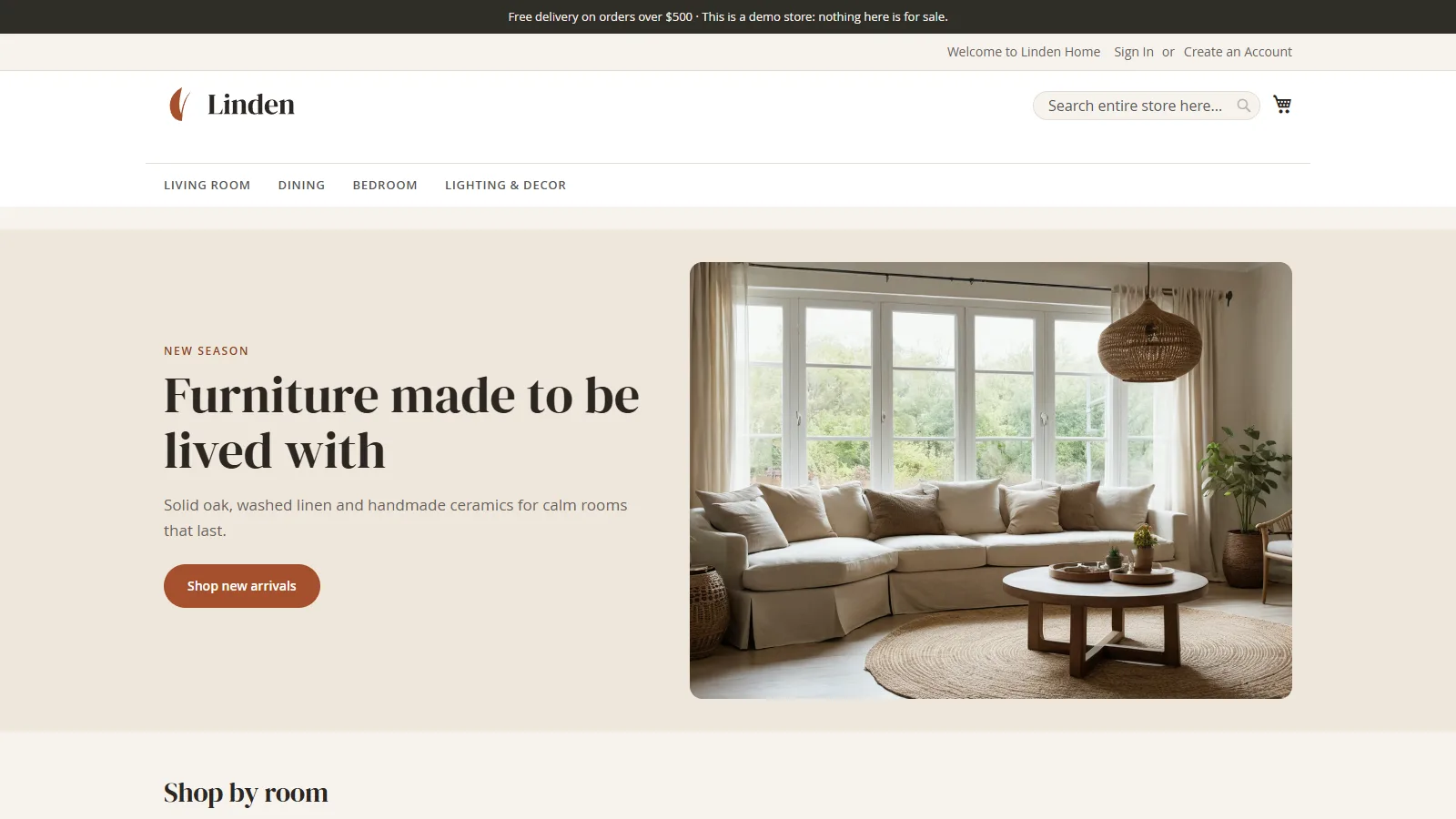
A tour of the Linden demo store: the home page hero, room tiles, new arrivals and story, a sofa product page, the Living Room category with filters and search results.
Download the PDF user guideA Magento furniture theme built on Luma
Luma is the theme Adobe ships with every Magento 2 store, and most Magento extensions are built and tested against it. Linden is a child theme of Luma: its theme.xml names Magento/luma as the parent, so every template, layout and script Linden does not change still comes from Luma. Checkout, the customer account area, the mini cart, layered navigation, product compare, wish lists, reviews and the newsletter form work exactly as they do in Luma, and extensions that add their own Luma-compatible templates keep working. Linden changes the look with Magento's own LESS system (a copy of Luma's variables with Linden's colours and fonts, plus one stylesheet of its own), adds a few layout files for the header, footer and home page, and leaves the rest alone. When Magento updates Luma, Linden inherits those fixes.
- Parent theme: Magento/luma
- Same checkout, account and cart as Luma
- Styles through Magento's LESS variables
- Works with Luma-compatible extensions
Home page sections you edit as CMS blocks
Linden's home page is assembled from parts you already know how to edit. A thin announcement bar sits above the header. The hero has a small eyebrow, a large serif headline, a sentence and a button beside a large photo. Below it, Shop by room shows up to four tiles made automatically from your top-level menu categories, using each category's own image and name, so a new category appears without touching the home page. New arrivals lists your eight newest products with Magento's own Catalog Products List widget. Then come four short promises and a dark story section with a photo. The announcement, hero, promises, story and the footer's about text are CMS blocks that the companion module creates on install; edit them in Content → Blocks, either as HTML or with Page Builder's HTML Code element. Your own Home Page CMS content still shows below Linden's sections.
- Announcement bar, hero, promises and story as CMS blocks
- Room tiles from your top-level categories and their images
- New arrivals row of your eight newest products
- Your Home Page content still shows below
Category, product, cart and checkout pages
Category pages put Luma's layered navigation in a rounded white panel on the left, with your price ranges and filterable attributes such as Material, and the sort and view toolbar becomes a card above a four-column grid on desktop. A category image becomes a short rounded banner above the products. Product cards are white with rounded corners, a soft photo background that zooms slightly on hover, the name, the price with sale prices in red and the old price struck through, and an Add to Cart button that stays visible instead of appearing only on hover as in Luma. Product pages use a large serif title, a bold price, a large Add to Cart button, Luma's photo gallery in a rounded frame and tabs whose More information table is striped. The cart summary, the mini cart and the checkout's progress bar, address cards and order summary use the same colours and corners, while their behaviour is Luma's.
- Filters and toolbar in rounded panels
- Add to Cart visible on every card
- Serif product titles and bold prices
- Cart and checkout restyled, behaviour unchanged
Colours, fonts and logo
Linden's palette is seven LESS variables at the end of web/css/source/_theme.less in the theme folder: ink (text), muted text, paper (page background), lines, accent, dark accent and the serif font. Change a value, redeploy static content and the whole store follows, including Luma's own buttons and links, which read the same variables. Headings use DM Serif Display, which is bundled inside the theme under the SIL Open Font License, so nothing is loaded from Google; body text stays on Luma's locally served Open Sans. Linden comes with a simple Linden wordmark as its default logo; upload your own in Content → Design → Configuration → Header → Logo Image, as with any Magento theme.
- Seven @linden__ colour and font variables
- DM Serif Display bundled, no Google Fonts
- Luma's Open Sans for body text
- Logo uploaded in Design Configuration
The companion module and your licence
Linden ships with one small module, CodeCraft_Linden. It creates the five CMS blocks on install (and never overwrites blocks you have already edited), provides the room tiles block, and adds Content → Elements → Linden Licence, where you paste the licence key from your order email. One key works on one live domain, and you can deactivate it there to move to another domain. On localhost and similar local addresses Linden runs as a local preview without a key. On a live domain without an active licence the store keeps working and looks the same, but every storefront page shows a small "unlicensed copy" notice and the admin shows a warning. The module checks the licence with coodecraft.com once a day; if our server cannot be reached, a valid licence keeps working for up to 14 days.
- Creates the home page blocks without overwriting yours
- Licence screen in Content → Elements
- No key needed on local addresses
- Unlicensed live stores keep working with a notice
Install and requirements
Linden needs Magento Open Source, Adobe Commerce or Mage-OS 2.4 with the Luma theme (included with Magento), PHP's sodium extension (standard in PHP 8) and command-line access to run Magento's setup commands, as every Magento theme does. It was built and tested on Mage-OS 4.0.0, which is based on Magento 2.4.9, with PHP 8.3. The download contains the app folder (the theme and the module), an illustrated installation guide as a PDF, a README and the licence. Copy the app folder into your Magento root, then run bin/magento setup:upgrade, and in production mode bin/magento setup:static-content:deploy, then bin/magento cache:flush. In the admin open Content → Design → Configuration, edit your store view, choose Linden and save. We ran these steps against a fresh store, chose Linden in the admin and flushed the cache through System → Cache Management, and the storefront switched to Linden with its home page blocks in place.
Honest limits
Linden is a Luma child theme, not a Hyvä theme or a PWA Studio storefront, so it uses Luma's RequireJS and Knockout front end and has Luma's performance profile. It has been tested on Mage-OS 4.0.0 (Magento 2.4.9) only; it has not been tested on Adobe Commerce Cloud or on older 2.4 releases. There is no theme settings panel: colours are LESS variables, and changing them needs a static content deploy. You need command-line access to install it; it cannot be uploaded through the admin. Linden does not add a mega menu, product quick view, a blog or a page builder of its own; it styles what Luma and Magento provide. The new texts are in English and can be translated with Magento's translation files. The demo store's products, photos, logo and texts are samples and are not part of the download. Linden 1.0.0 is a new release without a track record on many live stores.
Works well with Linden
Most stores running Linden pair it with these. Every plugin below shares the same licence system, coding standards and support team.