Brew Lane — Café & Coffee Shop Website
A ready-made café website with a tabbed menu, events and workshops, table reservations and a gallery
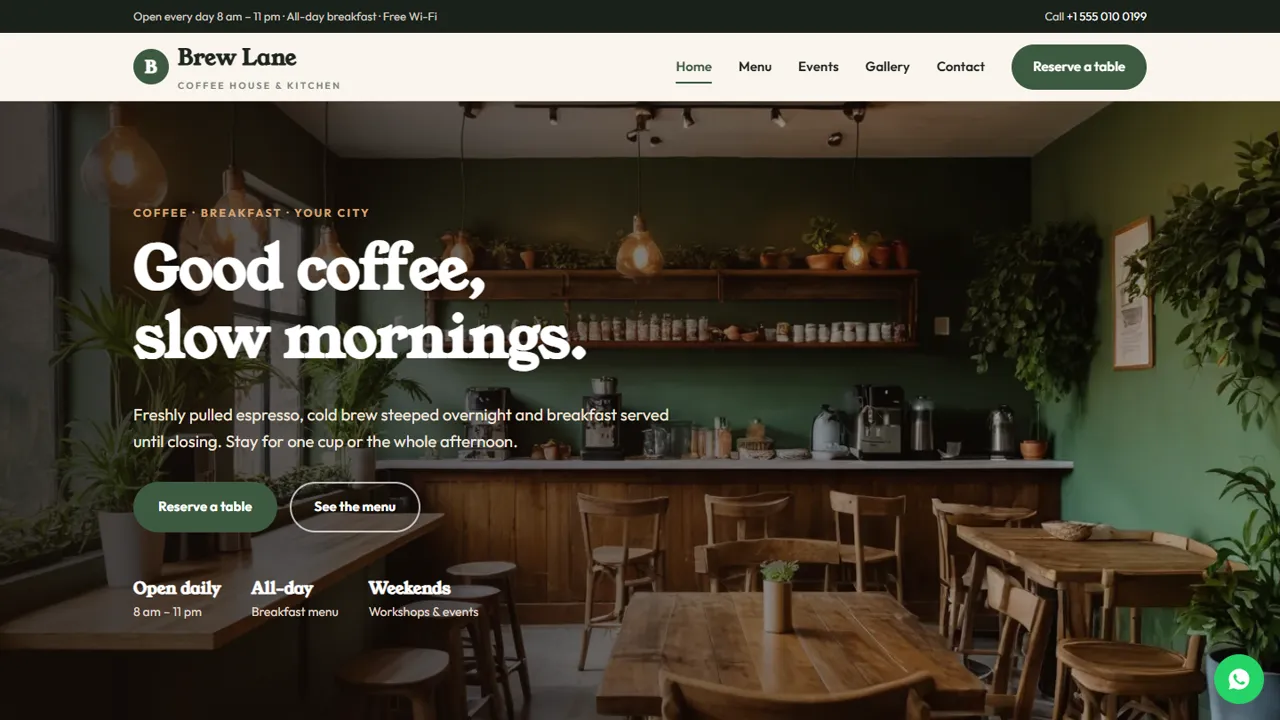
Everything included
- Tabbed menu with prices
- Events and workshops page with an upcoming-dates table
- Table reservation form with date, time and group size
- Home, menu, events, reserve, gallery and contact pages
- WhatsApp and click-to-call on every page
- CafeOrCoffeeShop schema, titles and meta descriptions
- Admin panel for your details, currency, chat and enquiries
- Colours and fonts changed from one CSS block
From order to a live website
- 1
Choose a package
Code only, We set it up, or Customised. All prices are one-time.
- 2
Pay securely
Your download link is emailed once payment is confirmed and also appears in My Account.
- 3
We contact you
For setup packages we email within one business day for your cPanel / hosting login and domain.
- 4
Live on your domain
Your café site runs on your own hosting, with reservation requests arriving in your inbox.
What café guests look for
Before they visit, people check what you serve, what it costs, when you are open and whether they can get a table. Brew Lane puts the menu, prices, hours and events on clear pages, with a Reserve a table button on every screen.
- Home page with favourites and your coffee story
- Menu in tabs: coffee, tea, breakfast, food, desserts
- Gallery of the space, the plates and the people
- Contact page with map and hours
Events and workshops that fill up
Latte art classes, coffee tastings, open mic and board game nights bring people back. The events page shows each event with its day, time and fee, plus a simple table of upcoming dates you update each month. Guests book a seat with the same reservation form.
- Event cards with day, time and fee
- Upcoming-dates table
- Workshop seats bookable from the reservation form
- Private hire note for birthdays and team events
Reservations in your inbox
The reservation form asks what the guest is booking, the date, time and number of people, plus a notes box for seating or a celebration. The request arrives by email and you confirm on WhatsApp or by phone.
- Table, workshop or private-hire options
- Group size dropdown
- Spam trap and input checks
- No payment taken on the website
The pages, one by one
The home page introduces the café with Indian beans, breakfast all day, room to work and weekend workshops, then your favourites from the espresso bar, kitchen and cold brew, sample quotes from regulars and a band inviting groups to save a table. The menu page lists drinks and food in tabs with a price beside each item: hot coffee from espresso to a pour-over of the week, cold coffee, tea and more, all-day breakfast, sandwiches and bowls, and desserts. The events page describes a latte art workshop, a coffee tasting session and open mic and board game nights, with an upcoming-dates table. The gallery shows the space and the plates, and the contact page has a message form, the map and your hours. The reservation page adds a short 'before you come' list. All dishes, prices and dates in the demo are samples.
- Home, menu, events, gallery, reservation and contact pages
- Reservation times from 8 am to 9 pm
- Group sizes from one guest to 10+
- A custom 404 page
Your café admin
Table and workshop requests are saved in the Enquiries inbox at your-domain.com/admin/ and emailed to you, so the morning shift can open the admin and see who asked for a window seat or a birthday table. Each request shows what was booked, the date, time, number of guests and any notes, and the whole list downloads as a CSV. In the admin you set the café name, logo, phone, WhatsApp number and the message guests send from the button, address and map, opening hours, Instagram and other social links, and colours. You can switch on live chat, Google Analytics or the Meta Pixel, and an announcement bar for this weekend's workshop. The menu and event dates are plain HTML rows you edit in any text editor.
- Reservations saved and emailed
- CSV download for your booking book
- WhatsApp greeting set in the admin
- Choose the currency your menu is priced in
Download, upload, open
The zip contains the seven HTML pages, stylesheet, JavaScript, photos, the PHP form handler, the admin panel and an illustrated installation guide. Upload it to any cPanel or shared hosting with PHP 7.4 or later, create your admin login at /admin/ and paste your licence key to switch the forms on; the key activates one live domain, and you can try the site on your own computer without one. SQLite is created by itself on first run, MySQL is optional, and email is sent with PHP mail() or your SMTP server.
- Plain HTML, CSS, JavaScript and PHP
- No WordPress or plugins
- Works on shared hosting
What it does not do
Brew Lane is your public website, not an ordering or POS system. It does not take online orders, payments or ticket sales, and it does not connect to Zomato, Swiggy or a billing app. If you need online ordering, ask us about adding it.
- Reservations: requests by email
- Payments: at the café
- Menu: edited as plain HTML rows
More ready-made websites
Built by the same team, with the same setup service and support.
Browse every ready-made website, or compare our custom website packages if you need a site designed from scratch. Want more guests to find you on Google Maps? See our local SEO service, or talk to our web design team.